
When attempting to simulate processes with one or several recycle loops
(a feature most common in continuous processes), SuperPro's simulation
engine enters a sequence of iterative calculations whereby one or more
streams on the loop(s) structure are "torn" and first used as
process inputs (with values for component flows, temperature and pressure
that are provided by the simulation engine) and then they are also treated
as outputs where the same quantities are calculated as the outcome of
the last step (procedure) on the loop(s). Then the values are compared
and if the discrepancy is higher than an accepted tolerance, the process
is repeated until the supplied values and the calculated values are "within
tolerance limits". Until now, users were only presented with the
outcome of this process : either success or failure. Starting with this
version, we offer users a way to monitor the progress (or lack thereof)
during successive calculations in those iterative calculations. The simulation
engine records in a file the values of all the variables that are being
monitored and allows you to inspect them after the calculations ended
(either due to exceeding a maximum number of iterations or due to managing
to bring all variables under tolerance limits). You can turn on the recording
of loop convergence progress by checking the "Record Convergence
Progress" box in the Recycle Loops & Tear Stream Options Dialog
(select Recycle Loops & Tear Stream
Options... from the flowsheet's context menu):
After running the M&E balances, the program will record in an MS-Excel® file a record of all the variables that are being successively guessed during the loop 's convergence: Temperature, Total Flow and/or Individual Component Flow. The file is saved in the same location as the original document, and will have "_RCP.xls" appended to it.

The saved book has several sheets. The first sheet contains general information related to the convergence process: the tear streams, the partitions (sets of steps that the program solves in a loop iteratively, etc.) Then, for each 'partition' a separate sheet is added that displays convergence progress. Notice that the report includes the guessed value, the calculated value and their relative difference. As long as the difference is above the convergence tolerance the difference is displayed in red; when the discrepancy falls below the specified (relative) tolerance, then it is displayed in blue.
Every time a new simulation is initiated in a flowsheet that contains
partitions (and tear streams), the application needs to make an initial
guess on all the parameters (flows and temperature) for each torn stream.
Until now the options available were:
- Reset all flows to zero and temperature to ambient, or
- Use whatever values the stream currently has; since the streams are always
intermediate streams, their current values were the results of the previous
(most likely non-converged) simulation run.
Starting with this release, a new option is now available: A user can provide his/her own complete 'guess' for a tear stream.

After bringing up the Recycle Loops & Tear Stream Options dialog (right-click over flowsheet, and select Recycle Loops & Tear Stream Options... from the context menu), Click on "Use Custom Initialization Strategy" (yellow highlight above). This allow you to specify a (possibly) different initialization strategy for each of the tear steams. If you want to provide your own guess, then select "Use Custom Guess" in the "Initialization Option" box next to the stream that you wish to provide your own guess, then click on the "...' button (highlighted in green above). This action will display a stream initialization dialog (similar to what you are used for input streams). Complete the initialization and click OK.
A user-defined cost model provides an option to a user to dictate a (power-law) model that relates the capacity variable of a given equipment type to its cost. As equipment types vary wildly in features and specifications, the default cost models that the application utilizes to estimate equipment costs may not be appropriate in your design. If the cost estimate provided by SupePro was not adequate then users had two options:
- Overwrite the price with their own. The problem with this approach is that if the conditions of the process change and a larger (or smaller) unit is required, the user will haver to remember to adjust the price as well.
- Provide a power-law based model for the specific equipment used. The problem with this approach is that if the same equipment type is used in several places in the process, or worse yet, if the same equipment type may be used in future project, then the same process had to be repeated (and the user-defined cost model should be re-introduced from scratch allowing the possibility of mistakes and inconsistencies in the cost estimates). Beginning with this version, a User-Defined Cost Model (or UDCM for short) can be saved in the User's database and later associated with any other use of the same equipment in the same process file or any other process file.
You can introduce a new UDCM directly to the database by selecting Databanks / Equipment / User-Defined Cost Models... from the main menu. The following interface will appear (if we were to introduce a new UDCM for Nutsche Filters):

Once the 'BioPharmaStd' UDCM has been deposited in the databank of UDCMs, then in order to employ it in specific use of a Nutsche Filter, visit the Equipment dialog of that equipment, and go to the 'Purchase Cost' tab:

Once you click on "Use Cost Model from Database" (highlighted
in yellow above) the model-name selection dialog appears. Select the UDCM
you wish to use and click OK. That's it.

Note that you can customize (or modify) the model you pulled from the
database (if needed). Simply click on "Use Locally Defined Cost Model"
and make your adjustments. If need be, you can retain the new (adjusted)
model back in the database (by clicking on the  button
shown above the table).
button
shown above the table).
Up to now when viewing the contents of one of your resource databanks (e.g. Heat Transfer Agents), you could only view the System-DB (or Designer-DB) collection separately and the User-DB collection separately. Since for most resources name uniqueness is required across both collections, when viewing the User-DB and attempting to introduce a new resource, you may inadvertently run into name conflicts. Starting with this version, you can view on the same dialog the contents on your entire databank (Designer plus User). If you wished to view the contents of only one database, you can use the filtering option available on all databank content viewing interfaces (yellow button shown below) and refine the contents to suit your preference.

Notice that you don't have to be viewing the contents of the "User-DB" in order to be able to add a new resource. The "Create New" button is always active (as long as your User-DB is available for writing).
For versions up to 8.5, a user could either accept the program's suggested selling price for a stream tagged as 'revenue' or provide his/her own, always on a per unit of mass (or volume) of the total stream. When the program suggested a price, it would calculate it based on the price of each component in the stream weighed by its relative composition. Since a final product stream may have present several ingredients (each with their own selling price) but its true value is really dependent upon one and only one 'key' ingredient, it would be much more appropriate to be able to specify the selling price of the final produce stream on a 'per-key-ingredient' basis. Starting with v8.5 users can do exactly that. When the Stream Classification dialog is presented (Tasks / Stream Classification from the main menu) the interface has been expanded to accommodate the specification of revenue output (or input) stream prices on a per ingredient (or component) basis rather than on a per-entire stream basis.

Several new options have been added and are available for selection to customize the Excel Report. The Custom XL Report is quickly becoming the 'report of choice' for a lot of or user base, and for a good reason. It's a report that is custom-made to suit your needs. As a reminder, the XL Custom report options allow the user to pick from all the dozens of possible tables, charts, totals or values only those that are important for your specific needs. We have now added the following new choices:
1. Materials (new paragraphs in existing chapter)
a. Material Output Table
b. Material Output Price/Cost Table
c. Material Output Charts
d. Material Output Inventory Charts
2. Utilities (new paragraphs in existing chapter)
a. Heat Transfer Agent Cost
b. Labor Demand Table & detailed breakdown tables
c. Labor Cost Table
d. Power Generation Table & detailed breakdown tables
e. Power Cost Table
f. Power Revenue Table
3. Consumables (new chapter)
Consumable Table (Demand and Cost)
4. Storage Units (new chapter)
a. Supply Unit Material Demand Charts
b. Supply Unit Material Inventory Charts
c. Receiving Unit Material Deposit Charts
d. Receiving Unit Material Inventory Charts

For more details on the main revenue rate and alternate flow definitions, please consult Rate Reference Flows Dialog (part of the on-line documentation).
As enthalpy of streams becomes more and more important in the design of biofuel processes, several users have requested the ability to display on the flowsheet (as part of the information tag feature) enthalpy-related properties of streams. This feature has been added in this version.

In soon-to-be-released follow up builds, SuperPro will also be able to display those properties on the stream summary table as well.
It is common practice in batch processes to reuse the same equipment
resource during several stages of the batch. Typically, storage units
are utilized that way. Up until now, a main equipment was considered 'un-available'
from the start time of its first engagement during a batch until the end
time of its last engagement during the same batch. Therefore, for equipment
with were engaged with a long delay (waiting) time between uses, this
would lead to long occupancy times and potentially that equipment could
have become the scheduling bottleneck for the recipe. Up until now, the
only alternative to bypass this restriction was to either :
(a) Chose to ignore this equipment resource completely from scheduling,
or
(b) Introduce multiple equipment units, one behind each use.
Starting with this version, there's another option: Users may check the box "Allow Use Across Batches" shown on the 'Scheduling' tab of the Equipment dialog (see yellow highlight below).

If you tag an equipment resource as shown above, then the scheduling calculations will consider as its occupancy time simply the sum of the procedure times (over all procedures hosted by that equipment in a batch) instead of the time between the start of first use to end of last use. Of course, if the cycle time is set to a value that is less than that the equipment's occupancy time plus its waiting time, it is possible that this may lead to sharing violations (where a procedure of a later batch may happen to overlap its use with a procedure of an earlier batch). This is a similar situation that can occur in the use of CIP/SIP skids. Since their occupancy time (per batch) is not factored in the calculation of minimum cycle time, it is possible that the same skid may be assigned to be used by two different operations (part of different batch numbers) at the same time. If that turns out to be the case, SuperPro Designer will display an error in the error output pane, indicating where the conflicts are.
But SuperPro Designer goes even one step further: We have added a new feature as part of the Recipe Scheduling Information dialog (main menu, Tasks/Recipe Scheduling Information...). Notice the new "Cycle Time Calculator" button that is only present in recipes where at least one equipment (main or auxiliary) is shared across batches.

Clicking on that button, will present a (new) interface that presents the windows of time that batch cycle times lead to no sharing violations (see below)
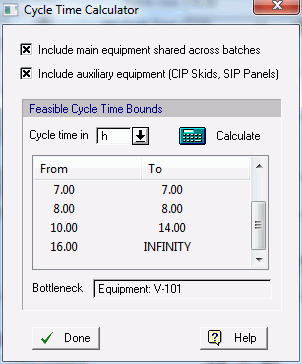
For the example shown above, selecting a recipe cycle time a value of 7h, 8h, any time between 10h-14h, or any value higher than 16h is guaranteed to not lead to sharing violations. Any other cycle time specification (even if it's higher than the minimum cycle time) will lead to sharing violations.
For more details on how to use the new Cycle Time Calculator dialog please consult the topic Error Output Window,
in SuperPro's e-book (manual in PDF format).
When hovering with the mouse over a bar while viewing an EOC (Equipment Occupancy Chart), SuperPro now displays not just the name of the activity (operation, cycle, procedure, etc.) represented by that bar, but also its start and end time. Such information is often very critical in understanding issues that may appear with a given recipe scheduling (e.g. occupancy conflicts, resource limit violations, etc.).

When displaying the composition of an intermediate (or output) streams, SuperPro Designer only lists component with 'non-zero' flows. Since the list of all registered components in a typical process model may be very long, presenting only the entries with non-zero flows greatly simplifies the understanding of what is included in given stream. However, oftentimes, streams may contain amounts of material in very small quantities (traces) due to round-off errors in calculations, or simply because such material intentionally is indeed present in a user's model in traces (e.g. ppb level amounts). Previously, SuperPro had a built-in limit on what flow was considered as the threshold for 'zero-flow'. As our preset value may not be accommodating to all applications, now users can set their own. Simply bring up the Physical Units Options dialog by selecting the pertinent option in a flowsheet's context menu and the following dialog appears:

By specifying a value in the highlighted field, you can adjust what is considered 'zero-flow' from then on by the application.
Since auxiliary equipment (like CIP / SIP skids) don't have a presence
on the flowsheet (i.e. they are not drawn anywhere) it was previously
harder to access their properties. User had to find an CIP cleaning operation
that utilized the skid, and from there access the skid's properties. Starting
with this version, a simple double-click on the skid's name as listed
in the pertinent process explorer's tab and the skid's property dialog
appears right-away. Note that most of the properties displayed on the
dialog are non-editable. They are calculated by the program and are presented
for viewing purposes only. The only property that can be changed is "Omit
from Scheduling' (highlighted in yellow below).

Normally CIP Skids are not affecting the process's scheduling outputs (e.g. minimum cycle time, maximum number of batches per year, etc.). Only main equipment 's scheduling demands enter such calculations. However, since starting with this version, we allow main equipment to be utilized across batches, the cycle time feasibility windows can be estimated factoring in such use. As including the CIP/SIP skids is an option in those calculations, this flag allows you to exclude a particular skid (if needed) when all others do participate in the calculation of feasible cycle time periods (see ).
Previously the rate of failure was an option that if non-zero, would reduce the Main Revenue rate (due to 'failed' product on an annual basis). Since starting from v8 the main revenue rate may be not the same as the rate reference rate used for reporting the operating cost, or the size (throughput) rate, now it as become an option to discount all those rates by the same 'failure' rate. This option is available on the 'Production Level' tab of the Economic Evaluation Parameters dialog (accessible from the flowsheet's command menu by selecting Economic Evaluation Parameters... ).

When the economics of a project are non-favorable, the IRR cannot be calculated as a positive reasonable interest rate. In that case, the application will now display "N/A" in the related field (on the Executive Summary Dialog).

The emission stream outlet on a procedure, collects emissions released by all operations executed in that procedure. Since each operation's emissions tab may have dictated different outlet pressure specifications, SuperPro Designer used to set the emission 's stream pressure always to atmospheric (as it assumed that eventually this stream would be released to the atmosphere). However for cases where the emission stream is first treated (and then released) setting the pressure to atmospheric is not proper. Starting with this version, instead of setting the emission's pressure to atmospheric pressure, SuperPro Designer now sets the pressure to match the lowest release pressure amongst all operations contributing to the stream (during the entire unit procedure).
When a file that contained several allocated resources (such as heat transfer agents, labor, etc.) was opened by a user in a PC that does not have access to the database site information where the resources are allocated, a user is given the choice to de-allocate the resources (so that their properties are released and therefore become editable). In versions prior to 8.5, SuperPro Designer would collapse all resources of a given type without a database-counterpart (e.g. hot heat transfer agents) to the same (default) resource (e.g. "Steam"). This action would dramatically change the nature of the represented recipe. Starting with this version, each de-allocated resource is mapped to a unique (new) resource that exists just in the user's flowsheet (but can be re-deposited to the user's database if needed.
Often times the equipment host of a procedure assumes certain features
that may be of interest to the user to the extend that they necessitate
a new icon. Starting with this version, SuperPro Designer will automatically
switch the icon in the event that such a change has been made. For example,
for the case of Storage in Large Bag (on a Skid), the user may elect to
request any one of several features on the skid:
- mixing (stirring)
- temperature control (heating/cooling)
- automatic weighing (scale)

Depending on which combination of features is selected on the equipment tab (shown above) anyone of the following icons shown below may appear to represent the procedure:

Note that if any streams are already connected to the icon, they are automatically re-drawn and re-connected to the new icon.
Often times the presence of a certain equipment feature may allow a certain type of operation to be available to procedures utilizing this equipment as a host. For example, in the case of our new equipment that represent holders of large bags (as disposable containers) if the equipment features an agitator attachment, then "Agitate" can be an option for a procedure hosted by such an equipment. Since such holders may be available without the agitator feature, for such equipment the "Agitate" operation should not be an option. Until now, SuperPro Designer's list of operations was always the same, for the same type (class) of equipment. Starting with this version, same equipment types may have distinct features that dictate different operation options.

Furthermore, such discrepancies in equipment features may render same equipment types incompatible to each other. For example, if attempting to share the storage holder from a procedure that is (currently) assigned to an equipment with a stirrer (and thus it may contain an 'Agitate' operation) you will not find in the listing of 'compatible' type equipment (and thus potential equipment substitutes) holders of disposable containers that do not have the 'Mixing' feature set. Essentially, the notion of 'Equipment Compatibility' has been refined beyond simply equipment type equality to include equipment feature compatibility.
Starting with this version, we have moved the "Generate Operation Gantt Chart" command (for a single or multiple batches) under the "Charts" menu. This command used to be under the "Tasks" menu.

b1. |
Storage in a Single Disposable Bag Supported by a Skid (Holder) |
b2. |
|
b3. |
|
b4. |
Fermentation in Disposable (Stirred) Bioreactor Bag (Seed & Full Scale) |
b5. |
|
b6. |
This new storage option (available under Procedures / Storage & Blending / in a Disposable / Large Bag (on a skid) ) complements nicely the existing storage in a disposable generic container. The existing option, does not expect the disposable storage container to be hosted by a skid (by default); even if the user requests the presence (and sizing) of a host skid, the costing of the equipment does not incorporate the cost of the storage skid. On the other hand, the new storage procedure (in a large bag on a skid) expects the presence of a skid and factors in the cost of the skid as well. Furthermore, the user may request the presence of one or more features (e.g. stirring, temperature control, scale etc.). If any such features are requested then the skid's cost will reflect the choices. Also, starting with this version, the icon of this unit procedure will change to reflect the chosen features (attributes) of the selected skid (see a16 above).
This new separation option (available under Procedures
/ Chromatography & Adsorption / Membrane Adsorption ) represents
a new separation technique that utilizes disposable membranes to either
filter out inerts or retain valuable product(s). The new procedure is
hosted by a new equipment class (Membrane Adsorber) that utilizes a new
class of disposables (Adsorption Membranes). The equipment can either
be operated semi-continuously (in a "Flow-Through" mode) typically
for retention of inerts or in a "Load & Elute" mode, where
the mixture to be separated is first loaded and then eluted to retrieve
the desired product. Membrane inserts (cartridges) are typically used
only once and then disposed after use.
Note: This new procedure/equipment may not be part of the first
release build of SuperPro Designer v8.5 but it will become part of this
release in a soon-to-be-released later build of the same major version
(8.5).
As part of design targets, sometimes important to expect a certain temperature on an intermediate (or output) stream to be at a given value. Starting with this version we introduce a new "Design Spec" controller unit that allows a user to attempt to achieve a certain target stream temperature by allowing the program to manipulate (ie vary) a user-chosen flow or temperature of an input stream.
Two new procedures have been added to support operations like fermentation and reaction in a disposable bag. Essentially, all the functionality previously available in large-scale industrial fermentor (or bioreactor) can now be used while assuming the reacting material is held in a disposable bag. There are two version of the new procedure: one for regular (large) bioreaction / fermentation and one for seed fermentation. Both procedures can be found under Unit Procedure / washing with a cleaning agent. One of them handles bulk material washing (so its input is a bulk material stream) and the other handles discrete material washing (e.g. bottles, vials, etc.). The new procedures can be found under Unit Procedures / Batch Vessel Procedure / in a Disposable Bioreactor, and under Unit Procedures / Batch Vessel Procedure / in a Disposable Seed Bioreactor.
A new procedure has been introduced to represent units dedicated to freezing or thawing material. A bulk and a discrete version of the same (in principle) set of operations has been introduced. The bulk version of the procedure assumes its input is bulk material whereas the discrete version assumes its input is in terms of discrete entities (representing bags, vials, etc.). The new procedures can be found under Unit Procedures / Heat Exchange / Freezing / Thawing, and under Unit Procedures / Heat Exchange / Freezing/Thawing (Discrete).
A new procedure has been introduced to represent pumping of liquids using a peristaltic pump. It can be found under Unit Procedures / Transport (near) / Liquids / Peristaltic Pump.
Several new operations were introduced with this version capture the
operations executed in a membrane adsorption unit (in flow-through or
bind-and-elute mode). For a list of all operations, please view the Add/Remove
dialog of the related procedure (under Unit
Procedures / Chromatography/Adsorption / Membrane Adsorption)
Note: The Membrane Adsorption procedure and all operations available in
it will not be part of the original release build of v8.5 but will be
added in a soon-to-be-released build.
A new operation has been introduced to capture a temperature-related design specification. Using this operation the user can request the program to keep varying a selected input stream's flow or temperature, until a target stream's temperature reaches a desired level.
The load-and-split operation previously available only as part of generic box set of operations is now available for use inside any batch vessel procedure (in a reactor, fermentor, etc.).
A new pair of operations have been created to represent the "freezing" and "thawing" inside the new freezing/thawing module. Also, the discrete versions of the above have been introduced in this version.
A new operation has been created to accommodate the new Perstistaltic pumping module.
The following enhancements have been made in the modeling of multi-stage evaporation:
a. We now account for boiling point elevation (i.e., the vapor phase has a higher temperature than the liquid phase). This was ignored in the past, and it was not significant for many dilute solutions. However, it is an important factor for sucrose solutions that several of our users have to deal with recently.
b. A new (optional) compressor power model for MVR.
c. As a consequence of item (b), the pre-existing options for specifying the total power consumption for this operation will be used in the future for specifying additional power (pumps, etc) only.
d. We have added direct de-superheating model in MVR (optional). Now the model calculates how much de-superheating agent (a selected cooling agent) is needed to lower the temperature of the mixture of recompressed vapor plus supplementary steam to its boiling point at the pressure in the steam chest of the first effect. It seems that de-superheating is common practice due to its advantages (higher HTC, better HTC control).
e. Added set-by-user flexibility for most model inputs (temperatures, enthalpies) so that the user can play if he/she is not happy with the internal models.
f. Better error / warning message reporting when abnormal situations are encountered.
g. Added detailed COM functionality: new VIDs (variable constants) allow for fetching and/or setting of all variables to the ME evaporation model.

We have added ability to model multi-component solvent loss to the solid
phase and multi-component carrier loss to the liquid phase; also we've
added the ability for the user to classify each component as :
- Solute
- Solvent, or
- Carrier
so that the mass balances can be carried out more accurately.

Several enhancements / corrections have been made to the absorption/stripping
model More specifically:
(A implies that the fix applies to A(bsorption) and S implies that the
fix affects (S)tripping calculations):
1. A/S: The fitted Y(X) absorption curve at 1200 Pa/m (fig. 6-34 of Treybal)
has been re-approximated for better fit to data.
2. A: Due to misinterpretation of the Onda correlation of Onda the estimated the gas-phase film coefficient (kG) was incorrect (in some conditions.
3. A: The calculation of HTU was incorrect.
5. A/S: Several warning messages have been added to announce for all cases that NTU could not be calculated.
6. A/S: The employed equation for the calculation of NTU is not valid for multicomponent absorption or stripping. For this reason, NTU is now calculated by assuming that the design component is the only one absorbed or stripped by the column.
7. A/S: Changed the way the removal efficiency is estimated from NTU in rating mode so that it is consistent with the calculation of NTU from the removal efficiency in design mode (so that values do not change significantly between design mode and rating mode).
8. S: The equipment design based on a specified pressure drop used to lead to incorrect results.
9. A/S: Added temperature correction of Henry’s constant (based on Clausius-Clapeyron relationship).
10. A/S: Revamped the interface of both operations. Added new output variable to the model for displaying the minimum or maximum (in absorption or stripping, respectively) requirement for the L/V ratio. Note that this is equal to the temperature-corrected Henry’s constant of the equilibrium relationship y = Hx.
The model has been improved to handle a gas-only feed. The PFR reaction operation used to require at least a partly liquid feed to be present when a kinetic reaction specification was provided. This restriction has been lifted and gas-only feeds to a PFR can now execute a kinetics-based reaction.
Previous model used to handle energy losses using an efficiency index, assuming at best all work input (Win) would be converted to cooling load (Qc). Instead of asking the user to specify the cooling efficiency, we now request the user to provide the Coefficient of Performance (COF) as the ratio of Qc/Win; note that even though this is still the same ratio as before, the COF can (and most frequently is) greater than 1.

In a custom mixing procedure, the adjustable feed 's flowrate is supposed to be calculated by the program (during the execution of M&E balance calculations) in order to meet a given requirement (specified by the user). In the long list of targets available to the user, we have added one more option: achieve a target temperature on the mixed (outlet) stream. In a way, this feature is the continuous flow equivalent of the newly added temperature target in a Pull-in operation (see below).
When pulling in material into the contents of a vessel, now the user has the option of directing the program to calculate the amount to be pulled in order for the vessel's contents to achieve a target temperature. This is often a condition encountered when 'live-steam' is being added into vessel contents with the intention of heating up the contents expeditiously. With the newly added option (as part of the "Advanced Options Dialog"), you can set the target temperature of the contents, and allow the Pull-in operation to calculate (during execution of M&E balance calculations) the amount of steam that is required to be fed.

Sometimes the equilibrium constants provided for a set of reactions may lead to infeasible solutions. Previously such conditions went undetected leading to outputs that either didn't satisfy the equilibrium relations or the material balance.
Oftentimes during fermentation operations gases (air, oxygen, CO2, etc.) is being fed at two distinct places (sparger and head-space). If the compositions of the two air feeds are different and the flowrates quite distinct, previously it was impossible to capture such gaseous inlets (at conditions critical for the proper execution of the fermentation). Starting with this version, we have introduced the availability of a secondary air (gas) inlet to a fermentation operation. Users can specify a VVM value to be used and set the appropriate rate for the auxiliary feed, or they can instruct the program to simply accept whatever amount is present on the stream line.

Instead of directly specifying the duration of a stoichiometric reaction (or fermentation) now you can use another operation as the master that dictates the duration based on its own duration.

In operations requiring a lot of power input (such as Shredding, Grinding) often the dissipated heat leads to significant temperature rise. A new parameter has been added that allows the user to simulate such temperature effects on the material being processed by such operations.

When employing a cooling operation inside a vessel procedure, up until now, the program calculated the required flow of a coolant (selected by the user) that was needed to meet the cooling requirements of the operation. Starting with this version, we allow the user to account for the cooling load directly as power consumption (after supplying a coefficient of performance index - similar to d5 above). This option may best be used when the 'vessel' procedure is carried out in disposable bag that can be easily refrigerated locally (without the need for central refrigeration supply/return utility system).

Starting with this version, we do not allow continuous storage procedure to utilize any of their output lines to draw material out of the vessel. This is made so that to bring these procedures in line with the underlying principle of SuperPro Designer's simulation engine, that in case of continuous procedures, and when the equipment icons offer multiple choices of output ports, the engine assumes (and expects) material to be removed using (at least) the default output port. If the nature of operation in the vessel is such that may engage multiple lines (e.g. a split) then the bottom output (default output) must be one of the output lines involved.
e1. |
|
e2. |
On/Off Equipment Properties Were Not Updated When a New Equipment Host Was Assigned |
e3. |
Hitting Esc While Viewing the Databank of Sites & Resources Would Lead to a Crash |
e4. |
Prior to this release, if an intermediate stream (possibly carrying material) was connected to a unit procedure, but no operation was assigned to handle the contents of the stream (a condition potentially leading to incorrect overall mass balances) was missed and not reported.
When applying equipment sharing, as soon as a new equipment host is selected, the right-hand side of the tab that is supposed to display the sizing characteristics of the equipment changes to reflect the newly selected equipment's size values. If as part of the size properties an on/off property was included (e.g. "Is ASME Vessel" for vessels) this property was not adjusted.
When viewing the contents of the user databank for db-sites and db-resources, if a member of a tree (either site or resource) was selected, hitting Esc to close the dialog would lead to a crash.
While specifying (or editing) the details of a master-slave duration relationship, if the user attempted to exit the dialog by clicking on OK while no operation was selected ("(None)" is showing), a crash (instead of an error message) would result.
Here's a list of notes on previous builds released for this major version of SuperPro Designer (v8.5):
B01, SBN 110330: Master-Slave
Dialog Crash Fixed (Bug
Fix)
When viewing / editing the master-slave relationship in unit operation,
if the user attempted to exit the dialog without specifying an operation
(i.e., selection was left to "(None)") and then attempted
to exit the dialog, a crash would result.
B01,
SBN 110330: Stream Classification Dialog: Price Update Corrected
(Bug Fix)
Under certain conditions, the stream classification dialog would not
present the proper (calculated) price of a revenue stream if the choice
was set to be on a per-component basis.
B02,
SBN 110420: Holding Capacity Describes Storage in Large Bag Skids
(New Feature)
The "Holding Capacity" has been introduced as a size variable
for the skids supporting storage in large bags. It is also part of
equipment (skids) that support storage in generic container (to describe
the holding capacity of each 'holder' in a shelf or compartment of
that equipment).
B02,
SBN 110420: Expand/Collapse to Specific Level of Detail in Gantt Charts
(New Feature)
During the viewing of Gantt Charts, a new button has been introduced
that allows users to quickly expand or collapse the entire graph to
a selected level of detail (e.g. 'Procedure'), without visiting each
and every summary task bar.
B02,
SBN 110420: Bitmap Indicators in Gantt Charts (New Feature)
During the viewing of Gantt Charts (operation and/or equipment), the
first column will present a bitmap if the line corresponds to a procedure
or equipment that presents a critical entity for the chart (e.g. longest
procedure, or bottlenecking equipment).
B02,
SBN 110420: Time Units in Gantt Spreadsheet View Follow the Chart's
Selection (New
Feature)
When switching from absolute to relative (or vice versa) for the time
display in a Gantt chart, the chart's units would change but the grid's
view units wouldn't. This has been fixed.
B02,
SBN 110506: Adding a Stream to the Contents of the Stream Summary
Table Would Lead to a Crash (Bug
Fix)
When attempting to add a stream to the contents viewed in the stream
summary table, sometimes, this action may lead to a crash.
B02,
SBN 110506: Million-BTUs (MBtu) Added as an Energy Unit (New Feature)
Since specifying the price of a energy cost on a per-BTU basis would
have required very small figures, it was suggested to us that a Million-BTU
unit would be a more appropriate reference.
B02,
SBN 110506: More Options Added for Large Bag, Disposable Bioreactor
Bags in the User DB (Improvement)
After collaborative work with Sartorius®
Stedim Biotech GmbH (in Germany) we have introduced a wide range of
consumable bags (single-use) for storage or use for inoculum preparation
(disposable bioreactor bags) with actual specs (incl. cost) supplied
by the manufacturer.
B02,
SBN 110506: DB-Equipment and Equipment Spec Sheets Updated
(Improvement)
There have been several additions to variables describing equipment
(in rating mode) in SuperPro and therefore an update had to be made
in possible descriptions retained in the User's DB. For example, all
reactor vessels are now equipped with a new variable 'MxCp' that captures
heating/cooling losses to the vessel body itself. All these new variables
are now automatically added to your User DB as soon as it is hooked
up to the latest release of SuperPro Desiger.
B03,
SBN 110523: Protection Against Problematic Characters in Names of
Resources (Components, Mixtures, HX Agents, etc.) (Bug Fix)
As it turns out, if a resource's name contains either a single quote
character ( ' or `) it creates issues when saved in the database.
Starting with this version we no longer allow the names of such resources
contains such problematic characters. User's database contents are
automatically scanned and if any such names were found the illegal
characters are removed or replaced with the '*' character (if removing
the characters creates a naming conflict).
B03,
SBN 110523: Tooltips Added to Gantt Operation & Gantt Equipment
Charts/Grids (New)
When browsing an Operations (or Equipment) Gantt chart, we've added
a new tooltip feature that presents useful information when hovering
over certain areas of the chart or grid.
B03,
SBN 110523: Leaching & Absorption/Stripping Documentation Updated
(Improvement)
A new, revised description of the above unit operations has been included
in this build. The modeling of those operations have been significantly
upgraded compared to previous versions but the documentation was still
lagging.
B03,
SBN 110523: Flush Operation is Now Available Within P&F Filtration
Procedure (Improvement)
Several users have requested to have a "Flush" (or "Rinse")
operation available in the context of a Plate & Frame filtration
procedure. The "Flush" operation was already available in
Nutsche Filtraion and Dead-End Filtration, therefore starting with
this build, we now have the same "Flush" operation available
within the P&F filtration procedure.
B03,
SBN 110523: Chemical Engineering's Cost Index (for Inflation) Updated
(Improvement)
When cost estimates exist for equipment, they produce cost of equipment
at a given date (depending on the model used). The application takes
on the responsibility of updating the cost to today's money by using
an inflation index published annually by the Chemical Engineering
magazine. This release now has the latest data for inflation adjustments
based on that index.
B03,
SBN 110604: Pull-Out Operation Improved BPG Calculations (Improvement)
When multiple pull out operations were set to execute in the same procedure,
and under unique circumstances the back-propagation calculations used
to fail (resulting occasionally in a crash). The modeling of this
operation has been improved to handle such extreme circumstances better.
Also, starting with this release, a pull-out operation will not execute
(do its calculations) if it inherits vessel contents that have no
liquid content.
B03,
SBN 110604: Consumables Missing from the User DB (Bug Fix)
Up until this release, when a SuperPro file contained consumable(s)
that were pulled off the User DB, but at the time of the file opening
are no longer there, the program failed to recognize their absence
and it could (mistakenly) mismatch them with other (unrelated) consumables
in the database.
B04,
SBN 110701: Enforce Limit on Number of Unit Operations per Procedure
(Bug Fix)
Even though there was always a limited number of operations that SPD
could support per unit procedure (32) SPD did not enforce this limit
(and prevent users from adding more) as it was deemed highly unlikely
that any user would run into it. Well, some user did, so we've decided
to enforce the limit. Starting with this build you will not be allowed
to introduce more than 32 ops per UP (or else you will get an error
message).
B04,
SBN 110701: Leaching Operations Revamped (Improvement)
The leaching model has been significantly improved in terms of allowing
for multiple carrier andc solvent components. The interface has been
improved to allow for more flexibility in the model (optionally) without
sacrificing simplicity. Much better error handling has been added
with more guidelines on how to circumvent modeling difficulties. The
documentation for this model has been also updated to reflect the
new changes.
B04,
SBN 110701: Export Scheduling / Resource Data to MS-Project via XML
file (New
Feature)
Up to now, SuperPro supported the exporting of scheduling and resource
consumption data of a recipe to MS-Project by depositing its data
into the MS-Project provided Access database. Starting with MS-Office
2010 this option has been dropped from MS-Project in favor of importing
data via XML files. SuperPro now allows you to export the scheduling
and resource (equipment, materials, utilities, labor, etc.) data into
an XML file that can be directly imported by MS-Project.
B04,
SBN 110701: Custom Mixing i/o Simulation Dialog Reorganized to Fit
1024x768 Resolution (Improvement)
The custom mixing operation's i/o simulation dialog has probably the
most options and its dialog is loaded with controls. It has come to
our attention that the dialog didn't show properly on screens with
resolution of 1024 x 768 pixels (minimum resolution required
to run SuperPro). Starting with this release, we have re-arranged
the presentation of options so that it fits in such screens.
B04,
SBN 110704: Number of Operations per UOP Expanded to 128 (Improvement)
Up to now, SPD restricted the number of operations per procedure to
32. Starting with this release, the limit has been significantly expanded
to 128.
B04,
SBN 110704: Cake Wash Operation No Longer Sizes the Filter (or Centrifuge)
(Improvement)
The cake wash operation, when present in filters or centrifuges it
used to attempt to size it, thus competing with the 'primary' operation
(filtration). Starting with this release we have decided to prevent
this operation from sizing its contained equipment, and simply use
the size as determined by the main operation.
B04,
SBN 110704: Staggered Equipment Names Enforced to Be Unique
(Bug Fix)
When renaming the equipment resources used as staggered equipment,
SuperPro neglected to check for uniqueness of names across main, staggered
and auxiliary equipment names.
B04,
SBN 110704: Equipment Names Must Be Unique Across All Equipment Categories
(Improvement)
When renaming a main or auxiliary equipment (such as CIP skid) SuperPro
enforced uniqueness among equipment in the same category only. Since
all such equipment may appear on the same equipment occupancy chart,
it is deemed necessary to enforce uniqueness across all equipment
category. Starting with this release, equipment resources must have
unique names even across auxiliary equipment and vice versa.
B04,
SBN 110704: Exporting Scheduling Information to MS-Project Improved
(Improvement)
A new feature introduced in SPBN 110701, the ability to export scheduling
information via XML files to MS-Project has been polished to fix some
minor issues with the exporting of values (esp. when it comes to amounts
or resources associated with each resource assignment). Also, the
ability to export task names in a unique way has been added in order
to facilitate the exporting of multiple recipes in the same MS-Project
file to evaluate multi-recipe batch scheduling.
B05,
SBN 110930: Auto-Initialization Links Are Handled More Efficiently
(Improvement)
Auto-initialization links allow you to have input streams and/or equipment
contents be initialized with values originating from a source (stream
or equipment) that is either in the same file (locally) or in an another
file (externally). Starting with this build, SuperPro will only open
external files if needed to provide feeds for any links in the flowsheet,
and will only open an external source file once and then update all
links in the flowsheet.
B05,
SBN 110930: Auto-Initialization Links Can Be Viewed Centrally
(New Feature)
Auto-initialization links can now be viewed in one interface, that
is part of the context-menu of the flowsheet (Auto-Initialization
Links / View/Edit...). Note that this menu option is only there if
at least one link has been defined.
B05,
SBN 110930: Power Dissipation Specification Was Ignored in Some Models
(Bug Fix)
Auto-initialization links can now be viewed in one interface, that
is part of the context-menu of the flowsheet (Auto-Initialization
Links / View/Edit...). Note that this menu option is only there if
at least one link has been defined
B05,
SBN 110930: Centrifugal Extraction Model Improved (Improvement)
Multiple options now exist for how to calculate the operating throughput
in this model: can be based on heavy phase, light phase or combined.
Also, process time is either set by the user or determined from throughput
specification.
B05,
SBN 110930: Dead End Filtration Model Improved (Improvement)
More options added to specify filtrate data as Filtrate Volume per
Area (if so desired). When the operation is carried out in batch mode
and the equipment is in design mode, users have the option of now
setting either the Filtrate Flux or the Filtrate Voume per Area.
B05,
SBN 110930: Rotary Vacuum Filtration model Improved (Improvement)
More options added to this model; specifically: (a) Added Filtration
Time options (Set By User, Calculated Based On Filtrate Flux) as in
Microfiltration (Batch Concentration). In Batch Mode, the user sets
both the time and the flux in design mode, and either the time or
the flux in rating mode. In Continuous mode, the flux is set in design
mode and calculated in rating mode filtrate data as Filtrate Volume
per Area (if so desired). When the operation is carried out in batch
mode and the equipment is in design mode, users have the option of
now setting either the Filtrate Flux or the Filtrate Volume per Area.
B05,
SBN 110930: Neutralization, Wet Air Oxidation (Bug Fix)
When the component selected as the "Neutralization Agent"
has been deleted, a confusing message was displayed. This has been
fixed. The same issue appeared in Wet Air Oxidation when component
"Oxygen" was not present in the feed.
B06, SBN 1218 - Membrane
Adsorption (New
Feature)
A pair of new unit procedures has been added in order to simulate membrane
adsorption using a membrane adsorber
unit in bind-and-elute mode as well as in flow-through mode. All related
operations that are applicable as options for each procedure even
though they have been inspired by the corresponding chromatography
operations, they have been redesigned from the bottom up so that they
can be more flexible and powerful in their simulation of the actions
that can be carried out inside a membrane adsorber:
Load, Elute, Wash, Equilibrate, Regenerate, Flush, Sanitize (for the
bind-and-elute mode) and Flow Through, Strip, Flush, Regenerate and
Equilibrate are all brand new operations. A new class (category) of
consumables (adsorption membrane)
has been introduced to capture membrane cartridges that can be used
in membrane adsorber units.
B06,
SBN 1218 - Stationary & Vibrating Screening (New Feature)
These two new unit procedures have been introduced to accommodate separation
of solids based on their size. The operations servicing these new
procedures are brand new as well as the hosting equipment types.
B06,
SBN 1218 - Batch Vaporization Operation Supports Solvent Switching
(New Feature)
The new batch vaporization operation (available inside any vessel)
now supports two modes: Concentrate and Solvent Switch. In solvent
switch mode a new solvent replaces the existing one during evaporation.
The enhanced module now calculates the amount of new solvent required
in order for ratios of liquid/solid volume to be the same (before
and after the solvent swap).
B06,
SBN 1218 - Enthalpy, Specific Enthalpy and Heat Capacity Are Now Displayed
on Stream Dialogs, Stream Tags & Stream Summary Table (New Feature)
As more and more applications of SuperPro
Designers are developed in domains where energy (enthalpy) management
is critical, there has been a request from several users to display
the enthalpy content of a stream. Starting with this build, we display
the enthalpy content of a stream directly on the first tab of the
stream's i/o dialog; we also display its specific enthalpy & heat
capacity on the second page (Physical State). Users should be reminded
that the heat capacity displayed should only be meaningful on single
state streams (all liquid or all vapor). For mixed phase stream, the
displayed value is the weighted average between the two phases and
probably not very helpful. We also allow the users to display such
values on steam tags (so that they can be directly visible on the
flowsheet) and on the stream summary
table as a property line.
B06,
SBN 1218 - Mixture Making Procedure: Propagates Demand on Non-Process
Input Streams (Bug
Fix)
In the mixture making procedure, the corresponding operation attempts
to calculate the necessary amounts of each input stream in order to
meet the user-specified requirements on component concentration and/or
amount of the output stream. Even though the unit used to work properly
when its inputs were direct process inputs, if the inputs to the procedure
were intermediate streams (e.g. pulls out of a storage vessel), the
simulation engine didn't properly push the demands backwards.
B06,
SBN 1218 - Microfiltration: Rare Crash Fixed (Bug Fix)
Under rare circumstances (esp. when the feed
of a MF, or UF had
no liquid component) the simulation around such procedures would result
in a crash.
SBN
1218 - Add/Remove Operations Dialog: Use Copy-and-Paste Buttons
(Improvement)
When adding new operations in an existing UP sequence, users can now
add operations as copies of currently existing operations in the unit
procedure by using copy-and-paste buttons added to this dialog to
avoid having to add the operations and then initialize them in ways
similar to existing operations.
B06,
SBN 1218 - Simultaneous Reporting of Pre- or Post- Simulation Errors/Warnings
(Improvement)
As the simulation engine gets ready to execute the M&E
balances, it performs several checks (on proper connectivity, etc.)
before the calculations are started as well as several after the calculations
end (e.g. on scheduling conflicts, etc.). In previous releases some
of these errors were presented one-at-a-time. Starting with this release
all errors/warnings are echoed in the error / warning pane of the
SuperPro thereby allowing the user
to address them after just one run.
B06,
SBN 1218 - Inappropriate Heat Transfer Agent Detection Before M&E Balances (Improvement)
If the user changed the supply and/or return temperatures of a heat
transfer agent used in several places in the process, the application
failed to detect if that change was rendering one (or more) engagements
of that utility inappropriate before the M&E
balances were executed. Instead it was reported during the M&E execution. This has been fixed.
B06,
SBN 1218 - Dead-End Filtration (Improvement)
Added option to specify filtrate data as Filtrate Volume Per Area (new
specification). When the operation performs in batch mode and the
equipment is in design mode, the user can set either the Filtrate
Flux or the Filtrate Volume per Area. In all other cases the new variable
is calculated by the program.
B06,
SBN 1218 - Temperature Units Applied Consistently Across Operation's
Tabs (Improvement)
Several operations require (or display) multiple temperature values.
When the units in one setting are changed (e.g. from Celcius to Farenheit)
all temperature readings are now automatically changed (on the same
tab or any other tab of the operation). This helps the user view all
temperature values in more consistent way.
B06,
SBN 1218 - New Volume and Volumetric Flow Units Added to Accommodate
Beer Fermentation Industry (Improvement)
As more and more users utilize SuperPro
Designer in simulating beer fermentation and production processes,
it was necessary to add a pair of new units that are very common in
that domain: hecto-liter (denoted
as 'hL') represents a volume of 100L, and
a beer-barrel (denoted as 'b-barrel')
that represents a volume of 31 US gallons.
B06,
SBN 1218 - Flash Operation now Allows for Heating or Cooling Agent
Selection (Bug
Fix)
Previously users could only choose a heating agent to carry out the
load required by the flash operation. For the (rare) circumstances
were a cooling load was required, the selection of cooling agent was
not possible. This has been fixed.
B06,
SBN 1218 - Wet Air Oxidation, Neutralization Resulted in Crash
(Bug Fix)
If Oxygen was not present during the simulation of a wet air oxidation
operation, or if the selected neutralization agent wasn't present
during the simulation of a neutralization operation, the program failed
to report appropriately the condition.
B06,
SBN 1218 - Report Generation Logic Has Been Improved (Improvement)
The report generation logic has changed. It used to be that the reports
were created only if the report file didn’t exist and/or the file
contents could be different either due to simulation data changes
or due to report option changes; if the file existed and the user
didn't change any of the input data, the (existing) file would be
shown (without regenerating it). Since there was instances where this
logic failed to present the most-up-to-date contents, and starting
with this build, each report is re-created all the time if it hasn’t
been created before in the current session (regardless of possible
input changes that may or may not have been recorded). The program
will notify the user about the fact that some of the reports contents
may be outdated, and present a message like:
"Data affecting the simulation results have changed. Solve M&E balances first? Yes/No? "
Regardless of what the user selects (Yes or No) the program will create
a new report; if the user had opted to re-do the M&E
calculations then new numbers will be created; if they user selected
'No' then the report will be re-created using the (possibly outdated)
results.
B06,
SBN 1218 - Rate Reference Flows Dialog Crashes (Bug Fix)
In certain rare circumstances, the dialog presented under Tasks/Rate
Ref. Flows... may lead to a crash. Some of the controls in the dialog
were not properly prepared to receive very long stream names. This
has been fixed.
B06,
SBN 1218 - Custom Excel Report Can be (optionally) Appended in Existing
File (Improvement)
It used to be that the program would always generate a new Excel file
to receive the contents of the custom Excel report. As some users
may have included their own custom programming that may manipulate
the numbers included in that file, we have now allow for the possibility
to add the contents of the custom XLS file
as added sheets to an existing workbook file. This way, any existing
code will continue to work every time a fresh new content has been
included. Of course, if the worksheets pre-existed from a previous
export, then they are replaced with the new ones (same names, new
contents).
B06,
SBN 1218 - Drop-Down List-Boxes Size Themselves Intelligently
(Improvement)
It used to be that the size of selection drop-down list-boxes was predetermined
(regardless of content); in some cases the height was too long and
unnecessarily covering other displays, whereas in other cases the
height was too small (compared to content) forcing the user to scroll
down / up too much. Starting with this build, we have introduced 'intelligent'
drop-down boxes that size themselves to content to avoid previous
shortcomings.
B06,
SBN 1218 - Stock Mixture Composition Change Did Not Propagate to Input
Streams (Bug
Fix)
It used to be that if an input stream contained in its list of ingredients
a stock mixture, and the user later changed the composition of that
mixture, the stream's pure-component composition did not receive the
updated composition of the mixture. This has now been fixed.
B06,
SBN 1218 - Receiving Storage Unit's Priced or Waste Treatment Cost
Does not Follow Choice for Basis (Volume or Mass) (Bug Fix)
It used to be that if a material storage unit was defined to keep track
of its contents on a volume basis, its selling price (or waste treatment
cost) was set automatically to be on a per-volume basis; similarly
if the basis was chosen to be mass, then the price (or cost) was set
to be a per-mass basis. Starting with this release the two settings
are no longer tied to each other.
B06,
SBN 1218 - Tablet Coaters Are Allowed
to be Shared (Improvement)
It used to be that the program would not allow Tablet Coaters to be shared amongst multiple procedures.
The core reason was that since the program is not capable of handling
left-over discrete entity contents from one use of equipment to another
(as it is for bulk amounts), it prevented the user from every
sharing equipment resources that have that potential (i.e. of inhering
non-empty contents to other procedures). This restriction has been
lifted. The program will allow the sharing of such resources, but
it will complain if during simulation it detects a procedure initiating
its set of activities in a host equipment that is expected to have
discrete entities and it is not empty. Such a condition will abort
the simulation with an error.
B06,
SBN 1218 - Batch Component Splitting Output Temperature Was Incorrectly
Set (Bug Fix)
It used to be that at the end of a batch component splitting operation
the program would set the temperature of the draw stream always to
25° C. This has been fixed and the temperature is set according to
the temperature of the vessel contents.
B06,
SBN 1218 - Disposable Large Bag on a Skid and Disposable Generic Container:
Missed to Check Volume Feasibility (Bug
Fix)
When increasing the volume of an existing consumable (container) (while
being engaged in one or more equipment) the program neglected to check
if the new container's volume fits within each individual holder's
capacity. This has been fixed and a warning is now issued during the
M&E calculations.
B06,
SBN 1312 - Storage Units, disposal cost SBN 1312 (Bug Fix)
Due to an interface bug, the specification of the disposal cost on
supply units was not taken properly.
B06,
SBN 1312 - Power Specification on Several Units Was Not Accepted
(Bug Fix)
Due to an interface bug, the specification of power or specific power
was not accepted by the program. This applied to operations such as
: drum dryer, misc. pumps, fan.
B06,
SBN 1312 - Mutli-Effect Evaporation (Improvement)
Heat balance calculations in this model were improved slightly by better
selecting the reference temperature for enthalpy calculations. Also,
in same operation model, due to a bug, the name of an output stream
was inadvertently changed (under certain rare conditions.)
B06,
SBN 1312 - Inconsistency in VLE determination (Bug Fix)
In prior versions, there was a slight inconsistency in the way the
application was calculating the V/L fractions for each component during
M&E balances and while displaying the i/o dialog of a stream;
this inconsistency would lead to different total enthalpy values,
or densities displayed.
B06,
SBN 1312 - Continuous Storage with Split Specification Interface:
Running Total Incorrect (Bug
Fix)
The running total of all split specifications while displaying the
Oper. Conds tab of the continuous storage model, would incorrectly
display that total (should sum up to 100%).
B06,
SBN 1312 - ICR, EER Reports present key values rounded (if they are
sufficiently high) (Improvement)
EER – Executive Summary Table (very section): if the value of the “Cost
Basis Annual Rate” is more than 1000, now the report displays
the value without any decimal digits.
ICR - "Overall Process Parameters" (top section): if the
value of the “Unit Production Ref. Rate” is more than 1000,
now the report displays the value without any decimal digits.
B06,
SBN 1318 - Air-Lift Fermentor: Riser Volume & Heat Transfer Area
Not Computed (Bug
Fix)
When including an air-lift fermentor in design mode, the riser volume
and the heat transfer area was not calculated (left at 0.0).
B06,
SBN 1318 - Decanter Centrifuge: Better Estimate for Purchase Cost
(Improvement)
The built-in model used for estimating the cost of decanter centrifuge
has been improved to produce more realistic values. Minimum costing
throughput has been set to 5 MT/h.
B06, SBN 1515- Vessel Size
Warning Shown Twice (Bug
Fix)
When running a vessel in rating mode (volume set by user) in conditions
such the liquid volume calculated exceeds the max liquid/vessel volume
ratio allowed by the vessel, the related warning used to be echoed
twice by the simulation engine.
B06,
SBN 1515- Equipment Size Incorrect When Multiple Procedures Shared
Vessel (Bug
Fix)
In rare cases where a vessel, in design mode, was shared by multiple
procedures and at least two of the procedures included Pull-out operations,
the program would produce an incorrect size for the equipment.
B06,
SBN 1515- Exporting to SchedulePro Crash (Bug
Fix)
When exporting a recipe to SchedulePro that included a procedure without
equipment (e.g. a Transportation procedure) the application would
end up crashing.
B06,
SBN 1515- Flash Enthalpy Calculations Inconsistent (Bug Fix)
Under very specific conditions, the enthaply balance around a flash
drum did not appear to be correct (when considering the enthalpy values
displayed by the application on the stream entering and the streams
leaving the vessel). Actually the enthalpy balance was done properly,
but the values displayed around the flash drum were incorrectly displayed.
B06,
SBN 1515- Distillation Column Operating in High Pressure Didn't Propagate
High Pressure on Outlet Streams (Bug
Fix)
When operating a distillation column in high pressure, the outlet streams
were not set their pressure to match the column's pressure.
B06,
SBN 1515- Heating Operation Complained About HX Agent's In/Out Temperatures
Unnecessarily (Bug
Fix)
When using power to operate a heating (or cooling) the program would
still complain about inappropriate heating (or cooling) agent temperatures,
even though they were not really involved in the actual operation.
B06,
SBN 1515- Turbine's Estimated Cost Was Incorrect (Bug Fix)
There was a minor fix in the way the costing model produced estimates
for turbines.
B07, SBN 1718: Rotary Vacuum
Filtration (Improvement)
A new option added to the operation's Oper. Conds tab, offers the capability
to specify as the wash stream amount whatever is set on the stream
itself (as opposed to using a user-provided specification and back-calculate
the required wash amount and the back-propagate the requirement.)
B07,
SBN 1718: Checking for size constraints allows for a slight tolerance
(to avoid numerical discrepancies) (Improvement)
After calculating the required size of an equipment resource (i.e.
equipment in 'design-mode') oftentimes users may switch to 'rating-mode',
without rounding up the size to the nearest available size. In such
cases, it was common due to round off errors that the operation's
requirement may slightly exceed the specified size, and that used
to lead to unnecessary warnings about size violations. Starting with
this build, a tolerance has been added so that the unnecessary warnings
are not generated.
B07,
SBN 1718: Operations set to operate in Adiabatic Thermal mode don't
complain if no HX Agent is selected (Bug
Fix)
Due to a bug, the application used to complain if the user did not
pick a heat transfer agent in an operation set to operate in Adiabatic
mode. As in such cases one does not need to have an agent selected,
this was unnecessary and has been fixed (warning is no longer generated).
B07,
SBN 1718: Continuous GBX have now master-slave option (New Feature)
All generic box operations now allow for their process time to be set
by another operation (Master).
B07,
SBN 1718: Batch Heating / Cooling performed using enthalpy of entire
vessel contents (Bug
Fix)
In previous releases the batch heat and batch cool operations used
to perform their heating (or cooling) action only on the liquid portion
of the material inside the vessel (using simple Cp-based calculations).
Starting with this release, the heat exchange is assumed to be happening
with entire contents of the vessel and the heat balance is done on
an enthalpy basis to account for possible phase changes. As most often
is the case that such heat exchange in a vessel is highly inefficient
if performed exclusively on a gaseous phase, when no liquid is detected,
a warning is generated.
B07,
SBN 1718: Continuous Kinetic Bio-Reaction and Environmental Reaction
operations now may converge to non-trivial solutions, even in the
absence of biomass in the feed (Improvement)
When a bio-reaction kinetic expression was set to be first order with
respect to biomass (typically a product in the reaction stoichiometry),
and no biomass was present in the feed of the reactor, the program
previously could produce as the only solution the trivial (no-reaction)
solution. An option has now been added that allows the user to specify
an 'expected' reaction extent. This reaction extent estimate is used
as the basis for the generation of an initial guess set of values
for all the component concentrations to be used by the numerical solution
algorithm (Newton-Raphson method). By employing an initial guess of
values that is far from the trivial solution (no reaction at all)
it is now possible to converge to meaningful solutions, corresponding
to non-zero extent of reaction. Also, in situations where the residence
time (set by user or calculated based on vessel size) was larger than
what was needed for the reaction to go to its maximum achievable extent,
a warning is generated and the achieved extent is reported. In prior
releases, the solution module generated an error and overwrote the
previous value of residence time. Finally, the limiting component
and the achieved reaction extent (based on the limiting component)
is now displayed on the interface of the operation.
Similar improvements have been applied to the environmental continuous
kinetic reaction model that may be autocatalytic in nature as well.
B07,
SBN 1718: Equipment sized on operation's throughput was improperly
calculated (Bug
Fix)
For equipment that was shared and whose size was based on throughput,
there was a bug in the calculations that prevented the size to be
based on the largest demand for throughput. Such equipment affected
by this bug were: Mixture Maker, Continuous Mixer(s), GBX boxes, etc.
B07,
SBN 1718: Equipment 's 'Number of Units' was incorrectly calculated
(Bug Fix)
In case of shared equipment, the number of units was not always correctly
calculated (it was set to 1 even if the required size exceeded the
maximum available size).
B07,
SBN 1718: Sludge Drying Heating Load was Incorrectly Calculated
(Bug Fix)
The heating load in a sludge drying operation was calculated incorrectly.
This has been fixed with this build.
B07,
SBN 1718: Cp can be displayed on streams (New
Feature)
Starting with this build, a stream can now display its heat capacity
on its i/o simulation dialog. Please note that if a stream contains
a significant portion of its material distributed between a liquid
and vapor phase, the significance of the displayed Cp value is quite
limited (heat capacities are mostly meaningful to single phase streams).
B07,
SBN 1718: Help option has been added to the context (right-click)
menu of a procedure (New
Feature)
After several requests, we have added the access to SuperPro's help
system through a command available in the context (right-click) menu
of a procedure. The help topic that will be presented will be related
to the procedure type that the user started from. Please note that
the same help topic will be displayed if you select the procedure's
icon and hit F1.
B07,
SBN 1718: Information (names) of staggered equipment resources were
lost after editing the equipment's data, if the equipment was shared
amongst multiple procedures (Bug
Fix)
After sharing or un-sharing equipment resources with a designated set
of staggered equipment, the information about the staggered equipment
resources was lost. This has been fixed.
B07,
SBN 1718: Some equipment, due to their multi-parameter sizing nature,
do not support sharing any more in design mode (Improvement)
Since some equipment needed multiple size specifications to be dictated
by the operation(s) utilizing them, it was not realistic to expect
shared operations to compete and bid for size. Such equipment are:
Adsober, Stripper, Distillation Column & Cooling Tower. Starting
with this build such sharing is not allowed in design mode.
B07,
SBN 1718: Input stream's composition table information was not properly
conveyed to the stream before switching to another tab (Bug Fix)
Under certain (rare) circumstances, when a user changed some values
in the input composition table of a stream and then immediately switched
to another tab of the dialog (e.g. the Physical State tab), the information
presented was not properly updated to reflect the newly edited values.
B07,
SBN 1718: EOC chart allows access directly to a CIP Skid's dialog
from its occupancy box. (New
Feature)
When right-clicking over an occupancy bar that is part of a CIP / SIP
skid, a new option has been added that allows you to view the auxiliary
equipment's dialog.
B07,
SBN 1718: You can issue the "Copy", "Delete" or
"Paste" commands now from the context (right-click) menu
of a unit procedure (New
Feature)
After popular demand, we've added these commands to a unit procedure's
context menu (or right-click menu). Note that these commands were
previously available from the application's main 'Edit' menu, or through
keyboard shortcuts (such as "Ctrl-C", "Ctrl-X"
& "Ctrl-V").
B07,
SBN 1718: When the Vapor - Liquid binary chart was switched to show
equilibrium lines with respect to composition in mass, the lines were
incorrectly updated (Bug
Fix)
When the user selected the "Composition in Mass" option in
the Binary Chart dialogue, the converted value pairs were incorrectly
calculated and as a result the V-L chart was incorrectly displayed.
B07,
SBN 1718: Membrane Adsorber 's Equipment Data Simplified (Improvement)
Property values (more specifically size-related property values) of
a membrane adsorber in previous releases used to display values that
reflected amounts (collectively) for multiple units. Such values are
never displayed on any other equipment resource and have been removed
to avoid confusion and preserve consistency across all equipment types.
B07,
SBN 1718: Auto-Initialization of streams (or equipment contents) led
to a crash if the source file as not present (Bug Fix)
When users set the initialization of an input stream (or equipment
contents) be done using as source a stream (or equipment) from another
file that was not available (most-commonly removed or not passed along
to a colleague along with the main process file) the program would
result in a crash. We have now implemented code that detects such
issues and properly notifies the user.
B07,
SBN 1718: Belt filter's sizing and costing calculations have been
improved (Bug
Fix)
Due to a bug (now fixed), a belt filter in releases prior to this,
was not properly sized and its cost was not properly calculated.
B07,
SBN 1718: Cake wash operation must always follow a filtration operation
(Improvement)
Previously we didn't check if that condition was satisfied, resulting
in cake wash operations that would fail to calculate.
B07,
SBN 1718: Back-compatibility issues with files created prior to v6
have been resolved (Bug
Fix)
When opening files created with the application's main version 6.0
(or prior) the application would fail reading the content properly
(in rare circumstances).
B07,
SBN 1718: Heat exchanger costing has been fixed to predict more reasonable
prices for small size exchangers (Improvement)
The cost function of a plate heat exchangers has been modified to reflect
a minimum cost size of 1 m2
instead of 10 m2.
This results in more reasonable costs for small heat exchangers (with
sizes between 1 m2
and 10 m2),
previously deemed as too high.
B07,
SBN 1718: Stock mixture master container document during batch sheet
generation has been improved (Improvement)
When generating a batch sheet of a process with several stock mixture
definitions, the application used to crash.
B07,
SBN 1718: CIP/SIP skid utilization information on batch procedures
in continuous processes was incorrectly displayed (Bug Fix)
When engaging a CIP skid or SIP panel in a batch procedure inserted
in a continuous process, the breakdown information tree was not properly
displayed (led to a crash). This has been fixed.
B07,
SBN 1718: CIP Waste is now reported more accurately (Improvement)
When a CIP waste was generated (as part of each wash step), each step
could have its own cost treatment (or disposal) price tag. This detailed
pricing was considered but not reported properly in the Waste section
of the itemized cost report. Now each CIP step reports its own waste
amount, treatment cost and total cost contribution on a per batch
basis. Same for the economic evaluation report. Also, costs can now
be provided in a flexible unit format that can be set on a per-mass
or per-volume basis.
B07,
SBN 1718: Sampling waste and local receptacle waste costs can now
be set on a user-selectable cost basis (Improvement)
When specifying the treatment cost for the amount of material collected
by a local receptacle (engaged by equipment with material holding
capability that is used by multiple procedures) or the Sample operation's
amount, the units can now be chosen on a per-mass or per-volume basis.
B07,
SBN 1718: Injection Molding and Blow Molding now allow you to specify
power consumption requirements in flexible manner (Improvement)
In releases prior to v8.6 b05 users were only allowed to specify the
total power requirement of a blow molding operation or an injection
modeling operation. Due to a bug, v8.5 b06 prevented the user from
editing the total power requirement value. Starting with this build
(07), users can specify the power requirement for such operations
as a total, or on a per equipment unit, or on a per unit-of-throughput
basis.
B07,
SBN 1718: Flow-through operation in a MA Adsorber interface used to
disable the 'Ignore in Sizing' option presented in the component table.
(Bug Fix)
The check box indicating if the user wishes to 'Ignore During Sizing'
a particular component's bound amount, was inadvertently disabled;
this has been fixed.
B07,
SBN 1718: New Example Has Been Added (Citric Acid Production)
(New Feature)
A new example case study has been added to the set of examples supplied
with the software. It describes a citric acid production process.
The file and detailed documentation on the process simulated can be
found in the "Citric Acid" sub-folder under the "EXAMPLES"
folder.
B07,
SBN 1718: New Example Has Been Added (Live Steam) (New Feature)
A new example case study has been added to the set of examples supplied
with the software. It describes how to directly heat up vessel contents
by directly injecting steam to achieve a certain temperature target.
The file (LvStm8_5.spf) and detailed documentation on the process
simulated can be found in the "Misc" sub-folder under the
"EXAMPLES" folder.
B07,
SBN 1810: Fix for Rare Crash during BPG Connectivity Check (Bug Fix)
Under extremely rare circumstances & connectivity the checks that
the simulation engine executes to validate that any back-propagation
flow specification can be satisfied, the program would crash (due
to circular checks).
B07,
SBN 1810: Adding More than 10 Reactions or Fermentations in the Reaction
or Fermentation Scheme would Lead to a Crash (Bug Fix)
When adding more than 10 reactions in the reaction (or fermentation)
scheme the program would crash. This has been fixed.
B07,
SBN 1810: Generating an Input Data Report for Large Files Led to a
Crash (Bug
Fix)
When attempting to generate the input data report for very large files,
some storage limits used to be exceeded and the program crashed. This
has been fixed.
B07,
SBN 1810: Gas Compression's Power Not Displayed Properly (Bug Fix)
When opening files generated with older releases, the displayed power
value for Centrifugal Compression operations did not show properly
(and occasionally not updated properly). Also, the unit selection
drop-downs for power and power per unit did not show any options.
B07,
SBN 1810: Resource Consumption in Continuous Procedures not Included
(Bug Fix)
When displaying the resource consumption chart for a resource (e.g.
heat transfer agent), when having continuous procedures in a batch
flowsheet, any operation engaging the resource neglected to properly
add its contribution to the total rate, as it failed to properly report
that it is 'on' all the time. As a result, some of the displayed charts
may have been incorrect.
B07,
SBN 1810: Vertical Vessel & Horizontal Vessel's Equipment Dialog
Did not Include the Proper Tabs (Bug
Fix)
Under certain (rare) circumstances the equipment dialog of horizontal
vessels or vertical vessels either did not include the scheduling
and/or throughput tab or included them twice.
B07,
SBN 1810: Concentration Calculator Now Pops up Even if Mass Fractions
don't Add up to 1. (Bug
Fix)
The concentration calculator utility dialog (that can be brought up
from any input stream i/o simulation dialog) was not allowed to appear
unless the mass fractions of all components present added up to one.
This restriction has now been lifted.
B07,
SBN 1810: Plug-Flow Aerobic Bio-Oxydation (kinetic) Model Fixed
(Bug Fix)
Under rare circumstances the convergence of calculations by this model
failed. This has been fixed.
B07,
SBN 2005: Equipment Gantt Chart Crashes (Bug
Fix)
When a skid was hosting several operations, some of them in procedures
that are excluded from scheduling calculations, the Equipment Gantt
Chart used to crash. This has been fixed.
B07,
SBN 2005: Receiving Storage Units Did Not Report All Places of Usage
(Bug Fix)
When a receiving storage unit was assigned to receive a stream that
carries material by means of the auto-removal feature of a procedure
(and not because it's engaged explicitly by an operation such as a
transfer out) it was not reported in the "Locations" tab
of that storage unit. Also, when a storage unit was designated to
receive the waste of one (or more) CIP steps, the name of the step
was not reported but instead the entire CIP operation was referenced.
B07,
SBN 2005: Procedures Hosted by Equipment In Rating Mode Can No Longer
Be Empty (Bug
Fix)
Up until this release, a procedure hosted by an equipment resource
in rating mode (i.e. that does not need sizing) used to be allowed
to exist even without any operations in it; it simply relied on the
automatic transfer in of material through the default input stream
to have the material brought in, and the default auto-removal to carry
the material out. As no timing associated with such material can be
associated with the transfers, such a representation would yield issues
if the input stream is a process input (and thus should be reported
in charts of raw material consumption), or if the output stream is
process output (and similarly, it had to be reported as part of material
produced).
B07,
SBN 2005: Context-Sensitive Help Topics Mixed-up (Bug Fix)
Some of the topics presented in the online help facility of SuperPro
contained the wrong subjects (e.g. Unit Operation models under "Databanks").
This has been fixed.
B07,
SBN 2005: Centrifugation Operation No Longer Complains Unnecessarily
about Heat Transfer Agent (Bug
Fix)
When the outlet temperature of a centrifugation operation is not set
by the user, the operation is not supposed to heat or cool contents
to match the user's specification; however, the application used to
complain if no heat transfer agent was assigned. This has been fixed.
B07,
SBN 2005: New COM Engine Calls Allow for Setting of Initial Contents
of Equipment; Retrieving Equipment Contents after an Operation
(New Feature)
It has been requested by users to allow for a COM engine call that
facilitates the specification of the initial contents of a given equipment
(before the simulation starts). This feature has been added as part
of a general call that sets or retrieves information about equipment
contents before or after a given operation. The two new document interface
functions are: GetEquipContentsVarVal() and SetEquipContentsVarVal().
You will have to install the latest "Designer.idl" that
comes with this edition of the software. For more details on this
(new) interface function, please consult the OnLine Help Topic: COM
Library / Accessing Pro-Designer Variables with COM / Equipment Variables
(item #4). It is
B07,
SBN 2005: Auto-Adjust Flag on Charge's Stream Occasionally Lost
(Bug Fix)
When editing the composition of a charge operation's stream (through
the operation's dialog) if the user decided to set the "Auto-Adjust"
flag the specification occasionally was lost (rare).
B07,
SBN 2005: Back-Compatibility leading to Crashes on Labor and/or Power
Charts (Bug
Fix)
When opening files generated by previous editions of the software (v7.5
and before), due to a bug in translating the format to the most current,
some files may have resulted in a setting that lead to a crash of
the Labor and/or Power chart. Occasionally, even the files themselves
were not readable. This has been fixed.
B07,
SBN 2005: Cash Flow Calculations Had a Minor Calculation Issue when
the Interest was set to 0.0 (Bug
Fix)
Payments used to be incorrectly calculated to 0.0. This has been fixed.
B07,
SBN 2005: Improper Eluant Specification Resulted in Negative Output
Flows from a Chromatography Column After Elution Calculations.
(Bug Fix)
When the eluant amount needed is set in absolute terms but the eluant
amount in product stream was set in terms of 'Bed Volume' multiples
(BVs), it is possible that after the equipment is sized the latter
to turn out to be larger than the former. The solution code did not
detect such inappropriate setting, and therefore the difference was
deposited to the waste stream; unfortunately, the difference could
be a negative value and that resulted in further problems downstream
and possibly a crash. This problem has been fixed.
B07,
SBN 2005: Multiple Back-Propagation Error Messages (Bug Fix)
When a back-propagation line is issued a demand of '0.0' flow, an BPG
error is generated and the demand is not pushed backwards. When such
back-propagation line was on a closed loop (which is solved iteratively)
such error was reported multiple times creating the impression that
there are several such lines with the problem. We have now corrected
this issue and the BPG error is only reported once.
B07,
SBN 2005: Over-Concentrated Feed Error Had No Text (Bug Fix)
When feed of a diafilter contains solids in concentration higher than
the target during the concentration stage, an error is supposed to
be generated and the diafiltration calcuations are skipped. The error
was properly generated but due to a bug, the content of the error
was blank. This has now been fixed.
B07, SBN 2013: Time-Shift Not Exported
Properly When Depositing to MS-Project DB (Bug Fix)
When exporting the scheduling information to alculating the required
size of an equipment resource (i.e. equipment in 'design-mode') oftentimes
users may switch to 'rating-mode', without rounding up the size to
the nearest available size. In such cases, it was common due to round
off errors )
B07,
SBN 2013:
Pressurize Operation Won't Reset Properly When Solved on a Loop (Bug Fix)
When a "Pressurize" operation was solved repeatedly on a
loop convergence iterative scheme, and during one of the iterations
the solution failed to calculate the required amount of agent, the
operation failed to reset itself properly and seemed to accumulate
material in the next iteration. This has been fixed.
B07,
SBN 2013: Crash with the Unit Storage
Definition Dialog (Bug
Fix)
Due to a bug, when a unit storage property editing dialog was forced
to appear from the Process Explorer, the application would crash upon
exiting the dialog. When the same dialog was visited from the document's
command menu, then the crash would not appear.
B07,
SBN 2013:
Diafiltration Auto-Removal Not Working Properly (Bug Fix)
It seemed that when the auto-removal mechanism was triggered for a
diafilration procedure that is sharing host equipment with other (similar)
procedures the application did not handle the material properly; instead
it would forward it to the next procedure in line to share the equipment.
B07,
SBN 3311:
Latest SDK used for Communication with Sentinel Key (Improvement)
It seemed the previous code for communicating with the sentinel protection
key under very rare circumstances was leading to crashes for installations
under Win7. This edition utilizes the latest release from Safenet,
Inc. for this line of sentinel keys.
B07,
SBN 3412:
Tear Streams Not Properly Initialized (Bug Fix)
Tear streams were reset to 0.0 even if user requested to keep their
values from prior simulation.
B07,
SBN 3412:
Enthalpy Rates Were not Shown (Bug
Fix)
When displaying the value of enthalpy on streams' info tag the application
used to display only the energy units but not the time units (i.e.
it was not displayed as a rate).
B07,
SBN 3412:
Info Tag for Auto-Initialized Streams Was not Updated (Bug Fix)
When displaying stream variable values on an info tag, and the stream's
values changed due to auto-initialization process being activated
(from any source), the displayed values were not updated.
B07,
SBN 3412:
Settings for Location of Info Tag Were Not Copied (Bug Fix)
When copying the entire style from a stream to another stream, the
settings related to the user's preferred location of the info tag
were not copied.
B07,
SBN 3412:
Energy Balance in Continuous Stoich. Reaction Operations Sometimes
Inconsistent (Bug
Fix)
When performing the energy balance in a continuous stoichiometric reaction
operation, and under certain (rare) conditions, the energy balance
was inconsistent.
B07,
SBN 3412:
No Warning of 'Missing Reactant' if Reaction Extent is set to 0.0
(Improvement)
Oftentimes a user may negate (temporarily) the presence of a reaction
by simply setting its extent to 0.0. The program used to display a
warning if one (or more) reactants were missing (even if extent was
zero).
B07,
SBN 3412:
Discrete Freeze Drying Operation's Batch Sheet Template was Missing
(Bug Fix)
In previous builds, the template used to include discrete freeze drying
in batch sheets was missing.
B07,
SBN 3412:
Introduced New Unit for Energy : "MJ" (New Feature)
A new unit for energy has been introduced "MJ" to represent
a million Joules.
B07,
SBN 3412:
Missing Information When Exporting to SchedulePro (Bug Fix)
When exporting recipe information to SchedulePro the application neglected
to export the classification type of output streams and as a result
all material streams ended up being tagged as "Aqueous Waste".
This has been fixed.
B07,
SBN 3412:
Number of Stages in Mixer-Settler Not Displayed Properly (Bug Fix)
The number of stages variable of a Mixer-Settler (as part of its equipment
dialog) was not displayed properly.
B07,
SBN 3412:
Calculation Error During the Simulation of a Mixer-Settler operation
(Bug Fix)
If the solution of the mass & energy balances for the first stage
indicated that there was no need for more stages, the program would
return an error stating that the number of stages could not be determined
(instead of returning a value equal to 1.0 for the number of stages).
B07,
SBN 3550:
When an Inappropriate Agent is Detected, it is not Reset to Default
Agent (instead of "(none)"). (Bug
Fix)
After solving the M&E balances, when the application's simulation
engine detected that based on the calculated temperatures of the material
being heated (or cooled) the selected agent was inappropriate based
on the delta-T's at the entry and exit of the operation), the engine
used to set the agent to "(none)" and force the user to
revisit the i/o simulation dialog to re-select an appropriate agent.
This used to create issues if the user opted to switch to adiabatic
operation. Therefore, now, when the above situation is encountered
the engine resets the agent to the default (heating or cooling as
the situation requires) agent and still forces the user to revisit
he i/o dialog (in case that agent was still inappropriate).
B07,
SBN 3550:
Calculation Error During the Simulation of a Mixer-Settler operation
(Bug Fix)
When the relative volatility of a component in a batch distillation
operation was calculated as a very small number (e.g. less than 1.0E-4)
the corresponding field in the displayed table was unable to show
it and thus it was showing either an empty field or some inappropriate
value. This has now been fixed and in such cases the application displays
0.0.
B07,
SBN 3550:
All Ports Are Now Available in GAC and INX Columns to Operations
(Improvement)
All outlet ports of an INX column or a GAC column are now available
to the operations inserted in a procedure utilizing those columns.
It used to be that only a limited number of ports were available.
B07,
SBN 3550:
Initial Number of Units in GAC and INX Column is now 1 (Improvement)
When instantiating a GAC or INX column in a continuous mode flowsheet
the initial number of units is now 1 (it used to be 2).
B07,
SBN 3550:
GAC Adsorption Column Volume Was (sometimes) Incorrect (Bug Fix)
The simulation engine used to calculate the column's required volume
by dividing the total bed volume requirement of the adsorption phase
by the total number of units (“Number of Units”). The total number
of units was taken as the number of units that are used in parallel
for the adsorption phase plus the number of extra (out-of-phase) units
that must exist in order for the regeneration phase to be continuous.
However, the correct bed volume per unit should have been determined
by dividing the total bed volume requirement of the adsorption phase
by the number of adsorbing units in parallel alone (“Number of Simultaneous
Units”). This has been fixed.
B07,
SBN 3550:
The pressure drop in a GAC Adsorption Column Incorrect (Bug Fix)
The pressure drop calculation based on Ergun’s equation was incorrect.
This was due to the incorrect value of density returned for the feed
stream. This has been fixed.
B07,
SBN 3550:
The Dedicated Port Names for a GAC Column Have been Renamed
(Improvement)
A more appropriate name is now being displayed by the flyby tool tip
when the mouse is over the input and output ports of a unit procedure
hosted by a GAC Column. The new names are:
- Feed (for the main inlet
that is typically air plus some volatile matter that will be retained
(adsorbed) by the column
- Regenerant In (typically
steam: used to regenerate the column for the next use)
- Product (main outlet that
carries cleaned air)
- Regenerant Out (carries out
steam or whatever media was used to regenerate the column, plus any
volatile matter recovered from the GAC packing).
B07,
SBN 3670:
Fermentation Operation with Perfusion Line or Fed-Batch Line Input
Proceeds Even if No Contents are Detected Initially. (Bug Fix)
In previous versions, a fermentation operation would not proceed (and
immediately be skipped) if the simulation module did not detect any
liquid contents in the vessel upon the start of the operation. This
would not apply well to users intending to bring material in for fermentation
solely through the fed-batch line or the perfusion line. This issue
has been fixed in this release.
B07,
SBN 3670:
Error Messages Are Now Echoed in a More Intuitive Sequence
(Improvement)
When the application's simulation engine encounters any warnings and/or
errors they are echoed in a dedicated tab (at the bottom of the workspace.
In prior releases the order of messages didn't necessarily follow
the order by which the procedures where simulated and, consequently,
sometimes they were not easy to understand. This has been changed
and now the order of messages echoed follows the solution sequence.
B07,
SBN 3670:
Overall Component Mass Balance Modified (Improvement)
In previous releases the last column in the table of the overall component
balance used to show the different of (OUT-IN); For several users
this seemed counter-intuitive as they would like to see positive numbers
for component (s) generated (e.g. by reactions) and negative amounts
for component consumed in the process. As a result we've changed the
last column to be the difference (IN-OUT).
B07,
SBN 3670:
Figures in Profitability Analysis Table are Now Rounded up
(Improvement)
Rounding the numbers in EER's profitability analysis table makes it
easier to read.
B07,
SBN 3670:
XL Report Options: Easier to include an entire category for an option
(Improvement)
When selecting a feature to be included in the 'Custom XL' report (e.g.
equipment contents) users would have to manually check in each equipment
whose contents needed to see included in the report. We've now added
a couple of buttons that make the inclusion of all equipment just
one click away.