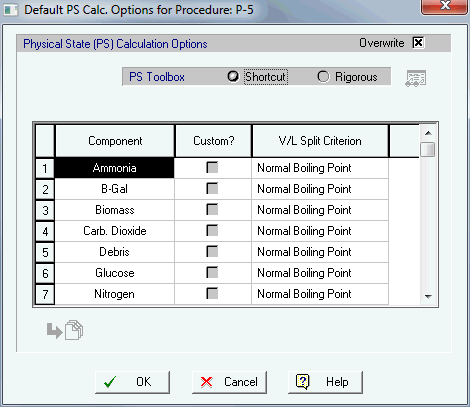
Up until this release (v9) SuperPro Designer decided the distribution of a component between the vapor and the liquid/solid phase (in a stream, in vessel contents, etc.) based on simplistic component-by-component criteria (such as Normal Boiling Point, or Antoine Line). Non-ideal models that better capture the distribution of components between the vapor and the liquid phase based on fugacity correlations (such Wilson's relation for liquid fugacity, or equation of state based corrections for the gaseous fugacity - such as Van der Vaals, or SRK, etc.) were only available within certain operations (Flash, Condensation, Evaporation, Distillation). When attempting to model the liquid contents in a vessel, for instance, those models were not available for use and SuperPro' s simulation engine reverted to the simplistic component-by-component criteria. If none of those adequately represented what the user expected, he/she could overwrite the calculated vapor fraction for any component by specifying his/her own set value. Starting with this version (v9), SuperPro Designer makes such VLE modeling options available everywhere there is a possibility of vapor to in equilibrium with liquid.
Each simulation process file keeps two sets of physical state (PS) calculation
options as two distinct 'PS Toolboxes' :
- A Shortcut (PS) Toolbox (with component-by-component criteria dictating
the vapor fraction of each component)
- A Rigorous (PS) Toolbox (with a specific mixture model employed to calculate
fugacities which in turn lead to the calculation of the vapor fraction
of each component).
SuperPro Designer does NOT dictate where each PS Toolbox (shortcut or
rigorous) should be used. Its engine continues to make the same decisions
as previously (i.e. for streams and vessel contents it uses the default
shortcut PS toolbox; only for the operations that are dedicated to doing
vapor-liquid calculations in detail - such as flash, condensation, etc.-
does SuperPro's engine continueto use the default rigorous PS Toolbox).
The biggest addition in this release, is that a user can overwrite the
default logic for V/L equilibria (e.g. during simulation in a given procedure)
by instructing SuperPro to use :
a) A different set of component-by-component criteria (i.e., customizing
the shortcut toolbox for that unit procedure alone), or
b) Abandon the shortcut toolbox altogether, and use the default rigorous
toolbox (or even, customize the default rigorous toolbox for all simulation
calculations inside this unit procedure).
The dialog above appears when selecting Default PS State Calc. Options... from a unit procedure's context menu.
After selecting "Rigorous" in the dialog above, the View/Edit
button  becomes active and after clicking on it, the following dialog appears:

From the above dialog we can even customize the choices used in the rigorous V/L calculation options toolbox to a set that is most suited for the conditions and mixture expected to be present in the vessel during simulation of the given procedure. These more refined options allow users to better estimate the composition (and total amount) of liquid phases in vessels, variables that could be critical in simulations of reactions and/or sizing of vessels.
Note that departing from the default behavior and customizing of the PS Toolbox can be done either at a) the Unit Procedure level, or b) the Input Stream level.
Customizing the options at the unit procedure level automatically applies the new VLE toolbox model to all its process states (or vessel contents if they exist) and all the output streams to that procedure.
In previous versions of SuperPro, all procedures in a recipe simulation (set to execute in batch mode) were assumed to repeat their execution cycles (from one batch to the next batch) in a span identical to the recipe's cycle time (the time between consecutive batch starts). However, sometimes a unit procedure needs to have a different cycle time frm the main recipe, even that procedure interacts with the main recipe (i.e. receives and/or sends material to some procedure(s) in the main recipe). In other words, it repeats its operation sequence with a pace different from all other procedures. To use proper SuperPro Designer terminology, the procedure's cycle time is set to be different than the recipe's cycle time. It could be shorter or it could be longer. If it's shorter, then the material received (per its own procedure cycle) would be less than what the sending procedure would report per batch; if the cycle time of the independently cycling procedure is longer than the recipe's cycle time, then the material processed (per its own cycle) would be more than what the receiving procedure (that belongs to the main batch) reports as its amount per batch. To specify that a given procedure cycles on its own, visit the Procedure Data... dialog (from the unit procedure's context menu).

After checking the box indicated in yellow above ("Cycles Independently of Main Recipe") the dialog presents a few extra options (highlighted below):

You can dictate the pace of the independently cycling procedure either directly (by specifying the time between consecutive starts) or indirectly (by specifying how many cycles this procedure will repeat per batch of the main recipe - a number that could be > 1 for procedures that cycle 'faster' than the main recipe, or <1 for procedures that cycle 'slower' than the main recipe). Note that the number could be decimal (e.g. 1.5). The dialog also expects the user to provide a time shift (which is accurate for the first batch but, of course, changes in later batches). This time shift can be thought of as the difference between the two time clocks: the main recipe's clock and the independently cycling procedure's clock. It is needed when presenting any time-dependent use of resources (such as buffers, labor, etc.) on a time chart in order to identify possible bottlenecks.
Note: After a procedure is declared as cycling on its own (independently of the main recipe), a new bitmap indicator will appear at the bottom left of the procedure's icon (highlighted in blue below):

If you don't wish to have this indicator show, you can turn it off from the icon's visual style ( Style / Edit ... from the procedure' s context menu):

When including a continuously operating procedure in a batch recipe, the assumption is that the unit procedure is 'ON' all the time. Up until now, the operation represented by this procedure was not included in any time charts. However, any resource required by the operation (such as buffers, labor, etc.) did appear as a constant vertical offset in the resource's consumption chart, starting from the chart's very beginning (0.0 time). Starting with version 9.0, SuperPro Designer allows users to optionally specify a time shift to be applied (if needed) for when the continuous operation starts to operate with respect to the beginning of the first batch. That way, a continuously operating procedure will not appear to engage resources before the procedure leading up to it appears to engage its resources. To dictate such a time shift you need to visit the Procedure Data... dialog from the procedure's context (right-click) menu:
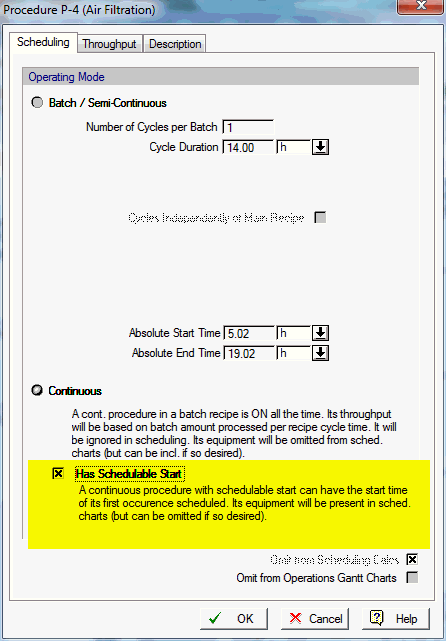
Of course, just like any other schedulable activity, the time-dependent events can be excluded (if so desired) from time charts.
A new piece of information is now displayed on the Recipe Scheduling dialog. This dialog is shown when selecting Tasks / Main Recipe Information... from the application's main menu:

The Annual Batch Size Throughput Rate coincides with the Main Product Rate if it has been defined by the user. The main product rate is defined from the Stream Classification interface (Tasks / Stream Classification... from the main menu). Unless this choice is overwritten, the annual batch size throughput rate (used to indicate the 'size' of a batch recipe or the 'throughput' of a continuous process) coincides with main product reference rate. Note that users may opt to differentiate from the Main Product Rate and pick any other flow in the process as the 'Size' or 'Throughput' reference rate from the interface that appears after choosing the Tasks / Rate Reference Flows... option from the application's main menu.
For versions up to 9.0, all time charts (such as resource consumption charts and equipment occupancy charts) were disabled (not possible to produce). This was true even if some unit procedures in a continuous process (as specified in the Tasks/Set Mode of Operation... dialog) had been designated to operate in semi-continuous or batch mode (e.g. a batch distillation procedure, or a batch fermentation procedure). Starting with this release, a user may elect to show such charts (even in continuous mode) provided they have at least one unit procedure set to be in semi-continuous / batch operating mode.

The time axis displays a length of time that can now be set as "Time
Horizon" directly (for example, 1 day, 1 week, etc.) as opposed to
requesting to view a number of batches.

Note that setting the time horizon to a fixed duration (e.g. 1 day) will
only display activities that can conclude (finish) within the specified
window of time.
The flash (rigorous) VLE calculations have been improved significantly since the last release. One of the areas of improvement is the following: you are now allowed to have some components be explicitly designated as if they were part of a third phase (non-participating in the V/L split calculations in any way other than enthalpy carriers). Such specification can either be made at the flowsheet (process) level, thereby becoming available anywhere the user chooses to engage the (default) rigorous toolbox instead of the shortcut toolbox for VLE calculations, or at a local level (e.g. part of Flash operation specification, or a specific stream and/or state physical state (PS) calculation. Either way, the specification can be made by clicking on the button shown highlighted in yellow below:

Then, the following dialog will appear:

To exclude a component from participating in the VLE calculations, you need to check their box off in the above list. For instance, all components shown highlighted in yellow above have been excluded.
Note: Even though a component may be excluded from distribution to vapor and/or liquid phases, it still contributes to the energy balance with its enthalpy and receives any heat applied to the mixture (as part of the exiting material). In other words, all components participate in the energy (heat) balance. Also, please note that liquid/solid models are always used to model the enthalpy of such a 'third phase' if defined as part of the Rigorous PS Toolbox set of options.
Sometimes it's convenient to set the vapor fraction (as a percentage) of a given component present, thereby eliminating that parameter from the list of variables that need to be found when solving a rigorous VLE set of equations. Since the specification of a component's vapor distribution (fraction) is made regardless of the composition of the mixture, such intervention can only be allowed when Raoul'ts law is used (for computing the K-value of all participating components). Note that this option is not allowed when describing the default rigorous toolbox of the process or of a unit procedure since the specific conditions upon which the rigorous PS toolbox will be applied are not known; it is only available when describing the application of a rigorous toolbox model in a specific location in the process (a rigorous VLE operation such as Flash, or a given procedure state, or a given stream). To provide a value, simply click on the check-box indicated in the column "Custom?" and then type a value (in the 0-100 range).

Note: Extreme values are not allowed (0% or 100%).
It is very common to have two streams (or a stream and a procedure state) mix during simulation. When this happens, the resulting mix is assumed to behave (as a V/L mixture) using the toolbox specified for the 'state after' in that particular operation. Please note that all the assumptions for modeling the 'state after an operation' are normally identical to the PS toolbox of the containing procedure.

After the mixing calculations are done, the resulting mixture (S-103)
always has total enthalpy equal to the sum of the two constituent enthalpies
(from S-101 & S-102) that participated in the mixture. See example
below (i/o dialog for S-101 and S-102 are identical):

and for mixture:

Notice how the composition (in moles) and the enthalpy (in green highlight above) is as expected but the temperature is not (it's slightly less as now the new mixing model for the procedure was set to Raoult's law, whereas the mixing model for each contributing stream was the default shortcut model based on Tb).
Procedure's Mixing Toolbox:

Furthermore, even though by default, after we changed the mixing model for the procedure, the outlet stream's mixing model was also changed, a user may intervene and modified it once again. If that was to happen (see below):

Then, the outlet streams temperature would once again, change (see below):

Notice that the enthalpy value displayed is once again the sum of the inlet streams' enthalpies, yet the resulting temperature is not 85°C, not 82.35°C but 78.05°C as a different mixing model (Modified Raoult's Law is used).
By default, SuperPro Designer will assume that all material inside equipment
during a procedure 's sequence of operations modeling follows the default
shortcut toolbox (with any component criteria defined at the process level)
- see below:

However, a user may decide to overwrite this behavior for a given unit
procedure by right-clicking over the procedure and selecting the Default
PS Calc. Options... entry. Then from the ensuing dialog (that shows the
current settings) you can click on the "Overwrite" button and
you can modify the toolbox used for V/L distribution as follows:
1. Modify the component criteria (i.e., customize the shortcut toolbox
for this procedure), or
2. Switch altogether to the rigorous toolbox (either the default - as kept by the process - or a customized version of it).
In the example above, the user clicked on the (green-highlighted button)
and chose the "Modified Raoult" model (see below).

Note: The new choice will automatically be inherited (and used) for all the states inside that procedure as well as all the output streams of this procedure. Once again, if the user chooses to deviate from the procedure's PS option for one or more individual operations or streams, he/she can overwrite the default behavior.
Oftentimes opportunities arise during the design and operation of a
process that allow the use of a heat sink instead of spending cooling
utilities to remove heat from a heat source. The heat sink could be:
a) either another stream or material contents that need to be heated, or
b) the return line of a spent heating agent (at temperature Tout) that needs to be re-heated by the utility supply system back to its delivery state (Tin)
If a match of type (a) above is available then the process will see double savings (both on heating agents and cooling agents). If a match of type (b) above can be made, then the process will see savings in terms of reduced consumption of a heating agent as well as (possibly) some credit offered by the utility supply system for raising a spent agent back to its original supply state.
The main interface that allows users to experiment with possible energy recovery opportunities appears when selecting the Energy Recovery... option from the flowsheet's context menu.

All possible 'donors' of heat (i.e. operations that require cooling) appear as rows in the above table; their cooling load (as currently calculated by the process) as well as the temperature change (on the process side) is also displayed. Those temperature values are critical in terms of determining the 'quality' of heat and therefore the eligibility of potential candidate matches (i.e., the "Recipients" of the heat currently taken away by means of a cooling agent - displayed under the "Cooling Agent" column). If you decide that a particular entry can have the recipient of its heat switched from a cooling agent to either another operation (that requires heating) or the return line of a heating agent, then you should click on the "Recovered" check-box. Then, the View/Edit... button for that heat source becomes active. Clicking on it, the following dialog appears (the one shown is for the "DISTILL-1 in P-32" heat sink):

This dialog has three distinct areas (highlighted above in green, blue and pink colors):
1) The top-left box displays information about the heat donor that we are seeking a match.
2) The bottom table shows all potentially compatible heat sinks. There are two types of possible sinks: a) cooling operations and b) spent heating agents.
3) The top right box displays assumed operating conditions associated with the specific match (counter- or co-current exchange, minimum approach temperature, etc.); this information is considered when evaluating the feasibility of the specific match. If the match is deemed to be infeasible, the user will be warned, but the application will allow the user to over-rule its warning and keep the match. Note that the feasibility of a match can change from run to run, as the temperatures and enthalpy contents of the process material being cooled down or being heated up change as operating conditions and/or structural changes are made to the process description. That is the reason why typically the evaluation of energy recovery opportunities is one of the last activities performed during the design of a new process.
Note: In order for credit to be given (as $/yr) for agents restored to their target state and thus reduce the annual operating cost of the process, the definition of a heat transfer agent should allow for positive (non-zero) credit price as part of its definition (see highlighted area below). This dialog appears after you first display all agents currently engaged in the process (from the process's context menu, select Resources / Heat Transfer Agents.. ); and then double-click on the row that represents the desired agent ("Hot Water" in the case of the dialog below). The following dialog will appear:

After energy match opportunities have been identified, if you clicked
on the "Show Recipients of Energy Recovered" (at the bottom
left of the main interface of the Energy Recovery dialog, highlighted
in blue below) the dialog expands:

The expanded area is made up of two tables:
1) Top table (highlighted in yellow above). This shows all matched operations
that require heat (and therefore are being heated in the process by a
heating agent) and their corresponding operation matches ("Heat Sources",
or operations that are currently being cooled by a cooling agent);
2) Bottom table (highlighted in green above): This shows all heating agents that are used by the process. For those agents that are matched against "Heat Sources" from this process (in order to replenish the spent agents) the table displays the amount of load recovered and any credit (in terms of load) that will be awarded to the process.
Finally, when charting Heat Transfer Agent consumption (main menu, Charts / Heat Transfer Agents / Consumption / Single Batch (or Multiple Batches)... ) the user can choose to either show the reduced consumption of an agent (if the agent can be replaced by a suitable heat recovery match) or ignore it (for the purposes of showing the agent consumption) in order to view the true (inherent) needs of the process (in terms of that agent's utilization).

The choice to show the reduced consumption of an agent (due to energy recovery) is made by checking the check-box that appears during the selection of the agent in the Utility Consumption Chart Dialog (see yellow highlight above).
For more details on modeling energy recovery with SuperPro Designer, users are encouraged to read the related topic "Energy Recovery" in Chapter 9 ("Economics") of the manual or the eBook (PDF) version of the manual.
Starting with this version of SuperPro Designer, the user has the choice to set the character set to be used everywhere text strings are displayed. This includes the display of names on the flowsheet itself (as the names of procedures, equipment resources, etc.). It also applies to the display of procedure names, operation names, equipment resources, etc. on time charts, as well as the display of heat transfer agent names, labor types, etc. as shown on other pertinent resource charts. This is a major improvement for all our international users (especially in countries like China, Japan, Korea, etc.) with languages using a non-Latin based alphabet. The selection for the character of choice can be made:
a) For the current flowsheet that the user is working on.
b) For the entire application. In this case, all future documents will
use this character setting as well.
In order to enforce a new language set for the current document, you
must select the Preferences / Miscellaneous ... option from the flowsheet's
context (right-click) menu. Then the following dialog appears:

If you wish to change the language set for all your projects (from that point onward), then you should visit the File / Application Settings... dialog:

All projects from then on will start with a new default language set (whatever is selected in this dialog).
Just as the Vapor-Liquid separation calculations can be done using a
globally-set shortcut toolbox (or rigorous toolbox), the method used by
the program to calculate the liquid density or the vapor density can also
be set globally (at the process or document level) and then be inherited
and applied everywhere needed (on streams and, more importantly, on equipment
contents). The global setting can be done by selecting Density Calculation
Options... from the flowsheet's command menu. The following dialog will
appear:

Once the density calculation method is specified, all streams (existing and/or later created) as well as procedure states (i.e., equipment contents during the execution of a procedure), will use the same method. Notice that when you bring up any stream's (or procedure state's) description, the part that describes how the density (liquid and/or solid) is computed is greyed out (by default). If you wish for a particular stream or state to overwrite the default calculational method, then you must click on the "Overwrite" checkbox (shown in green highlight below for stream S-103)

and then choose how this particular stream's liquid density should be calculated (in the case above the user chose to specify a constant value).
Note: If in the future the default
calculational method for the liquid density calculation changes once more
(e.g. the user modifies some volumetric contribution coefficients, or
switches to a constant value), any location where the user has previously
chosen to overwrite the default model, will not be affected.
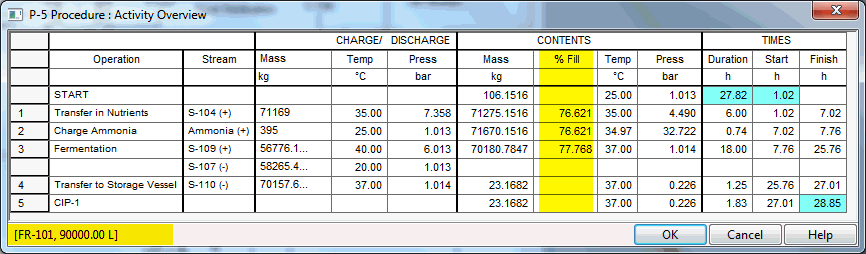
When displaying the Activity Overview table for a procedure, we can customize the display to include equipment-related information. From the Edit Contents... dialog (option available on the context menu of the table) notice the "Show Equipment Information" option and "Fill Percentage" options (new).

After making the above choices the Activity Overview Table now shows
as:
Until this release, the user had to choose whether to display component
flowrates (in mole/h or mole/batch, or kg/h or kg/batch or something similar)
or component fractions (in mole % or mass %) when a stream's information
was included in the stream summary table. Starting with this release,
a user may opt to show both (at the same time).

After checking on the option shown highlighted in yellow above, the SST will show the flows (in the unit selected there: kg, kmol, mol, lb, etc.) and then, next to each value, the table will also show the mass (or mole) percentage that each component represents (see below):

When presented with the dialog that allows us to edit the contents of the SST, we can view (if desired) the streams that only belong in a given section (see below).

This dialog appears when a user chooses the Edit Contents... option from the SST' context (right-click) menu.
This option is very useful when dealing with a large flowsheet and we need to focus in on a certain section of the flowsheet, or if we need to organize the contents of the SST in a way that presents streams in the same section next to each other.
Once again, when choosing what to display in the SST, we can now optionally
present more information around the chosen streams:
- Stream Classification (i.e., "Raw Material", "Aqueous
Waste", "Emission", "Product", etc.)
- Total Enthalpy (in user-selected units)
- Specific Enthalpy (in user-selected units)
- Heat Capacity (in user-selected units)
(see below)

Caution: be careful how to properly interpret the values of specific enthalpy and heat capacity if the stream has both liquid/solid and vapor phase (i.e., it's non-homogeneous).
Some users find it important to tabulate the energy (utility) demand for each operation in their process. To include such tables in your custom Excel report, a new options has been added in the Custom Excel (XLS) Report (see highlighted entry below):

Once the above option is checked, the report will include a tabulation of the energy consumption per operation in the process for each type of utility (under the "Utilities" worksheet of the Custom Excel Report). A partial view of such a table for one of the example process models included with the software is shown below (for "Cooling Water"):

Starting with this version, we have added new calls as part of the "SuperPro Document" 's interface that allows users of SuperPro Designer's COM engine to fetch and set the contents of equipment either at the beginning of the batch ("Initial Contents") or after any given operation (during a procedure) or at the end of the batch ("Final Contents"). For more details on how the new functions can be used please consult Appendix E (in the e-Book version of the manual).
When reporting all components of the operating cost (Materials, Labor-Dependent Entries, Facility-Cost Dependent Entries, Consumables, etc.) normally the costs are reported on either a per-year or per-batch reference. Now, we have added a new option: display the costs on a per UPRF unit (whatever that may be) - see below:

(in the above example the UPRF is in 'gal(STP)' ).
Note 1: By default the Unit Product Reference Flowrate (UPFR) is assumed to be the same as the chosen "Main Product / Revenue" flowrate (as shown in the Stream Classification dialog - under Tasks / Stream Classification... option). However, users may deviate from that and pick a new reference flowrate using the Tasks / Rate Reference Flows... interface.
Note 2: You can select the specific operating cost items to report by visiting Operating Cost Options... from the flowsheet's context menu.
In previous versions, the finish-to-finish timing relationship was possible but had to be done indirectly by appropriately choosing the reference operation and a negative time shift equal to the duration of the operation being scheduled. This was not convenient as the duration of an operation may be dependent upon processing conditions that could change from run to run. Staring with this version, a direct choice can be made that will make sure that the reference operation and the scheduled operation will finish at the same time (or with the specified time shift). This choice can be made on the Scheduling tab of an operation as follows:

From the above interface the operation being scheduled ("Transfer In") is set to have a FTF (Finish-to-Finish) relationship with the "Sterilize" operation in the "P-2" procedure (the reference operation).
As mentioned elsewhere, starting with this version, SuperPro Designer explicitly supports all four possible timing (scheduling) dependencies between activities (operations): start-to-start, start-to-finish, finish-to-start and finish-to-finish. Notice the four distinct bitmaps which represent all four relationships:
1. Start-to-Start (STS)
Start-to-Start indicates that the start of the reference operation (dark blue box below) is set to coincide with the start of the operation being scheduled (dark green box below).

2. Start-to-Finish (STF)
Start-to-Finish indicates that the start of the reference operation (dark blue box below) is set to coincide with the end (finish) time of the operation being scheduled (dark green box below).

3. Finish-to-Start (FTS)
Finish-to-Start indicates that the end (finish) of the reference operation (dark blue box below) is set to coincide with the start time of the operation being scheduled (dark green box below).

4. Finish-to-Finish (FTF)
Finish-to-Finish indicates that the end (finish) of the reference operation (dark blue box below) is set to coincide with the end (finish) of the operation being scheduled (dark green box below).

Note: the drop-down box at the bottom left of every Scheduling Property Page (in yellow highlight below) is automatically updated as soon as the user makes his/her choices about the timing options (in the two boxes highlighted in blue below).

If a user finds it more convenient, the choice for timing dependency can also be made back-wards: selecting an option in the drop-down box (bottom left, in yellow highlight above) will automatically specify the correct choices in the two boxes above (but of course, the user is required to pick the proper reference procedure / operation).
Until now the selection of a Master operation (if available) was only there to dictate the duration of the slave operation. In other words, the Setup time, Process Time and Turnaround Time of the slave operation are directly set by the matching parameters of the chosen master operation, and these parameters are no longer editable within the slave operation. This choice is done through the common interface shown below (and typically invoked from the Oper. Cond's tab in operations where this option is available).

In the sample screen shown above a "Transfer In" operation (the "slave operation", which is part of procedure "P-5" in "FR-101") is set to match its duration with operation "Sterilize" in procedure "P-2" (the "Master" operation). Note that this matching of duration does NOT automatically match the timing (i.e. start time synchronization) of the two operations as this may or may not be what the user wishes. However, since such double-matching of durations and start times is very common in process scheduling, a new option has been added on the Scheduling tab of an operation that already has been assigned a Master operation (see highlighted button below - as shown for the same "Transfer In" operation as above):

Clicking on the highlighted button will directly set a 'start-to-start' relationship on the timing of this operation with respect to the (already assigned) master operation.
Until now font used to display any text on the x-axis (time) or y-axis was built-into the program. Starting with this version, this choice is editable by the user to suit his/her preferences. The fonts of choice used for the time axis as well as the y-axis are now part of the chart's style set of features and can be set from the related dialog. For example, to set the font used to display the names of equipment resources in an Equipment Occupancy Chart, select Edit Style... from the chart's context menu, and from the ensuing dialog you can set the new font for the y-axis (see below):

There's a new simulation study added under the "Examples" folder: "Lysine". This example models a plant which produces 30,000 metric tons (MT) of lysine annually. Lysine is an essential amino acid for humans and animals. It is a key building block for muscle proteins, and plays a major role in calcium absorption and the production of hormones, enzymes, and antibodies For more information about the process itself, please consult the "Lysine.doc" file in the folder. There are also several smaller files under the "Misc" folder that demonstrate the use of some key (but somewhat complex) unit procedures / unit operations in SuperPro Designer: Hydrocycloning and Gasification.
Several sets of values have been added for display in the Executive
Summary Dialog (to view the dialog select View
/ Executive Summary ... from the main menu). The first tab (Summary)
now presents key indices like unit production cost and unit production
revenue per "UPRF" (Unit Product Reference Flow). This flow
is assumed to be the Main Product/Revenue Flow as specified in the Stream
Classification dialog (Tasks / Stream
Classification... from main menu) but it can be overwritten using
the Tasks / Rate Reference Flows...
dialog. The same tab (shown below) also shows the Annual Operating Time
(AOT) available and utilized, the maximum number of batches and the actual
number of batches (for processes set to operate in batch mode only).

The Operating Cost tab has also been significantly expanded (see below)
in order to present all components of the operating cost (Materials, Facility-Dependent,
Labor, etc.) on a per-year, per-batch, per-UPFR and percentage basis.

b1. |
|
b2. |
This new option (available under Procedures / Power Generation / Gasification ) is used to model the gasification of liquid/solid fuel (coal, biomass, etc.) into gaseous fuel under the assumptions of adiabatic operation and (optional) chemical equilibrium. The liquid/solid fuel reacts with oxidant (air or oxygen) and moderator (steam) to produce producer gas (a mixture consisting mainly of CO, H2, CH4, CO2 and H2O) and liquid/solid waste (ash, unburned carbon, etc.). Since there is no external heat source under adiabatic operation, gasification must be self-sustained and the overall gasification reaction must be exothermic. The heat required to carry out endothermic gasification reactions is provided by burning part of the fuel. The composition of the producer gas at chemical equilibrium can be estimated by either assuming that certain stoichiometric reactions take place or by applying the Gibbs Energy Minimization method. Optionally, a shift from chemical equilibrium may be assumed for each stoichiometric reaction.

For more details, please consult the related topic in Appendix A of the e-book version of the manual.
This new separation (chromatography) option (available under Procedures
/ Chromatography & Adsorption / PBA Chromatography (Detailed) / in
Bind-and-Elute Mode and Procedures
/ Chromatography & Adsorption / PBA Chromatography (Detailed) / in
Flow-Through Mode ) represents a packed-bed chromatography procedure
(similar to what the old PBA Chromatography procedure used to do) but
in a manner that more closely represents the steps involved when operating
the column in either :
a) Bind-and-Elute Mode, or
b) Flow-Through Mode
The two modes are similar to the procedures introduced in v8.5 for Membrane Adsorption.
Note that the old PBA chromatography procedure has been kept for back-compatibility purposes and for users who don't care to emulate the steps in the more detailed (and accurate) representation required by the new procedures.
The new (detailed) PBA Chromatography in Bind-and-Elute mode, expects to have a Column Loading operation, followed by an Elute operation and/or one or more Wash operations, possibly a Regenerate operation and finally an Equilibrate operation to return the column to its original condition so that it can be re-used for the next batch. Note that the inputs required by those operations are somewhat similar to the old operations but also have some significant changes. For more details, please consult the New Operations section below.
The new (detailed) PBA Chromatography in Flow-Through mode, expects
to have the Flow-Through operation followed by a strip operation and a
flush; a Regenerate operation and finally an Equilibrate operation ends
the cycle in order to return the column to its original condition so that
it can be re-used for the next batch.
Note: The equipment associated with this new procedure is the same
as the equipment used for the (old) PBA Chromatography (Simplified) procedure.
c1. |
|
c2. |
Gasification Operation (main operation in Gasification procedure) |
c3. |
Retentate Wash Operation (available in Dead-End Filtration procedures) |
Several new operations were introduced with this version to represent the operations that may be executed in a detailed modeling of a PBA Chromatography procedure in bind-and-elute mode or in flow-through mode.
For the PBA Chromatography Procedure in Bind-and-Elute Mode (under Unit Procedures / Chromatography/PBA Chromatography / Bind-and-Elute Mode):
Column
Loading

Note: The new component-related
data table (highlighted above in yellow) only requires retention data
(Retained %) and it displays actual amounts retained by the packing
of the column (Retained Amt ). No "Yield %" or "Release
%" needs to be specified here as they used to be required in
the old Column Load operation. Such data values are part of the elute
operation specification.


For the PBA Chromatography Procedure in Flow-Through Mode (under Unit Procedures / Chromatography/PBA Chromatography / Flow-Through Mode:
Column
Flow-Through

Column
Strip

Column
Flush

Column
Regenerate
Same as in Bind-and-Elute
Mode.
Column
Equillibrate
Same as in Bind-and-Elute
Mode.
For the (new) Gasification Procedure (under Unit Procedures / Power Generation / Gasification).
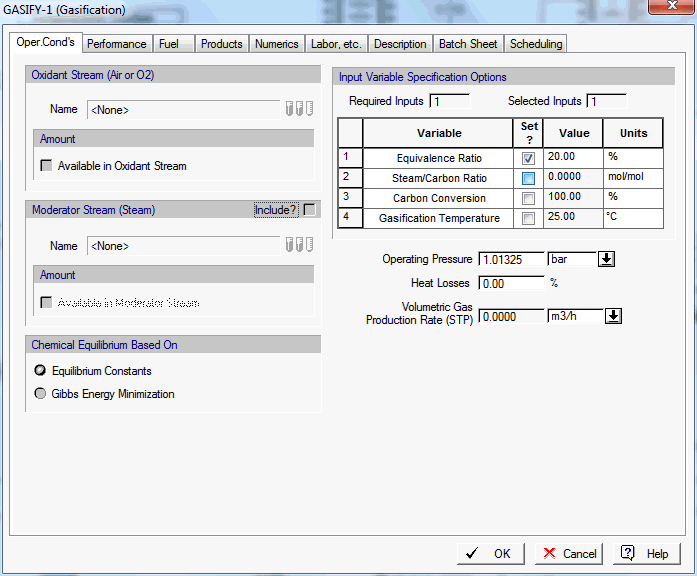
This operation is used to model the gasification of liquid/solid fuel (coal, biomass, etc.) into gaseous fuel under the assumptions of adiabatic operation and (optional) chemical equilibrium. The liquid/solid fuel reacts with oxidant (air or oxygen) and moderator (steam) to produce producer gas (a mixture consisting mainly of CO, H2, CH4, CO2 and H2O) and liquid/solid waste (ash, unburned carbon, etc.). Since there is no external heat source under adiabatic operation, gasification must be self-sustained and the overall gasification reaction must be exothermic. The heat required to carry out endothermic gasification reactions is provided by burning part of the fuel. The composition of the producer gas at chemical equilibrium can be estimated by either assuming that certain stoichiometric reactions take place or by applying the Gibbs Energy Minimization method. Optionally, a shift from chemical equilibrium may be assumed for each stoichiometric reaction.
This new operation ("Retentate Wash") is available under the Dead-End Filtration operation and is allows the user to model any washing that may be carried out on the retained material before disposal.

It is similar to the existing "Cake Wash" operation (available within a Nutsche Filtration procedure).
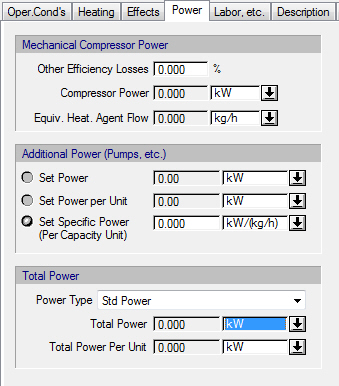
The following enhancements have been made in the modeling of multi-stage evaporation:
a. The interfaces for all tabs have been completely redesigned to be closer to the terminology used in the industry and to make it easier to navigate through the options.
b. For backward feed flow arrangement, the user can now set the true final concentration of the key component (and not a “reference” final concentration calculated at the temperature of the initial dilute solution).
c. For thermal vapor recompression, the user can now choose from which effect the vapor will be drawn for recompression. In addition, the simulation of thermal vapor recompression is now based on the entrainment ratio of the steam-jet ejector and not on the percentage of vapor that is drawn from the selected effect. This change was made because the entrainment ratio can be related more easily to steam-jet ejector efficiency.
The New Operating Conditions Tab:

Heating tab When No Vapor Recompression is Used:

Heating tab When Multiple Vapor Compression is Used:

Heating tab When Thermal Vapor Compression is Used:

New Effects tab:

New when no vapor recompression is used or when thermal vapor recompression is used :

New Power tab shown when multiple vapor recompression is used tab:
There have been many enhancements and improvements in the numerical solution of the Flash equations (see Appendix D of the e-Book for a detailed explanation of such equations).
Whereas the standard approach applies the Newton-Raphson method to solve the entire set of equations in the N+2 dimension of unknowns (where N is the number of components), the Rachford-Rice solution approach solves the equations in two layers: the outer layer is only one-dimensional (with V/F being the unknown) and (typically) converges very fast. The inner layer for a Raoult's law model is also one dimensional. If a non-ideal model for the K-value calculations is required, the inner layer is N-dimension, with Vi/Fi (the vapor fraction of each component i) being the unknowns.
Note: If heat balance equations needs to be solved, then there's a third layer (in Rachford-Rice) where another single equation in a single unknown is solved (before the inner layer is solved).
Generally, the flash calculations converge a lot faster using this technique. In the rare case that this approach does not help (non-convergence) the traditional Newton-Raphson approach on the N+2 dimension of the problem is used (see below):

For more details, please consult Appendix D of the eBook version of
the manual.
In previous versions of SuperPro Designer, for operations in which the VLE calculations required a rigorous PS toolbox (like a Flash or Condensation operation) the user was allowed to pick a rigorous VLE model for the operation calculation and then pick a (possibly different) model for the output stream(s). This freedom could create discontinuities in the values of temperature and vapor fractions of components at those outlet streams. In order to avoid such discontinuities, now SuperPro Designer will lock (freeze) the PS Calculation options for such outlet streams (see the "Physical State" specifications of the vapor outlet from a Flash Drum below):

Notice that the "Overwrite?" checkbox (highlighted in green above) is disabled. Also, a note is displayed (highlighted in yellow above) indicating that : "The stream's physical state is determined by its associated procedure P-9 and cannot be overwritten.".
In previous versions of SuperPro Designer, the sterilization (or pasteurization) model required cooling to a target temperature set by the user as the final stage of the operation. In the current version of SuperPro Designer (v9.0), if the set target temperature is high enough that no cooling is required from the previous stage, the model now does not expect the presence of a cooler. For instance, if the delivery temperature from the previous step of pasteurization (before the final cooling) is 25°C and the target temperature has been set to 30°C, then the model will conclude that no refrigeration is required and it will deliver the product at 30°C.
Several improvements have been added to the Hydrocycloning operation:
a. The user can now select among two of the most common Hydrocyclone geometries (‘Rietema’ and ‘Bradley’), each having different (built-in) values for all important geometric properties for preliminary design (inlet diameter-to-cyclone diameter, overflow diameter-to-cyclone diameter, underflow diameter-to-cyclone diameter, vortex finder length-to-cyclone diameter, cone angle, cyclone length-to-cyclone diameter). Optionally, the user can specify custom values for these properties.
b. The Hydrocycloning operation model is now based on the proposed dimensionless group model by Svarovsky in his book entitled “Solid-Liquid Separation” (4th Ed., Butterworth-Heinemann, 2000). According to this model, the number of units, the cyclone diameter, the ratio of underflow diameter-to-cyclone diameter and the pressure drop in the cyclone can be calculated as a function of the feed properties (total flow, solids concentration and particle size distribution), the reduced grade efficiency curve, and the solids concentration in the underflow.
c. The power
consumption as well the power consumption efficiency (ratio of ideal to
actual power consumption) can now be set by the user.
The power consumption as well the power consumption efficiency (ratio of ideal to actual power consumption) can now be set by the user.
e1. |
The Normal Boiling point of a Pure Component Cannot Be Higher than its Critical Temperature. |
e2. |
The Freeze-Thaw Procedure's Icon Had Connectivity Issues (Ports Were Not Properly Marked). |
e3. |
Prior to this release, a user was allowed to introduce a pure component in a process simulation (or in the User database) and set its normal boiling point to any positive value (in deg. K). However, if the value set was higher than the critical temperature it used to lead to calculational issues if this component was involved in rigorous VLE modeling. Since this is an impossible situation, it is now prevented by the interface.
When attempting to connect streams to the ports of a Freeze-Thaw procedure, the ports were incorrectly detected and therefore the end points of streams starting from or terminating at such procedures generated a gap. This has been fixed.
(a) Bugs in the solution of M&E balances when two or more effects are used, and the feed flow arrangement is backward, and there is also vapor recompression.
(b) A bug in the calculation of heating agent consumption and desuperheating agent consumption when multiple vapor recompression is used and a desuperheating agent is employed.
(c) A bug in the calculation of the evaporation percentage of each volatile component when the final concentration of a key component is set.
Here's a list of notes on previous builds released for this major version
of SuperPro Designer (v9.0):
B09,
SBN 2200:
Continuous Stoich. Reaction Operation: Target Component's Concentration
is Now Calculated. (Improvement)
If a user has selected a target component to monitor, and then specify
the reaction extent as the driving performance specification for calculating
the reaction mass balances, the program now computes and displays
the concentration of the target component at the end of the reaction
(just to inform the user).
B09,
SBN 2200:
Fanning Operations Now Report Their Per Unit Power Consumption.
(Improvement)
Fanning operations used to report their total power consumption previously.
If more than one units are employed (simultaneously) a more important
parameter to report would be the power-per-unit. This was not reported
previously.
B09,
SBN 2200:
Continuous Crystallization Operation: Vapor Output Stream Now Assumes
the Operating Pressure of the Crystallizer. (Bug Fix)
Previously, the gaseous outlet of a crystallizer did not assume the
operating pressure of the unit. This has now been fixed.
B09,
SBN 2200:
Continuous Crystallization Operation: Feed Can't Be All Gaseous. (Improvement)
Program now complains if the feed to a crystallization operation is
completely gaseous. Also, the heating and cooling loads were incorrectly
calculated when the feed was partially gaseous. Furthermore, if the
feed is partially gaseous, the gaseous part does NOT participate in
the crystallization process but directly assigned to exit the unit.
B09,
SBN 2200:
Dead-End Filtration Operation: Performance Options Disabled (inadvertently)
When Equipment in Design Mode. (Bug
Fix)
When having a Dead-End filtration operation in a continuous procedure,
and when the filter was set in "design mode", both performance
options: a) Set Filtrate Flux AND b) Set Filtrate Volume used to be
disabled. This is was a bug and has been fixed.
B09,
SBN 2200:
Hydrocycloning Operation. (Improvement)
When the equipment resource (hydrocyclone) was set in rating mode,
and the size was specified by the throughput of the unit, the program
no longer overwrites the specified operating throughput per unit as
part of solving the M&E balances (that would be incorrect). Instead,
the simulation engine simply checks the calculated throughput against
the equipment's Rated Throughput. If it's higher, then it generates
an error message.
B09,
SBN 2200:
Absorption Operation: The "Ignore Heat of Reaction" Option
Was not Working as Expected. (Bug Fix)
When describing a reaction to be carried out during an absorption operation,
the program used to always neglect the reaction enthalpy change (regardless
of the specified value of the relevant flag "Ignore Reaction
Heat"). This has been fixed.
B09,
SBN 2200:
Centritech Centrifugation Operation. (Improvement)
Users have now the choice to either provide the total power consumed
or the the power per unit (if multiple units are involved).
B09,
SBN 2200:
PFR (equipment) No Longer Considers the Max Working-to-Vessel Volume
Ratio. (Bug
Fix)
Due to a bug, a Plug-Flow Reactor would still consider violations against
a maximum value of working to vessel volume (a property that should
not be involved in any considerations by this equipment). This has
been fixed.
B09,
SBN 2200:
User Chosen Prefix Strings for Procedure, Bulk & Discrete Streams
Were Not Saved. (Bug
Fix)
Users may change the default "P-" prefix used by the application
when choosing a name for a new procedure introduced in a process.
This can be done from the dialog under File / Application Settings.
Similarly the can change the "S-" or "DS-" prefix
used for streams and discrete streams respectively. When a new
set of strings were chosen, the settings were not properly saved and
used by the application. This has been fixed.
B09,
SBN 2200:
Resetting Scheduling Mode to "Start-At-The-End-of-Previous"
Could Lead to Circular Calculations. (Bug
Fix)
When the user-chosen reference time for the scheduling of an operation
is no longer valid (e.g. deleted from the process), the application
used to reset the scheduling mode for operations that are in the middle
of a procedure's queue (ie not the leading operation) as "Start-at-the-end-of-previous"
which seems to be a common and safe practice. In some rare circumstances,
this new setting would lead to circular calculations that were not
captured (at the time) by the engine. Now if this is detected, the
new setting is done to use as reference the start of the batch to
avoid such circular calculations.
B09,
SBN 2200:
CXL Export Format Was Inadvertently Overwritten. (Bug Fix)
When generating the Custom Excel report, its report format was incorrectly
set preventing the report from being properly generated. This has
been fixed.
B09,
SBN 2200:
Custom Settings for Common Properties of Reports Were Not Used Properly.
(Bug
Fix)
When modifying the common properties of all reports, and when a given
report type used to have "custom" properties but then switched
to follow the common defaults, the user-chosen settings for the common
defaults were not used. This has been fixed.
B09,
SBN 2200:
Report Subtitle Uses a field "<FileName> as Part of Its
Specification. (Improvement)
When dictating a user-overwrite for the subtitle used in a given report
(or for all reports) users can now employ the field name "<FileName>"
as a place holder. SuperPro will replace that string with the actual
file name of the simulation case.
B09,
SBN 2200:
Annual Use of Consumables Calculation Inaccurate in Some Cases. (Bug Fix)
If the use of a consumable was employed by an equipment source hosting
a procedure with independent cycling, the calculation of annual use
of that consumable was incorrect. This has been fixed.
B09,
SBN 2200:
Shortcut Distillation No Longer Allows the Operating Temperatures
of the Reboiler and/or Condenser to Be User-Provided. (Improvement)
Instead of allowing the user to specify the operating temperature for
the reboiler and the condenser (as part of the description of a shortcut
distillation step) the application will now calculate it automatically
(using a weighted average of the boiling points of the participating
components at the operating pressure of the column). This prevents
users from specifying unrealistic values where the distillate or bottoms
that are beyond their two-phase region, and eventually leading to
incorrect calculations for the reboiler and/or condenser loads.
B09,
SBN 2100:
Split Percentage Precision is Upped to 4 Decimal Points. (Improvement)
When specifying any flow (or content) percentage (in mass or volume)
the application now allows the user to provide up to 4 decimal points
of precision. Note that amounts (not percentages) are still specified
mostly in precision of 2 decimal points and if not appropriate then
a small unit of choice should be made (e.g. switch from kcal to cal,
or from kg to mg).
B09,
SBN 2100:
Distinct Interfaces for Strip, Equilibration, Sanitization & Regeneration
Operations (in a Column). (Improvement)
Even though the operations of "Stripping", "Equilibration",
"Sanitization" and "Regeneration" are pretty much
the same (they all are types of column wash consuming a specified
agent according to user-provided requirements), the intention of the
each operation is different. Previous releases of the program used
the exact same i/o simulation dialog for all three. Starting with
this release, the i/o dialog for the above operation types uses language
specific to each operation.
B09,
SBN 2100:
Specific Templates for Batch Sheet Created for Several Column Operations.
(Improvement)
New (dedicated) templates have been designed and made available for
use when creating a batch sheet for the following operations:
- Column Regeneration (Simplified)
- Column Equilibration (Simplified)
- Column Wash (Simplified)
- Column Flush (Detailed)
- Column Strip (Detailed)
- Column Sanitization (Detailed)
- Column Regeneration (Detailed)
- Column Equilibration (Detailed)
- MA Flush
- MA Equilibration
- MA Regeneration
- MA Sanitization
- MA Wash
- MA Strip
Less generic and more specific language (to the dedicated operation
type) has been now included in the above templates.
B09,
SBN 2100:
Equilibrate Operation from MA Absorber is No Longer Part of PBA Chromatography
Procedure. (Bug
Fix)
Previously when adding an equilibration operation in a PBA Chromatography
procedure (detailed), the equilibration operation designed for the
MA Adsorber was added instead (due to a bug). This has been corrected.
B09,
SBN 2100:
Back-Compatibility Issues with Files Created Prior to v6.0 and Containing
a PBA Chromatography Procedure. (Bug
Fix)
Files that were created with early versions of the software (v6.0 and
before) and contained a step represented by a PBA Chromatography,
were not read properly by the current release. This has been fixed.
B09,
SBN 2100:
Continuous Crystallization's Vapor Stream Assumes Same Pressure as
the Operation's User-Set Pressure. (Bug
Fix)
Previously the vapor stream leaving the crystallizer did not have the
same pressure as the user-specified pressure during crystallization.
This has been fixed.
B09,
SBN 2100:
Report Options: Subtitle Now Follows the Same Principle as Other Settings
on the General Settings Group. (Bug
Fix)
When specifying a new string for the "subtitle" setting (of
the "General Options" for reports), the setting was not
properly inherited by all reports, unless a user specifically dictated
the choice under the "Custom" settings. This is now fixed.
B09,
SBN 2100:
Power per Unit for Centrifugal Pumps. (Bug Fix)
When executing the simulation of a centrifugal pump and calculating
the power consumption, the power unit consumption variable was not
being updated. This has been fixed.
B09,
SBN 2100:
Creating the Custom Excel Report Sometimes Failed to Start MS-Excel.
(Bug
Fix)
SuperPro Designer fires up Excel's engine as soon as it loads up, and
when a service from the MS-Excel server is needed (e.g. display an
'xls' document like the Custom Excel Report for a process) the server
responds promptly. However, due to some timing issues, sometimes,
this request failed. This has been fixed.
B09,
SBN 2100:
New VIDs Have Been Added to Return Utilization Factors for Procedures
and Equipment. (Improvement)
New VID constants have been added to serve COM calls that request values
of time utilization and size utilization factors.
B09,
SBN 2100:
New VIDs Have Been Added to Return Several Chromatography Equipment
/ Operations Variables. (Improvement)
Several new VID constants have been added that can be used when utilizing
COM services of SuperPro to request information related to column
(chromatography and/or Membrane Adsorber) operations and equipment.
B09,
SBN 2100:
Improvement in Hydrocycloning Operation. (Improvement)
Starting with this release the pressure of the two ouput streams is
no longer set equal to the ambient pressure. It is now calculated
by subtracting the pressure drop from the pressure of the feed stream.
B09,
SBN 2100:
Centritech-Centrifuge: User Has Option to Set the Per-Unit Power Consumption.
(Improvement)
Starting with this release the user may optionally overwrite the engine's
calculation for power demand in a Centritech Centrifuge and provide
his/her own requirement (per unit).
B09,
SBN 2100:
Volume Amounts & Density Values Were Not Updated in SST. (Bug Fix)
After concluding the M&E balance calculations, the application
updates all values of streams included in the stream summary table
(SST). Due to a bug, the values of volumetric flow and density were
not updated. This has been fixed.
B09,
SBN 2100:
Common Settings in Report Options Improvements. (Improvement)
When changing the common settings for all reports (SR, EER, etc.) the
changes did not get reflected if another report's options were switched
from "custom" to "default". This has been fixed.
Also, the subtitle now, for each report can be using the "<FileName>"
field name (the correct file name will be replaced in the string).
B09,
SBN 2040:
Running a Simulation that Includes an Environmental Reaction with
All Zero Coefficients Crashed the Simulation Engine. (Bug
Fix)
The i/o simulation dialog of a reaction (incl. environmental reaction)
allows a user to keep a reaction that has all zero stoichiometric
coefficients. The intention perhaps is to exclude the reaction temporarily
from an overall scheme but plan to activate it later. Running a simulation
with such a reaction defined a part of environmental reactors used
to lead to a crash. This has been fixed.
B09,
SBN 2040:
Support for Reporting Stream Flows on a per Recipe-Cycle-Time Average
Basis Has Been Added to the Stream Report Options. (Improvement)
Starting with this release you can request to include stream (and component)
flows be reported on a per Recipe Cycle Time (RCT) basis, when a process
is run in "Batch Mode". Such reference basis may be a preferred
option if flows are to be compared with other parts of the overall
process that may be run in continuous mode.
B09,
SBN 2040:
Multiple Questions/Warnings from i/o Simulation Dialogs Has Been Eliminated.
(Improvement)
When a user attempted to leave a tab displaying a given set of parameters
about an operation, if a questionable setting was detected (e.g. a
reaction with all zero coefficients), the consistency checker of the
simulation engine would request user's permission before allowing
it. Previously, the same question would also pop up when attempting
to close the dialog. This has been fixed.
B09,
SBN 2040:
Target Composition Calculator Active in a Wider Set of Circumstances.
(Bug
Fix)
Previously is some component(s) had zero mass (or mole) fraction, the
composition calculator button was inactive. Starting with this release,
it is allowed to invoke the target composition calculator provide
only that all components are exclusively in the liquid/solid phase.
In other words, as long as all components have a vapor fraction that
is 0.0, one can invoke the target composition calculator.
B09,
SBN 2040:
Transfer In Operation Displays "(none)" if the Stream Connected
to Selected Port is Inappropriate. (Improvement)
The "Transfer In" operation's i/o dialog will not allow a
user to chose an input port that (at the time of selection) has a
direct process input attached to it. Such streams should be used by
"Charge" operations and not "Transfer In" operations.
However, if a user chooses, let's say, the 2nd port (when either no
stream is attached or an intermediate stream is attached) and later
after closing the operation's i/o dialog, the stream attached to input
port #2 is deleted and substituted by an direct input (no source procedure),
revisiting the "Transfer In" operation's dialog would lead
to a vague display at the input port selection box. This issue has
not been fixed, and under such circumstances, "(none)" is
shown.
B09,
SBN 2040:
Heat Emission Calculations in a Vessel Heating Operation More Robust.
(Improvement)
When heating the contents of a vessel to a temperature level that nears
the bubble point of the mixture, the liquid contents start to evaporate
making heating emission calculations more challenging. There have
been several enhancements in the code to account for emissions more
robustly (and accurately) in such conditions.
B09,
SBN 2040:
Chemical Engineering Process Index Updated up to 2011. (Improvement)
When updating cost estimates using models that produce $ amounts in
past years (e.g. 1990), the economic engine of SuperPro updates the
figures using the CEP index that accounts for inflation. Values for
this index are published annually. This release includes the latest
figures that cover up to year 2011.
Note: for the remaining years up to 2014, a user-provided inflation
rate is used.
B09,
SBN 2040:
Improvements in Continuous Stoich. Reaction. (Improvement)
Starting with this release if the "Set Extent" option is
active, then the program now calculates a component composition for
any selected target component (even though its value is not driving
the reaction, but it is done simply for referential purposes.
B09,
SBN 2040:
Continuous Kinetic Fermentation Reaction In Adiabatic Mode May Crash.
(Bug
Fix)
Starting with a recent release, when an operation is set to operate
in 'Adiabatic Mode', the assigned heat transfer agent is reset to
"(none)" as any assignment is really meaningless since no
heat exchange is involved. Due to a mistake, the simulation module
in the continuous kinetic fermentation continued to access some properties
of the assigned heat transfer agent (even in adiabatic mode) and that
resulted to a crash. This has been fixed.
B09,
SBN 2040:
An Inappropriate Equilibration Operation Was Inserted in a MA Column.
(Bug Fix)
The detailed PB Chromatography procedure, inadvertently, allowed the
introduction of an equilibration operation designed for the MA procedure.
This has been fixed.
B09,
SBN 2040:
Pressure Calculation In Nutsche Filters Corrected. Also Fill Percentage
Violation Is Not Reported as an Error/Warning. (Improvement)
Nutsche filters appear to have a volume (as they calculate
cross sectional area and the user provides a height), but the volume
calculated is not meant to be accommodating the entire amount of materials
passing through the filter at once. Therefore, no tests should be
done for fill percentage and no pressure calculations should be made
(based on available head space like in a vessel).
B09,
SBN 2040:
Master-Slave Un-Initialized Could Lead to a Crash. (Bug Fix)
In some rare circumstances, if a user picked to set a master-slave
relationship on an operation and then attempted to exit the i/o simulation
dialog without visiting the Master-Slave setup dialog, a crash would
occur. This has been fixed.
B09,
SBN 2040:
Mass-Balance Around a Membrane Adsorber Did Not Close. (Bug
Fix)
Due to a bug in the calculation of M&E balances, a load
operation in a Membrane Adsober (MA), the material balances (in some
rare circumstances) did not close. This has been fixed.
B09,
SBN 2030:
Multiple Fixes in the Batch Evaporation / Solvent Swap Operation.
(Improvement)
Several bug fixes have been applied. A new option has been added that
allows the heat of vaporization to be estimated (based on the mixture
composition) as opposed to be set by the user.
B09, SBN 2030: Hydrocloning Operation
: More Performance Options Added. (Improvement)
Added option to set either the particle concentration in the Underflow
(expressed as volume %) or in Particle Mass (%) in the Underflow.
B09,
SBN 2030:
Pressure Calculation in Vessels Is Now Better Estimated. (Bug
Fix)
Due to a bug in the calculations, the pressure in vessels (after emission
calculations were done) was calculated incorrectly. This has been
fixed.
B09,
SBN 2030:
Emission/Vent Calculations in Purge, Gas Sweep Operation Improved.
(Improvement)
Minor fixes in the calculations related to the vent / emissions of
the above operations.
B09,
SBN 2030:
Pressure Setting Values for Vent & Evacuate Are Now Restricted.
(Improvement)
Starting with this release it is not allowed to have the pressure setting
in a "Vent" operation be below ambient pressure; similarly,
you cannot have the final pressure setting for an "Evacuate"
operation to anything above ambient pressure.
B09,
SBN 2030:
Support for Exporting Scheduling Data to MS-Project DB Has Been Dropped.
(Improvement)
Starting with this release you can no longer export scheduling data
from a SupePro Designer simulated process to a MS-Access database
(provided by MS-Project). Starting with MS-Project 2011 this feature
has been discontinued (from MS-Project) and replaced by exporting
/ importing scheduling data via XML files (also supported by SuperPro
Designer).
B09,
SBN 2030:
Better Reporting of Errors/Warnings Related to Failure in Mixing Calculations.
(Improvement)
Starting with this release when SuperPro's thermo engine fails to calculate
the temperature and/or the vapor-liquid composition in a mixture (aka
as "physical state" or "PS" for short), a better
message is echoed to help the user understand the cause for the problem.
When such messages are echoed, the user is encouraged to lower the
warning/error pane's filtering threshold so that he/she can view more
lower level information that may provide clues as to reason that the
calculations failed. Oftentimes, this could be due to missing thermodynamic
information (such as valid Antoine coefficients).
B09,
SBN 2030:
Amounts Consumed/Engaged On Streams May be Incorrect. (Bug
Fix)
When users switched plant operating mode from "batch" to
continuous (or backwards), sometimes information kept internally by
operations that related to material used by a stream or deposited
to stream, was not properly converted to adjust for the new plant
mode. As a result, when a user Shift+Clicked on a stream hooked up
to a procedure's port, some of the amounts presented could be wrong.
This has been fixed.
B09,
SBN 2030:
More Options Added to the CIP / SIP report. (Improvement)
Starting with this release few more options have been added to the
CIP / SIP report (see below):

The above options allow the user to include the reporting of consumption
of cleaning materials on input streams tagged as "Cleaning Agents"
(using the Stream Classification interface) as well as by CIP operations.
Reporting is done per CIP operation and per material. Similar tables
can now be included for heating agents consumed by SIP-related operations.
B08, SBN 2025: Multiple Fixes for the
Consumables Tab of the Equipment Dialog. (Bug
Fix)
When presenting the consumable-selection dialog from within the Consumables
tab of the equipment dialog, users could right-click on a consumables
category or a consumable itself and invoke an action menu (Add / Edit
/ Delete etc.). However, this menu was left-over inadvertently from
the use of the same dialog when invoked from the Consumables Databank
interface. This bug has now been fixed.
B08, SBN 2025: All Vent Streams Are
Now Set to Have 100% V/L Fraction for All of Components They Carry.
(Improvement)
Vent streams can contain mixture of emissions from multiple operations.
If we didn't set the PS calculation toolbox to "Vapor Only",
sometimes mixing new emissions on a previously used vent stream (not-empty)
would lead to mixing calculation errors. For that reason, we have
decided to set the PS Calculation Toolbox for all vent stream as "Vapor
Only" and lock it (prevent users from modifying it).
B08, SBN 2025: Pull-in and Custom Mixing
Operation Corrected to Adjust for Non-Trivial Final Pressure.
(Improvement)
If the user is employing physical state models where the distribution
between liquid and vapor is affected by pressure, previously the pull
in operation would have failed to calculate proper amount of material
added to achieve a given temperature target, due to the fact that
it would not consider the V/L ratio properly at the end state. In
other words, the elevated pressure may keep one or more components
into the liquid phase and this would have been missed. This release
now accounts for such possible effects. It is clearly needed for live
steam heating injected in a closed vessel.
B08, SBN 2025: Improved Significantly
Efficiency of Flash Calculations for non-Raoult's PS Calculation Toolboxes.
(Improvement)
When solving the flash calculations iteratively for mixtures with a
physical calculation (PS) toolbox other than Raoult's Law, the solver
needed the composition of the mixture at the Bubble Point and Dew
Point. Those compositions used to be calculated at every iteration.
Now they are calculated once leading to a significant efficiency improvement.
B08, SBN 2025: The Initial Contents
Mode Dialog Offers Direct Access to Specifying Amount and Composition.
(Improvement)
When choosing to overwrite the default initial contents of some equipment,
now there's a new button that offers direct access to the dialog that
allows the user to specify the amount and composition of the contents
(as the user wishes them to be).
B08, SBN 2025: Adiabatic Mode now Shows "(None)" as the HX Agent. (Improvement)When an operation is set to operate in Adiabatic Mode, the shown choice for heat transfer agent is now shown as "(none)". Previous releases used to show the (required) agent as previously selected when the mode was non-adiabatic.
B08, SBN 2025: Sometimes Displayed Temperatures
Were Not Properly Rounded. (Improvement)
Starting with this release, we have made an attempt to round displayed
temperatures to the values consistent with the specified boiling points.
For example, if a water-steam mixture is kept at 1atm, the displayed
temperature will not be 99.98°C or 100.01°C, but 100° C (the normal
boiling point of water).
B08, SBN 2025: Do Not Report Equipment
Sharing Violations on Equipment Resources Excluded from Scheduling.
(Bug Fix)
Previously, SuperPro would report equipment sharing violations between
procedures set to execute in an equipment resource that was designated
as "Exclude from Scheduling". Clearly that should not happen.
If the overlap does happen in an equipment resource that is not excluded
from scheduling, then the violating procedure is kept as the object
reporting the message and not the equipment (as the equipment could
contain several procedures but only one of them being in violation).
B08, SBN 2025: EBA Column: Height is
Now Set All the Time by User (when in Rating Mode). (Bug
Fix)
When an EBA column is in rating mode, the height of the sedimented
bed must now be set by the user at all times. The corresponding "Set
by User" option, Min Height, Over-design factor are no longer
used (disabled in this mode).
B08,
SBN 2012:
Consistent Application (Use) of a Procedure's Default PS Calculation
Toolbox. (Improvement)
Starting with v9.0 SuperPro Designer now allows a user to specify a
physical state (PS) calculation toolbox to be used (by default) throughput
all operations in a unit procedure as well as for all of the procedure's
output streams. The toolbox is, at the time of the procedure's creation,
matched the default shortcut PS toolbox of the flowsheet, but it can
be later overwritten by the user. Starting with this built, all calculations
inside such a procedure that require the use of a PS toolbox (e.g.
mixing, heating, etc.) are performed using the specified PS calculation
toolbox. Note that this PS toolbox is installed on all procedure's
states (equipment contents after every operation) and if desired,
can be overwritten for a specific operation inside the procedure.
The same applies to all of the procedure's output streams; they inherit
the newly set PS toolbox of the procedure, but a user can always go
to the "Physical State" tab of a given output stream and
overwrite the procedure's inherited PS toolbox.
B08, SBN 2012: Shortcut Distillation
Model Improved. (Improvement)
When employing a shortcut distillation operation (procedure), the estimated
loads for the condenser and the reboiler sometimes yielded results
that made the overall energy balance around the operation not close.
This has been fixed.
B08, SBN 2012: Condenser Temperature
at Emission Line Is Checked Against Vessel Contents Temperature.
(Improvement)
When requesting an open vent operation and emissions are possible,
the user has the option of requesting to have a condenser operating
on the emission line in order to trap and return to the vessel, any
easily condensable material thus preventing it from being included
in the emissions. Users must specify a temperature at which the condenser
is assumed to operate. If the provided temperature happens to be higher
than the (possibly calculated) temperature of the contents (and therefore
emission leaving the vessel) at the end of the operation, now a warning
message appears notifying the user that the condenser will be inactive.
B08, SBN 2012: Liquid Contents to Vessel
Volume Ratio is now not Allowed to Be Exactly 100%. (Improvement)
For vessels in design mode, typically an operation that changes the
liquid contents of the vessel (e.g. a transfer-in or a heat operation),
results in placing a size bid on the vessel requesting a vessel volume
that is large enough to fit the liquid contents up to a certain percentage
capacity of the vessel. That percentage is typically displayed on
the "Volumes" tab of the operation and it is indicated as
"Max Working to Vessel Ratio". Up to now, users were allowed
to request a value from minimum-working-to-vessel-volume (also specified
on the same page) and 100%, where 100% was acceptable. Starting with
this release, 100% is not considered acceptable. The reason is that
for the operation that will end up sizing the vessel, if the contained
vessel volume is exactly big enough to just contain the liquid phase,
then there was no head-space for any gaseous phase to reside, and
this was leading to problems related to emission calculations and
the calculation of pressure inside the vessel. Hence, the maximum
acceptable value is now 99.99%.
B08, SBN 2012: Equipment Occupancy Chart
(EOC) Uses Colors to Match Batch Sequence Number (even for independently
cycling equipment). (Improvement)
Starting with this release, the EOC now uses color code to indicate
the sequence number for the main recipe's batch as well as for all
equipment hosting procedures that are independently cycling. So, the
2nd repetition of an independently cycling procedure will be shown
with the same color as all procedure/operation blocks for the 2nd
batch of the main recipe.
B08, SBN 2012: Independently Cycling
Bitmap (Watch) Is Shown for Batch Procedures in a Continuous Process.
(Improvement)
Starting with this release, batch procedures in a continuous flowsheet
(process) also show the independently cycling bitmap to indicate that
each is cycling on its own pace.
B08, SBN 2012: Tables in Stream Report
Listing Materials Show Them in Alphabetical Order. (Improvement)
When a table is included in the materials and stream report (SR report)
and it lists entries referring to material, the lines in the table
are now ordered always alphabetically based on the material name to
facilitate locating a specific entry.
B08, SBN 2012: Savings Are Now Itemized
in the Executive Summary Dialog. (Improvement)
When savings are materialized in a process (due to energy recovery
matches or recycled generated power) the total amount is listed on
the first page (tab) of the Executive Summary Dialog. Now, the last
tab of the dialog, also itemizes the individual entries that contribute
to the total, just as it used to do for all "Credit" or
"Revenue" entries.
B08, SBN 2012: Flash Calculations Performed
with Standard Solver Reported Non-Convergence Unnecessarily.
(Bug Fix)
Due to a bug in the initialization of the Newton-Raphson solver for
the flash calculations, sometimes, the solver reported non-convergence,
when the solver had actually succeeded. This issue has been addressed
and fixed.
B08, SBN 2012: Maximum Equipment Size
(in Design Mode) and When a UDCM is Provided, is Assumed to Be the
Upper Limit of the Last Range of the UDCM. (Bug
Fix)
If a user supplied a user-defined cost model (UDCM) to be used for
costing a particular equipment, then the equipment resource used to
be still sized using the default (built-in) maximum size (same as
when SuperPro used its own, built-in model for costing). Starting
with this release, the maximum size used to identify how many equipment
units may be needed to satisfy the process-dictated equipment capacity,
is taken as the upper value of the highest size range of the UDCM.
B08,
SBN 2012:
Operation Task Bars Are Always Displayed in Same Order as in Procedure's
Operation Queue. (Improvement)
When displaying an Operation Gantt Chart or Equipment Gantt Chart,
the operation task bars (as they make up a procedure summary bar,
or a cycle summary bar) were included in order according to their
start times. Since this order is not necessarily the same as the order
specified in the procedure's queue (and therefore the order their
actions were simulated) it would convey an incorrect representation
of what was being carried out inside a procedure. This has been fixed
and now all operation bars are always displayed in the same order
as in the procedure's queue specification. Furthermore, a warning
is not issued simply because an operation down the order has a start
time earlier than a preceding operation. Only if the later included
operation's end time is also earlier than the start time of preceding
operation, only then, a warning is now issued.
B08,
SBN 2012:
Warnings / Errors Pane: Double-Clicking on an Empty Area Brings up
the Filter Threshold Specification Dialog. (Improvement)
Previously the only way to bring up the dialog was through the context
(right-click) command menu of the table. For quicker access, the dialog
can be invoked by double-clicking on an empty area of the warnings/errors
output pane.
B08,
SBN 2012:
Warnings / Errors Pane: Contents Can Be Easily Exported to an Excel
File. (Improvement)
A new entry has been added to the context menu of the Errors/Warnings
output pane: "Export to Excel". Selecting this option, will
bring a dialog that allows the user to specify an Excel file (and
optionally the location in the file) where he/she wants to have the
contents of the Errors/Warnings pane to be inserted. This feature
allows a user to share the messages produced by a simulation with
others (esp. Intelligen's technical support team) without sending
the file itself.
B08,
SBN 2012:
When an Operation's Thermal Mode is "Adiabatic" It Is no
Longer Required to Have an Agent Selected. (Improvement)
When users set the thermal mode of an operation to adiabatic, there's
no need to have a valid HX agent selected. In fact, the operation
will automatically de-select any previously selected agent, to prevent
it from seeing by the process as 'engaged' and included in the list
of "HX Agents Being Used".
B08,
SBN 2012:
Duplicate Currency Symbols Allowed. (Bug
Fix)
Due to a bug, currency databank allowed several entries to be allowed,
with the same (displayed) symbol. Such allowance made displaying prices
on different currencies impossible (and confusing). This option has
now been eliminated and all currencies must utilize a unique symbol.
Furthermore, if conflicts are detected in a "User DB" they
are automatically corrected by inserting three characters in front
of the symbol (first three characters from the currency name).
B08,
SBN 2012:
When Displaying the CXL Report with Charts (at Nominal Size) the Reporting
Engine Used to Crash. (Bug Fix)
In very rare cases, when copying-and-pasting into a SuperPro Designer
flowsheet a foreign object (e.g. a fragment of an Excel spreadsheet)
the program would hang. This has been fixed.
B08,
SBN 2012:
Emissions Interface Now Shows both Condensable and Non-Condensable
Components. (Improvement)
Previously, only the condensable components were shown.
B08,
SBN 2012:
Hydrocycloning Operation: Calculation of Underflow to Throughput Ratio
was Incorrect. (Bug
Fix)
This
bug used to lead to incorrect mass balances around the hydrocyclone
(under certain circumstances). This has now been fixed
B08,
SBN 2012:
Improved Multi-Effect Evaporator Simulation. (Bug Fix)
If the
final mass fraction or final concentration of a key component was
set, the program used to overwrite the user-defined relative evaporation
values of all pure components that were set as volatile but did not
exist in the feed. This would be wrong if the feed was part of a recycle
loop and these components appeared in the feed in the next iterations.
Now, the program no longer overwrites any user-defined data in the
Multi-Effect Evaporation.
B08,
SBN 2012:
Improved Multi-Effect Evaporator Simulation. (Improvement)
Previously, if a component of the
feed stream was set as volatile but this component was either all
gas or liquid-gas mixture, the program would assume that you know
what you are doing and it would treat this component as all liquid.
Now, from this version and on, the program will respect the physical
state of pure components in the feed stream and all evaporation calculations
will be based on the liquid/solid portion of the feed stream only.
For example, if 20% of water in the feed is already vapor and the
evaporation% of water in the evaporator is 10%, then a further 10%
of the remaining 80% of liquid water, or a further 8% of the total
amount of water in the feed, will be vaporized, and therefore 28%
of the total amount of water in the feed will be in the vapor phase
in the evaporator.
B08,
SBN 2012:
Improved Multi-Effect Evaporator Simulation. (Improvement)
If thermal
vapor recompression (TVR) is used and the specified entrainment ratio
is such that the required entrained vapor flow is higher than the
available vapor flow in the effect from which vapor is drawn, the
program will now try to estimate the maximum possible entrainment
ratio and it will display an error message that will include this
information.
B08,
SBN 2012:
Improved Multi-Effect Evaporator Simulation. (Improvement)
All output
streams now
have their physical state properties (temperature, pressure, component
vapor fractions and enthalpy) locked (frozen, and cannot be changed
by the user in order to protect against assumptions made by the simulation
model of the MEE).
B08,
SBN 2012:
Continuous Stoichiometric Fermentation Operation: Removed Bogus Error
Message. (Improvement)
If the
following conditions applied:
a) a reaction extent is calculated based on the specified target concentration
for a selected pure component, and
b) this component happens to be a product component, and
c) the calculated minimum possible concentration (corresponding to
0% reaction extent) is higher than the specified target concentration,
but
d) the difference between the two concentrations is due to computational
error (and negligible), then
... an error message used to be generated. This has been fixed.
B08,
SBN 2012:
Steam / Gas Expansion Operation. (Improvement)
Several
improvements have been applied in order to compute the enthalpy of
inlet / outlet streams more accurately (and consistently).
Starting with this version, the T,P and Enthalpy of the output stream
from the steam generation operation is
now estimated using the steam calculator. To prevent having those
values changed (if recomputed using SuperPro's built-in thermodynamic
engine) the PS toolbox is not allowed to be set by the user (therefore
the V/L fractions of the stream are simply displayed as outputs).
B08,
SBN 2012:
Electrostatic Precipitation Operation: Error Message Was Displayed
Unnecessarily. (Bug
Fix)
The message
was reporting that “the sum of mass percentages of particles in all
diameter ranges must be 100%” (implying that it was not) but in fact,
the departure was negligible and beyond the accuracy displayed by
the interface. This has now been fixed.
B08,
SBN 2012:
Hydrocycloning Operation Calculated the Reduced Overall Efficiency
Incorrectly. (Bug
Fix)
This
has now been fixed.
B08,
SBN 2012:
Hydrocycloning Operation: Minimum Possible Concentration of Particles
in the Underflow Was Incorrectly Estimated. (Bug Fix)
This
has now been fixed.
B08,
SBN 2012:
Hydrocycloning Operation: Calculation of Underflow to Throughput Ratio
was Incorrect. (Bug
Fix)
This
bug used to lead to incorrect mass balances around the hydrocyclone
(under certain circumstances). This has now been fixed.
B08,
SBN 2012:
Hydrocycloning Operation: Pressure Drop Can Now Set By User.
(Improvement)
The pressure
drop is now set by the user if the equipment 's sizing (or rating)
is based on the volumetric throughput or if the equipment's sizing
(or rating) is based on body diameter and the body diameter - volumetric
throughput model is based on inlet velocity.
B08,
SBN 2012:
Hydrocyclone (Equipment): More Sizing Options.(Improvement)
Added
option to size/rate the equipment either based on volumetric throughput
or based on body diameter. If the equipment sizing/rating is based
on throughput, the user may choose to ignore all variables related
to its geometry (e.g., body diameter, etc.). Similarly, same options
exist in rating mode: i.e., user can specify the 'size' of the equipment
units using either of a 'rated throughput' or a 'body diameter'. A
new “Geometry” tab has been added to the equipment data dialog, which
is used to edit/display hydrocyclone geometry specification data.
This tab is not shown when the equipment sizing/rating is based on
throughput and the hydrocyclone geometry is ignored.
B08,
SBN 2012:
Custom Mixing Operation Now Can Meet Target Temperature Using Adjustable
Stream's Sensible and Latent Heat. (Improvement)
When trying to achieve a target temperature set by the user as the
operation's operating target, previously the model only took into
account sensible heat added by the adjustable (mix-in) stream. Starting
with this release, the enthalpy balance performed at the mixed end,
includes any latent heat (e.g. from a saturated steam) present. This
improvement allows users to model the injection of 'live steam' with
the intention of heating a process stream by direct contact with live
steam.
B08,
SBN 2012:
Pull-In Operation Now Can Meet Target Temperature Using Adjustable
Stream's Sensible and Latent Heat. (Improvement)
When trying to achieve a target temperature set by the user as the
operation's operating target, previously the model only took into
account sensible heat added by the adjustable (pull-in) stream. Starting
with this release, the enthalpy balance performed at the mixed end,
includes any latent heat (e.g. from a saturated steam) present. This
improvement allows users to model the injection of 'live steam' with
the intention of heating the contents of a vessel by directly injecting
live steam.
B08,
SBN 2012:
Info Tags on Streams Use Same Precision (Decimal Points) as the i/o
Simulation Dialog. (Bug
Fix)
When presenting values of stream properties (e.g. temperature, pressure,
etc.) on an info tag, the values were not presented with the same
accuracy as the related i/o simulation dialog. This has been fixed.
B08,
SBN 2012:
Info Tags on Streams Presenting Values on a per-recipe-cycle-time
(RCT) Basis Didn't Update When RCT Changed from the Scheduling Information
Dialog. (Bug
Fix)
If users had chosen to display the value of a stream flow on a per-RCT
time basis, the values were changed after a new calculated value of
RCT was produced (e.g. after M&E balances were done). However,
a user can set the value of RCT directly from the Scheduling Information
Dialog. When the dialog is closed and a new value of RCT was produced,
stream tags affected were not updated. This has been fixed.
B07,
SBN 2003:
When There Isn't Enough of the Reaction-Limiting Component in a Reaction
the Echoed Message Lead to a Crash. (Bug
Fix)
A user can specify the reaction extent indirectly by expecting the
reaction to proceed until a component achieves a set concentration.
If the reaction-limiting component is not in enough quantity to achieve
what the user requested, then SuperPro Designer's simulation engine
generates an error. Due to bug, the error message was not composed
appropriately and this lead to an abnormal behavior (or even a crash).
This has been fixed.
B07,
SBN 2003:
Steam Generation & Gas Expansion Operations: Smooth Transition
from SuperPro's Thermo Engine to Steam Calculator. (Improvement)
The inlet stream to a steam turbine or a gas expansion turbine had
a state and enthalpy calculated using SuperPro's thermo engine (with
the user imposed assumptions / models). Inside the steam engine, the
program uses a more rigorous steam calculator that has data specific
to steam (at various pressures) that is a more accurate predictor
of enthalpies, temperatures and vapor-liquid fractions of steam (water).
In releases prior to this, the input's stream temperature was assumed
as fixed and its enthalpy re-calculated with steam calculator. Starting
with this release, the input stream's enthalpy is assumed given instead
to provide a more smooth transition in terms of energy (enthalpy)
preservation.
B07,
SBN 2003:
Crystallization & Vaporization Interfaces Now Have the Option
of Displaying only Components Present. (Improvement)
The i/o simulation dialog on the Oper. Cond's tab now provides the
option in the component tables shown to either show all components
or just the components that have non-zero amounts in the vessel.
B07,
SBN 2003:
Corrected Wegstein Acceleration Method. (Bug
Fix)
Due to a bug, the Wegstein acceleration formula applied when converging
the calculations of a flowsheet with tear streams, was not accurate.
This has been fixed.
B07,
SBN 2003:
Copying-and-Pasting Foreign Objects Sometimes Lead to a Crash. (Bug Fix)
In very rare cases, when copying-and-pasting into a SuperPro Designer
flowsheet a foreign object (e.g. a fragment of an Excel spreadsheet)
the program would hang. This has been fixed.
B07,
SBN 2003:
Emissions Interface Now Shows both Condensable and Non-Condensable
Components. (Improvement)
Previously, only the condensable components were shown.
B07, SBN 2003: Small Bug in the Interface of Concentration Calculator. (Bug Fix)When the user set the mass percentage in the stock mixture calculator, unless clicking away from the field, hitting ENTER would not force the program to accept the value. This has been fixed.
B07,
SBN 2003:
Stream Report Now Shows The Overall Amount of Material Unaccounted
as a Percentage of Total. (Improvement)
In a perfect simulation, the overall amounts of material entering the
process along with the amounts found in the original contents of equipment
(in cases of batch simulation only) must equal the amounts of material
leaving the process plus any material left inside equipment (in cases
of batch simulations only). However, due to some iterative calculations
related to specialized models, or due to the presence of loops in
the process, numerical inaccuracies would result in some material
reported as unaccounted (shown in the bottom right of the "Overall
Material Balance" table of the stream report. This amount besides
shown in absolute values (of amount/batch or amount/h) it is now shown
as a percentage of total in order to give the user a better representation
of how accurate the overall material balances are. If the percentage
of error is unacceptable, then the user can tighten the tolerance
used during iterative calculations to reduce the error.
B07,
SBN 2003:
In Rare Cases, When a Stream Needed for Pull / Push Operations was
not there, the Batch Sheet Generation Would Lead to a Crash.
(Bug Fix)
In some rare cases, the Column Loading, Column Wash, etc. operations
when exported to a batch sheet, may have resulted in a crash if the
stream that they are supposed to utilize was missing from the flowsheet.
This issue has been fixed.
B07,
SBN 2003:
Physical State Calculation Options in a Batch Distillation Procedure
Was Inadvertently Changed. (Bug Fix)
In all previous v9.0 releases, the
Batch Distillation procedure had its default Physical State Calculation
options (PS Toolbox) unintentionally converted to "Rigorous"
which by default use the Raoult's Law VLE model, thereby overwriting
any previous settings (such as based on boiling point criterion).
This was a valid action for the Rigorous Batch Distillation operation
(procedure) but not for the standard (shortcut) model.
B07,
SBN 2003:
Back-Compatibility Issue with Some Files Created with v8 Build 07.
(Bug Fix)
In all previous v9.0 releases, if
the program attempted to open a file that was created specifically
with the v8.0 Build 07 release of the program, and happened to contain
a rigorous distillation unit procedure, then it was possible that
a crash may occur when attempting to open that file. This issue has
been addressed with this release of v9.0.
B07,
SBN 2003:
Hydrocycloning Operation: Improved Error Handling. (Improvement)
Some of the previously reported error messages (during simulation)
from this operation were ambiguous and sometimes, unnecessary.
B07,
SBN 2003:
Venting / Emission Calculations Have Improved Handling of Cases of
Missing Parameters. (Improvement)
When emissions / venting required to be performed by an operation,
the simulation engine will assume Raoult's law for the equilibrium
of all (volatile) components between the vapor and liquid phase. Therefore,
the Antoinne coefficients must have been defined for all such components
participating in that equilibrium. If such components were missing,
SuperPro would fail to perform some flash calculations but the reported
error was misleading and didn't direct attention to the missing coefficients.
This has been fixed.
B07,
SBN 2003:
Procedure Activity Overview Table Crashed after Clicking on OK Button
(rare). (Bug
Fix)
Under some very rare circumstances (combination of unit choices) after
the procedure activity table was shown, if the user clicked on the
"OK" button a crash would occur. This issue has been fixed.
B07,
SBN 2003:
PH Flash Calculations Improved in Robustness and Error Handling.
(Improvement)
The simulation engine very often needs to perform a P-H (Pressure -
Enthalpy) flash on streams or equipment contents in order to fully
calculate the state of the material (its temperature and what percent
of each component is vapor). The efficiency and robustness of these
calculations has been improved. Finally, if the calculations failed
to produce a result, then the error message is properly channelled
to the warnings/errors output pane.
B07,
SBN 2003:
Improved Multi-Effect Evaporator Simulation.(Improvement)
After the MME solution is carried out, it now leaves the 'vapor' output
stream flashed and automatically checks its 'overwrite' PS Toolbox
option (sets the PS Toolbox to 'shortcut' and more specifically sets
all present components as 'Vapor Only'). Similarly, leaves the 'Condensed
Vapor' stream flashed and overwrites its PS Toolbox to 'shortcut'
but now all component present are set to be "Liquid/Solid only".
Same action on the "Liquor" stream.
B07,
SBN 2003:
Improved Hydrocycloning Simulation.(Improvement)
a) If the equipment is equipment is
in Design mode and the option to calculate the removal % of solid
particle components is selected through the operation’s data dialog,
the user must now set the “underflow to throughput ratio” (not the
“particle concentration in underflow”).
b) The
“underflow to throughput ratio” is now displayed as ratio (not as
%).
c) Some
minor calculation inaccuracies were fixed related to the "underflow
to throughput ratio" and "min possible concentration in
underflow".
d) Added warning now shown if the
particle removal is set by user (per component) and the (calculated)
overall efficiency is higher than the (calculated) underflow to throughput
ratio, and therefore the (calculated) reduced overall efficiency is
less than zero.
e) Fixed some minor errors in the calculation of liquid pure components
in the outlets.
B07,
SBN 1998:
After a Simulation That Failed to End Normally (e.g. non-converged
loops) the Stream and Procedure Tags were not Updated. (Bug Fix)
Sometimes the simulation calculations don't finish normally. For example,
in cases where there is one (or multiple) loops, it is possible that
the iterative calculations do not converge. In those cases, SuperPro's
engine will report the error, but it used to neglect to update any
process values (e.g. stream flows, equipment sizes, etc.) displayed
on stream and/or procedure tags. This has been fixed.
B07,
SBN 1998:
Databanks Menu Re-designed; Function Key Accelerators Re-Assigned
for Easier Access to the Commands. (Improvement)
The databank menu (part of the main menu of the application) was slightly
redesigned (the Equipment Materials... entry was moved under the Equipment
submenu, and some of the entries there were slightly re-arranged).
Also, the F-key accelerator access sequences have been re-assigned
to better match the order in the menu.
B07,
SBN 1998:
Crystallization Interface Didn't Properly Populate a List Box with
Components. (Bug
Fix)
The i/o simulation dialog on the Oper. Cond's tab did not properly
populate a list box with all the component choices for the selection
of the reference component in that operation. This bug was introduced
in prior releases of version 9 and has now been fixed.
B07,
SBN 1998:
After Changing the Reference Conditions for Enthalpy Calculations,
Some Streams Did Not Properly Adjust their Enthalpy Values Immediately.
(Bug Fix)
A user can dictate the conditions (T,P, reference state) at which a
substance is assumed to have zero enthalpy (it's an option under the
flowsheet's context menu). After changing the conditions, and visiting
a stream (but without re-solving the M&E balances) the application
used to still display the old enthalpy (or specific enthalpy) values.
This issue has been fixed.
B07,
SBN 1998:
Steam Expansion Operation Improved. (Improvement)
The steam expansion operation respects the pressure and enthalpy of
the inlet stream but allows its temperature to be recalculated based
on the steam calculator that it utilizes for its own modeling (unlike
what the stream displays that utilizes SuperPro's thermodynamic engine
based on the user's choice of modeling assumptions). Also, the outlet
stream's pressure and enthalpy is set from the calculations and the
temperature is recalculated based on the thermodynamic engine of SuperPro
and once again, the user's choice for the modeling assumptions.
B07,
SBN 1998:
Steam Generation operation does not complain if the pressure of the
Feed Water is Higher than the User-Defined Pressure of Product Steam.
(Improvement)
Due to an error, the application's error checking system, used to display
an error if the pressure of the feedwater was higher than the user-defined
pressure of product stream. Not any more as this error did not make
sense. In fact, one may expect a small drop in feedwater pressure
in the boiler.
B07,
SBN 1998:
Section Allocation Tab Did Not Activate The "Allocate" Button
Immediately. (Bug
Fix)
After selecting a site from the Site database, the "Update Allocated
Site Properties from DB" button on the section allocation tab
did not activate right-away. One had to exit the dialog and revisit
to activate it. This has been fixed.
B07,
SBN 1998:
The Equipment Vendor Dialog Allows you to Visit the Vendor's Properties
Dialog by Double-Clicking on a Row. (Improvement)
Starting with this release, you don't have to select a vendor's line
and then click on "Edit" to edit the properties of the selected
vendor. Double-clicking on the line will provide a shortcut (consistent
with most other similar interfaces of SuperPro).
B07,
SBN 1998:
When the PS Toolbox Does Not Match, the Violating Component Is Also
Reported. (Improvement)
Starting with this release, when SuperPro's simulation engine detects
that there's a mismatch between PS toolboxes (e.g. between the feed
of a flash drum and the flash drum procedure's choice), it used to
report the potential conflict but did not report exactly where the
mismatch was making it difficult for a user to pinpoint the discrepancy
and fix it (esp. in a multi-component process). Starting with this
release, the warning/error message also displays the component's name
that creates the mismatch. Note that there may be more than one such
components that create the mismatch. Only the first one found will
be reported. However, note that this component's criterion must be
mismatched AND the component must be present in both physical states.
B07,
SBN 1990:
The Heat Exchanging Operation Produced Misleading Warning Messages.
(Improvement)
The Heat Exchanging operation produced several somewhat confusing messages
(under some operating conditions). The messages have been revised
and better structured and presented to the user to avoid confusion.
B07,
SBN 1990:
The Multi-Effect Evaporation Model Didn't Properly Initialize its
Secondary Heat Transfer Agent. (Bug
Fix)
The MEE operation did not properly initialize its secondary heating
agent. Consequently under some (rare) circumstances, it was possible
that visiting the dialog of the operation and exiting immediately
could cause a crash. This bug has been fixed in this release.
B07,
SBN 1990:
Fixed Crash Related to Switching to Master-Slave without Visiting
Master-Slave Dialog. (Bug
Fix)
When the user switched the calculation of process time from "Set-by-User"
(or "Calculated") to "Set by Master-Slave Relationship"
from the Oper. Cond's tab and without visiting the actual Master-Slave
dialog (so, he/she used the previously kept settings) and attempted
to exist the i/o Simulation dialog of the operation, the program neglected
to check against circular references, therefore if one existed, it
would lead to a crash. This bug has been fixed in this release.
B07,
SBN 1990:
The Sulfur content of all components participating in a gasification
operation is now recorded and saved as part of the operation description.
(Bug Fix)
Previous builds neglected to save the sulfur content of components
participating in the (new) gasification operation, thereby requiring
the user to specify them every time the file was opened. This bug
has been fixed in this release.
B07,
SBN 1963:
Some of the icons content of all components participating in a gasification
operation is now recorded and saved as part of the operation description.
(Bug Fix)
Previous builds neglected to save the sulfur content of components
participating in the (new) gasification operation, thereby requiring
the user to specify them every time the file was opened. This bug
has been fixed in this release.
B07, SBN 1963: Fixed a
bug related to the display of VLE toobox specification of output streams
to procedures requiring rigorous VLE toolbox (Bug Fix)
The output streams of a unit procedure that requires a rigorous VLE
toolbox (e.g. Flash) had previously their VLE specifications overwritten
by the solution code of the operation to "Vapor Only" or
"Liquid Only" and the user could not change that specification.
However, the display of the VLE specification did not indicate that
their specification was actually "Overwritten" (over the
default, which is normally to follow the procedure's specification).
This has been fixed in this release.
B06,
SBN 1960:
Fermentation Operation with Perfusion Line or Fed-Batch Line Input
Proceeds Even if No Contents are Detected Initially. (Bug Fix)
In previous versions, a fermentation operation would not proceed (and
immediately be skipped) if the simulation module did not detect any
liquid contents in the vessel upon the start of the operation. This
would not apply well to users intending to bring material in for fermentation
solely through the fed-batch line or the perfusion line. This issue
has been fixed in this release.
B06,
SBN 1960:
Time line axis was not properly drawn. (Bug
Fix)
In early builds, the time axis in all time charts (Equipment Occupancy,
Material Consumption / Inventory, Heat Transfer Agent Consumption
/ Inventory, etc.) the grid lines shown on the axis didn't appear
properly. Also, the labels at either end of the line didn't appear
properly aligned.
B06,
SBN 1960:
Font size on y-axis label wasn't properly rendered. (Bug Fix)
In early builds, the label shown on the y-axis of several charts was
not reflecting the correct choices on the style dialog.
B06,
SBN 1960:
When Stream Summary Table (SST) displays percentages the '%' character
now shows next to the displayed values. (Bug
Fix)
A new feature added to this major version is the display of stream
flows and mass fraction (or mole fraction) percentages at the same
time on the table. When both values are displayed, the mass percentage
or mole percentage value of each component is followed by the '%'
character.
B06,
SBN 1960:
Entering values in foreign currencies seemed to inadvertently convert
the values in different units. (Bug
Fix)
Due to a bug in unit conversion, some prices entered and then stored,
when re-displayed the value was incorrectly changed.
B06,
SBN 1960:
Copying a Fermentation Operation from Another Procedure Could Yield
Illegal Port Assignments. (Bug
Fix)
Due to a bug, when invoking the Add/Remove dialog of a procedure and
attempting to insert a Fermentation operation from another procedure,
if the source operation happened to have port assignments for output
aeration streams that do not exist in the destination procedure's
host equipment, they may have yielded a crash.