B02, SBN 1000: pH Target Is Now Another Advanced Specification Option for a Pull-In Operation (Improvement)
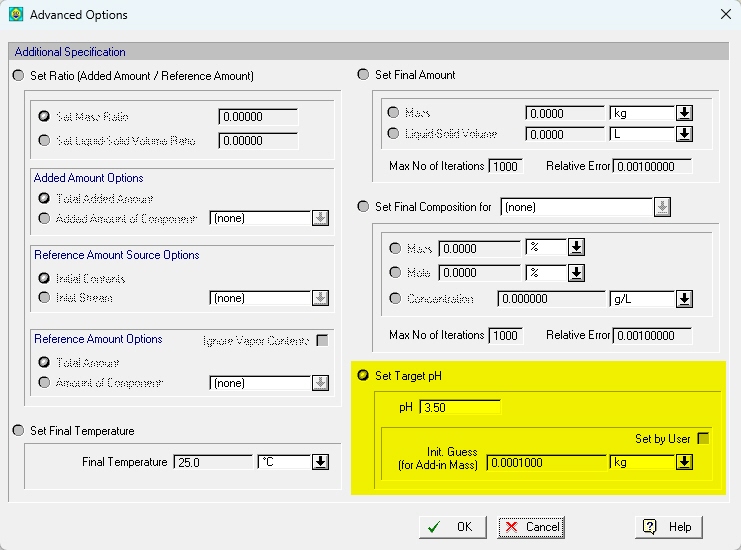
Pull-in operation is used to instill a logic in the simulation whereby an amount of material is being pulled into a vessel and the amount is calculated by the simulation engine so that it conveniently meets some operational target (e.g. ratio between amount in the vessel and amount added to be at a set level, the concentration of a chosen component in the vessel to reach a given number, etc.). Starting with this release, we are allowing users to instruct a pull-in operation to calculate the amount added so that the pH inside the vessel after the mixing reaches a user-set target value (3.50 in the screen shown below).
B02, SBN 1000: pH Target Is Now Another Advanced Specification Option for Fed-Batch Stream during Kinetic Chemical Reactions (Improvement)
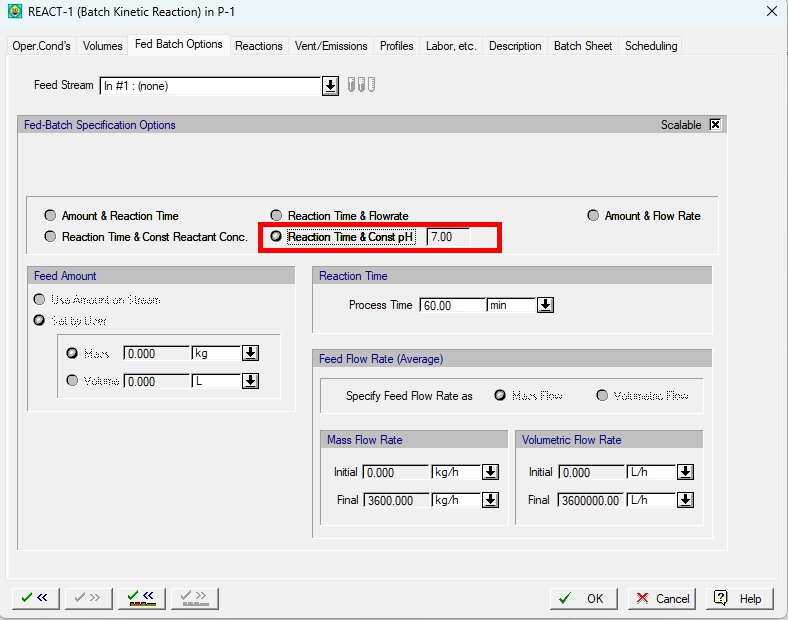
When requesting a fed-batch stream to be added during the modeling of a kinetic reaction, a stream carrying material from the chosen port is being added during the reaction time. Besides pre-setting the amount (or rate) of material being added on the chosen fed-batch line, users have the option to instruct the simulation engine to calculate the amount (as a function of time) in order to meet some criteria (e.g. keep the concentration of a reactant constant). Starting with this release, users can also request SuperPro Designer to calculate the time profile of the fed-batch add-in stream's flowrate and chose as a target keeping the pH constant (at a value as found at the start of the reaction). Please note that you can make sure that the starting pH is at the level required by engaging a pH Regulation operation first.
B02, SBN 1000: Centrifugation Operation's Separation Specifications Are now More Flexible (Improvement)
Up to now, when describing the operating requirements of a centrifugation operation (e.g. in a Disk-Stack centrifuge) the user:
a) Declared which component(s) should be considered as particulates (i.e. subject to separation) and
b) The split percentage of each declared particulate to the oil and/or solid stream (see below):
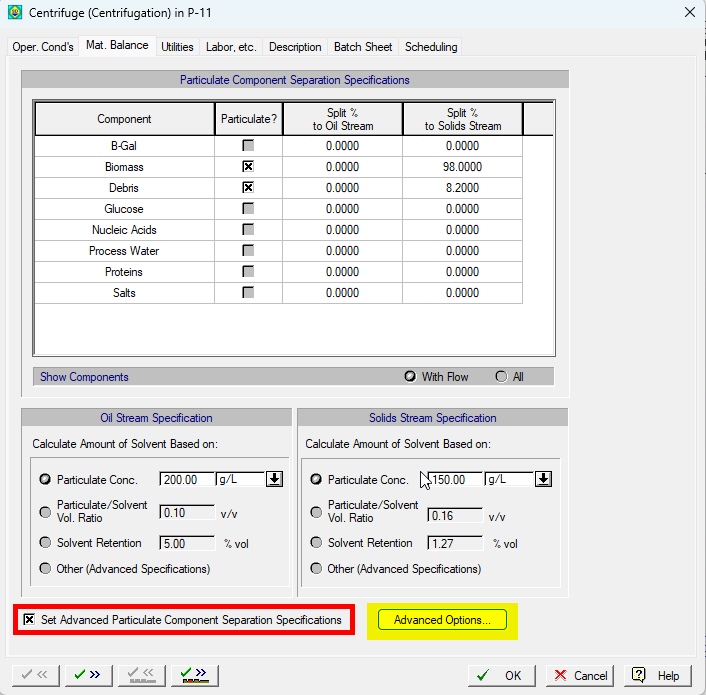
Starting with this release, we have added a power new interface that allows the user to provide a more complicated set of specifications for the separation expected by the centrifuge to perform setting targets that not only involve the split percentage of each particulate to each stream (Oil and/or Water) but the expected mass fraction of one or more components on the Oil and/or the Water stream. You can activate this more intricate set of constraints (to replace the old set of constraints that are merely a subset of possibilities when defining the expected separation) by clicking on the "Use Advanced Split Options" checkbox (see above). When you do, the "Advanced Options..." button becomes active and clicking on will present you with the following interface:
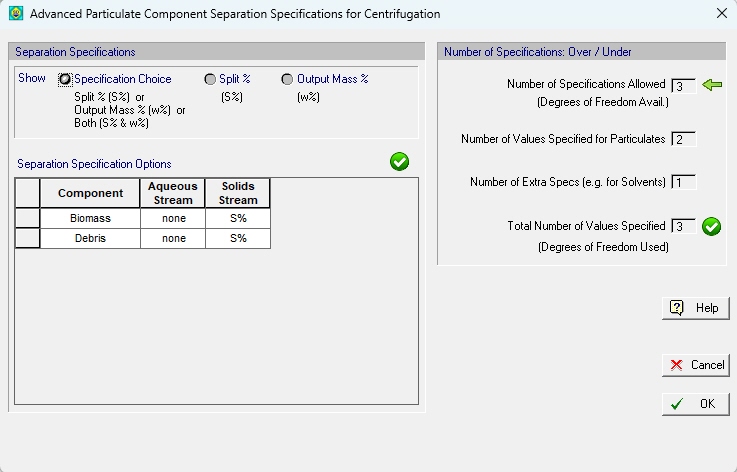
Since there's a multitude of specifications that can potentially be acceptable for the user to provide, the interface above works as follows:
1. First, you click on the "Specification Choice" option at the top (if not already selected)
This will show you a grid of components and output streams (Aqueous, Solids and Oil). You can choose what you wish to specify for each component and a stream pair. The choices is as one of the following three:
- a) The split percentage of that component in that stream (the default specification) (S%)
- b) The mass percentage of that component in that stream (w%)
- c) Both the split percentage AND the mass percentage of that component (row) on the corresponding stream (column) (S% & w%)
The fields on the right keep track of how many specifications you have chosen to provide. Note that the number of possible specifications that the system of equations allows you depend on the number of components present. For example, for the above situation where just 2 components are declared particulates, the number of degrees of freedom (aka, open specifications) is 6. Since two specifications are already taken from the previous interface that dictate how the solvent distributes on each stream, it remains for 4 extra specifications to be provided. Not all specification are allowed; for instance, in the case shown below, the total number of specifications taken is 6 (which meets the number of specifications allowed) but 3 of the 4 specifications are the split percentages of the SAME component, and that is not allowed so it will be marked with a red sign and an "irreconcilable set of specifications" error will be triggered.
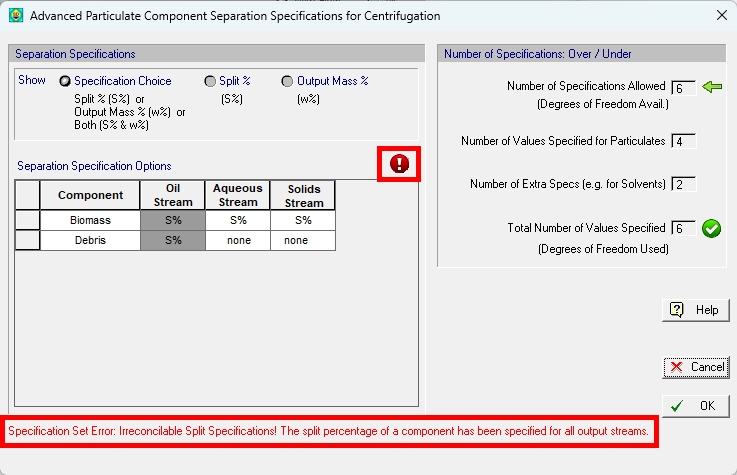
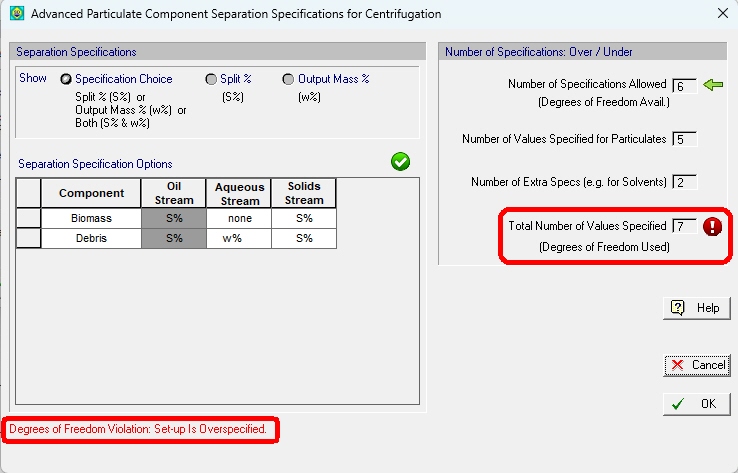
If you exceed or do not meet the number of specifications allowed then a "DOF Violation" error will be triggered (see below):
2. When you have chosen a valid set of specifications, you can change the setting at the top, and select either :
- Split % or
- Output Mass %
... and then set the actual values for the properties you had chosen in the specification grid. For example, after having selected a consistent set of specifications like
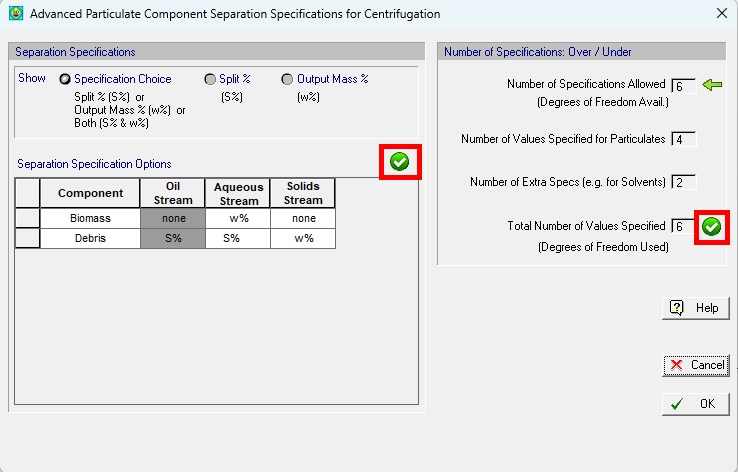
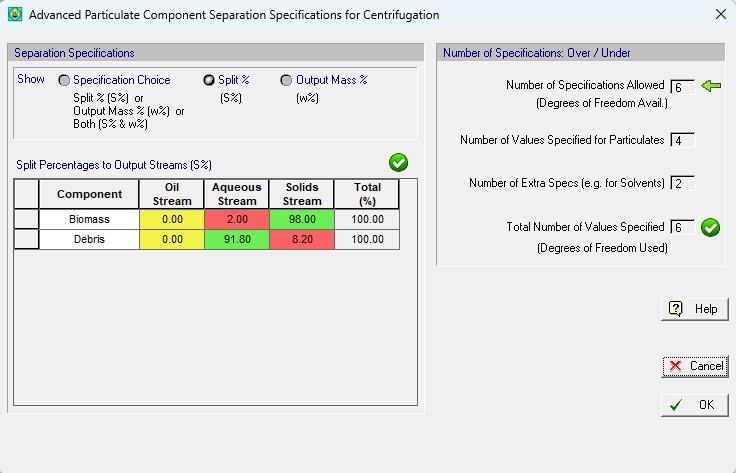
selecting to view the "Split %" you may see a grid like this
When you choose to see the grid for "Output Mass %" you may see a grid like this:
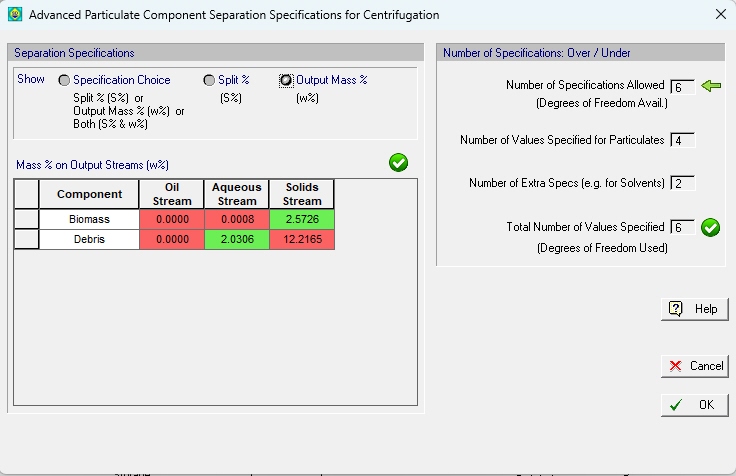
As you can see, the dialog paints with red background those values (for either Split % or Output Mass%) that you have chosen NOT to provide (but have them calculated by the program as simulation outputs), thus clicking on that field is not allowed. It will show you with green background those specification that you did choose to provide and thus clicking in that field is allowed and you can type the desired value for the split % or mass output % (in the range of 0% - 100%).
Note that the dialog will allow you to leave even if you have not chosen the proper set of specifications. There are two reasons for that:
a) You may have provided more than the required number of specifications, but after you exit the dialog and you are back on the Mat. Balance tab, you can select to include MORE components as particulates thus increasing the number of specifications allowed and perhaps NOW you the number of specifications provided meets the number of specifications allowed.
b) From the Mat. Balance tab, you may retract one or both specifications for the solvent and that will change the number of degrees of freedom and perhaps now your set of specifications is consistent.
It should be noted that all of the above degrees of freedom analysis presumes that the number of components chosen WILL BE PRESENT when the time comes for the model to execute as part of the M&E balance sequence of calculations for the whole process. The ultimate test will be done then. Of course, it's possible to exit the centrifugation's i/o dialog without errors but from the 3 components you chose to include as "particulates" maybe at simulation time only 2 are present. In that case the system will be tagged as "over-specified" and will not compute.
B02, SBN 1000: Stream (or Equipment Content) Enthalpy using EOS as their Physical State Calculation Toolbox now Include Terms to Correct for the Pressure Effect (Departure Functions) (Improvement)
Users now can opt to dictate to the simulation engine to use residual enthalpy calculations to correct ideal gas estimations of vapor enthalpy by using an Equation of State (EOS) for the computation of the required departure functions. Users can set this option in a manner similar to how the Physical State Calculation Options are set and propagated to all calculation locations (input streams, procedures, intermediate/output streams and equipment contents - aka procedure states -).
Here's how the new calculation option for enthalpy can be set at the document level:
Select from the flowsheet context menu the option:
Property Calculation Options... > Vapor Enthalpy Calculation Options...
... and the following dialog will appear:
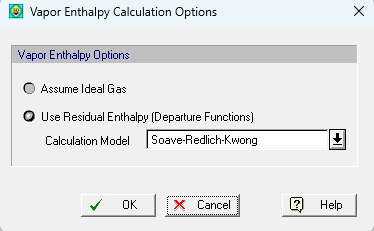
As a reminder, settings at the flowsheet (document) level are directly inherited by :
- Input Stream Calculation Options and
- Default Procedure Calculation Options
In turn, procedure calculation options provide the settings for:
- Procedure output streams and
- Procedure states (equipment contents)
As always, the user can interfere at any level and overwrite the inherited option. For example, if you need to have the non-ideal correction only be applied on stream, then select the "Prop. Calc. Option' tab from the stream's i/o simulation dialog:
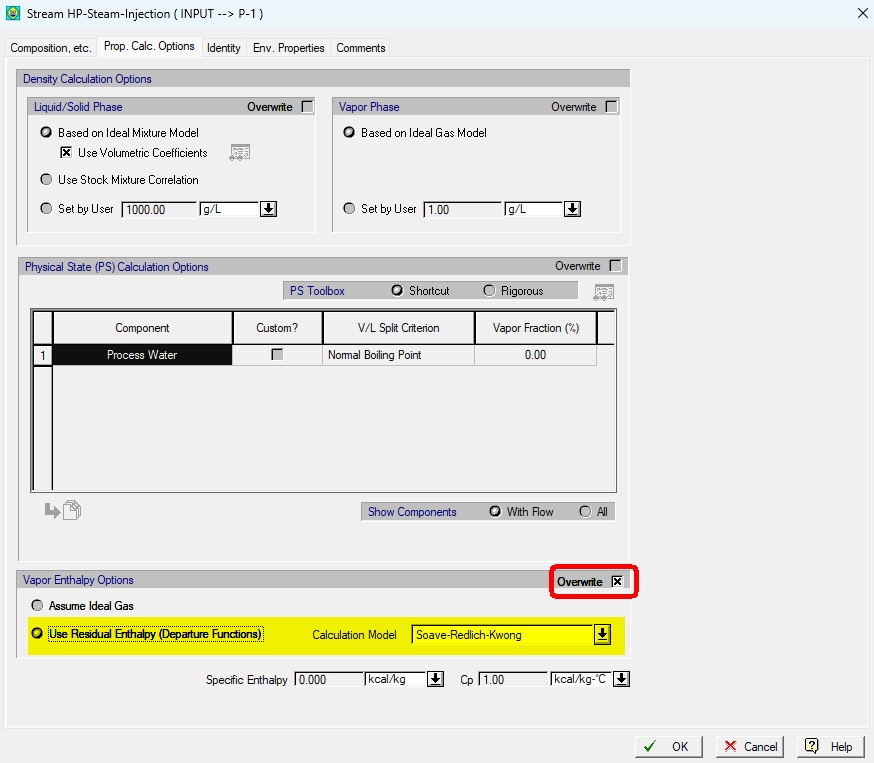
First click "Overwrite" and then when the choices below open, select the method you wish to be used for calculating the residual enthalpy on that stream.
Note that gaseous streams at high temperatures and low pressures can fairly well approximate the ideal state and therefore no correction is needed. However, gases at high pressures (or low temperatures) can deviate significantly from the ideal gas assumption and in such conditions the correction applied will yield significantly different values for enthalpy (provided the constants needed for the selected EOS are available and accurate).
B02, SBN 1000: Centrifugal Fanning Operation Has Expanded Options for Calculating the Required Power; also CF Fans now Feature both Rated Throughput and Rated Power as Size Descriptors (Improvement)
Currently, fanning demand for power was using the assumption of an ideal, incompressible fluid (technically applicable for low pressures and/or high temperatures). Since in practice those conditions aren't met, we have added another option to be used when calculating the power demand that assumes isentropic compression (reversible but not incompressible fluid); and we allow for an efficiency coefficient to account for irreversibilities.
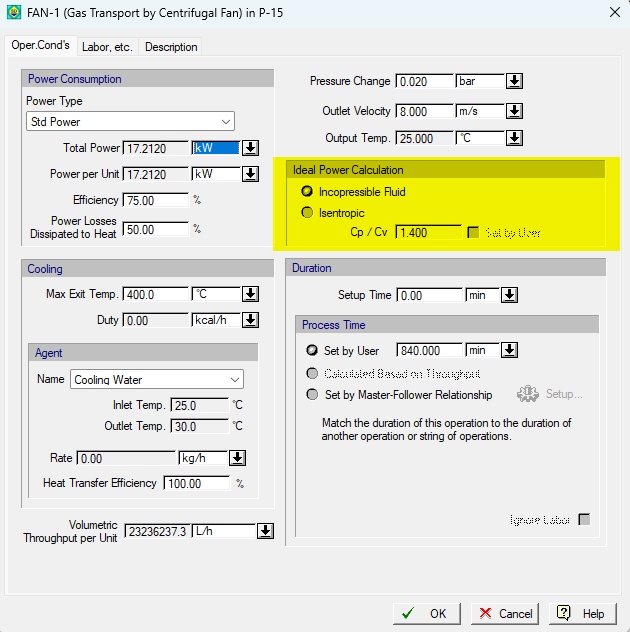
Please note that if the isentropic option is selected, users have the option to either provide for the Cp/Cv ratio to be used in the estimation of ideal isentropic work or let the engine estimate it by using the ideal Cp(T) and an average temperature between input and output and the relation Cp - Cv = R (that holds for ideal gases).
Finally, the corresponding equipment (a CF Fan or CF Blower) now reports as sizing parameters both the required volumetric throughput and the required power (in design mode). In rating mode both values serve as constraints to be checked against the operation conditions and demand for pressure change.
B02, SBN 1000: Centrifugal Compression Operation Has Expanded Options for Calculating the Required Power; also CF Compressor now Features both Rated Throughput and Rated Power as Size Descriptors (Improvement)
Currently, the centrifugal compressing demand for power was using the assumption of based on calculating the ideal (adiabatic, reversible) work using the isentropic model of compression. Starting with this release we also offer the option for the polytropic model to be used for such estimate. In either case, an efficiency coefficient is required to account for non-ideal behavior and computation of a actual work input to the system.
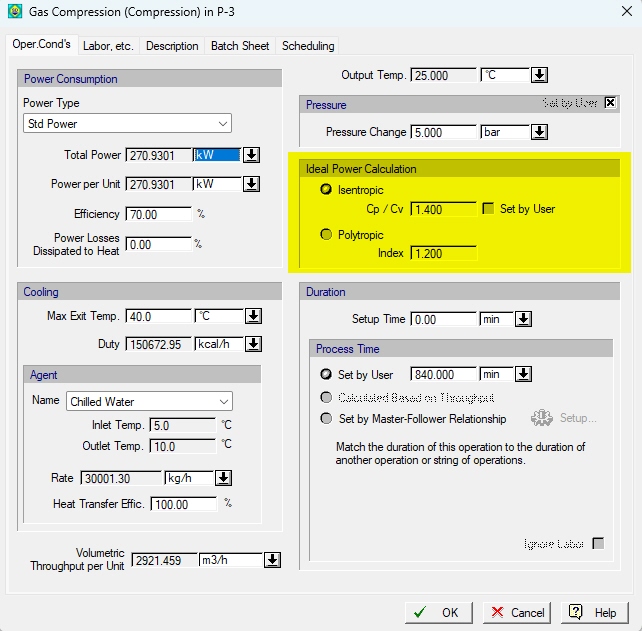
Just like we allowed in the CF fanning operation, we also allow here for the Cp/Cv ratio needed for the estimation of the isentropic work to be either provided by the user or asked to be calculated using the Cp(T) at the average temperature between input and output and the relation Cp-Cv = R. The provided efficiency coefficient is supposed to account for non-ideal behavior leading the actual work to be supplied by the compressor. As before the actual final temperature is calculated from an overall enthalpy balance that includes the actual power input of the compressor as well as the portion of "lost" work that is assumed to return to the system as heat (from the 'Power Losses Dissipated to Heat' coefficient provided.
Finally, the corresponding equipment (a CF Compressor) now reports as sizing parameters both the required volumetric throughput and the required power (in design mode). In rating mode both values serve as constraints to be checked against the operation conditions and demand for pressure change.
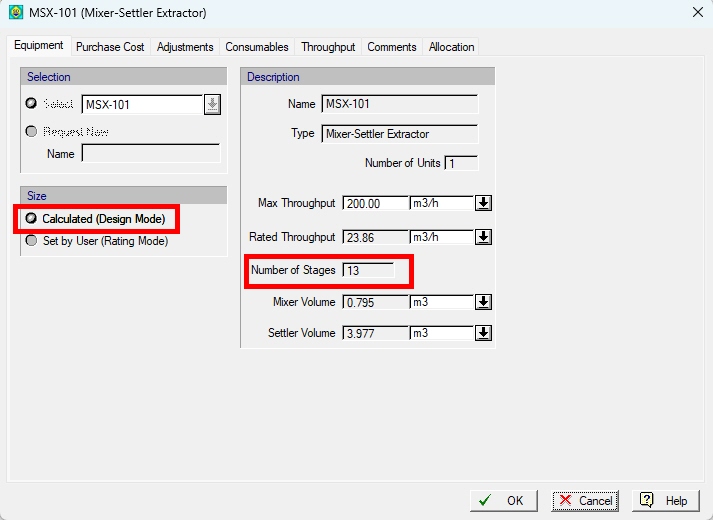
B02, SBN 1000: Mixer-Settler Extractor and CF Extractor Have the Number of Stages Calculated in Design Mode (Improvement)
In previous releases, the user was asked to provide the number of stages when involving a mixer-settler extractor or CF extractor, even if it was in 'Design Mode'. Under such conditions the modeling calculations for a Mixer-Settler extraction operation (or a CF Extraction operation) would always use a number of theoretical stages and with that compute a product recovery yield. In essense, in order to achieve a desired product recovery, it was a guessing game. Starting with this release, the user can place a Mixer-Settler or CF extractor in Design Mode and not have to provide the number of stages:
In that setup, the operation's i/o dialog now looks as follow:
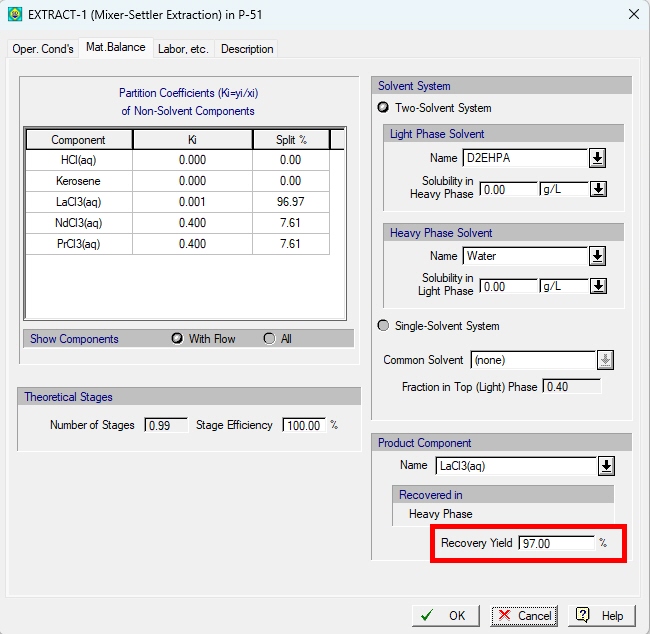
Notice that the yield is open for editing. The user provides a value and if it is achievable the program will compute the number of theoretical stages and from that will set the number of actual stages needed by the equipment.
B02, SBN 1000: Several Binary Coefficients Have Been Added and Are Ready to Be Used by the SPT-NRTL Non-Ideal Mixture Model (Improvement)
In a recent update SuperPro Designer started supported the SPT-NRTL model (a variation of the classic NRTL model) to capture non-ideal mixture vapor-liquid equilibria. Binary coefficients for that model are publicly available and users who wish to use this model should consult the available tables to pick up the pertinent binary data. Once used in specific process model, the binary coefficients can be deposited in SuperPro's database for future use. For some common binary interactions, the coefficients are now pre-loaded in SuperPro's user database.
B02, SBN 1000: The Ideal Heat Capacity Correlation Constants now Have Wider Range of Applicability (Improvement)
The coefficients used for the ideal gas heat capacity estimation as a function of temperature have been re-supplied for many gases that can be present at the exhaust of a combustion spot (Nitrogen, Oxygen, Carbon Monoxide, Carbon Dioxide, etc.) so that they provide meaningful values (close to experimental data) at high temperatures (between 1,000 °C and 3,000 °C). Previous coefficients were fitted to match values at lower temperatures but failed to produce meaningful values above 400 °C.
B02, SBN 1000: Extraction Operation in Mixer-Settler / Decanter and in a Vessel (Batch Extraction): When the Solubility Values Provided in a 2-Solvent Extraction Cannot be Satisfied a Warning Is Generated (Improvement)
This was missed previously.
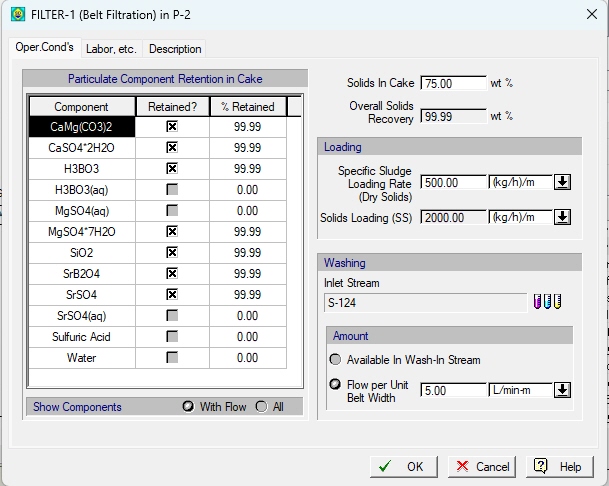
B02, SBN 1000: Several Filtration Ops: First a Component is Declared as Particulate/Solute and then its Separation Specification Is Set (Improvement)
Several filtration operations have a more user-friendly interface for providing the separation specification whereby first a component is declared as 'separable' (solute, retained, etc.) and then the 2nd column opens for the specification of the retention coefficient or split percentage etc. Operations that were modified include:
- Electrostatic Precipitation
- Granular Medial Filtration
- Baghouse Filtration
- Belt Filtration
B02, SBN 1000: Heat Exchanging Operation Allows for Its Parameters to Be Set/Fetched by COM Calls (Improvement)
A full-support has been added for all the parameters of a heat exchanging operation. For details on the new constants introduced to service those call please consult the on-line documentation on COM engine calls in operations.
B02, SBN 1000: Saved Printer Settings with File (Improvement)
When printing a report, users can opt to choose some special settings on the printer (e.g. 'Portrait' vs 'Landscape' mode). Previously those settings were not saved with the document. Starting with this release they are so that they don't have to be applied every time the document is opened an a report is generated.
B02, SBN 1000: New Option in Multi-Effect Evaporation Allowing them to Operate in Series (Improvement)
A new feature has been added to the “Multi-Effect Evaporation operation to enable the connection of two or more “Multi-Effect Evaporation procedures representing single-effect evaporators in series, as shown in the image below:
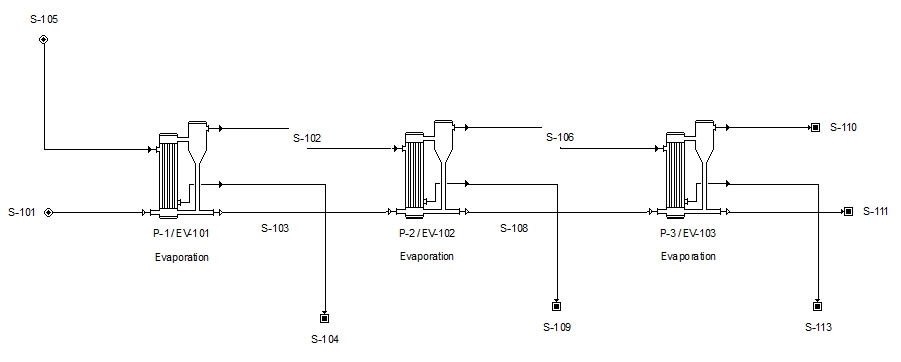
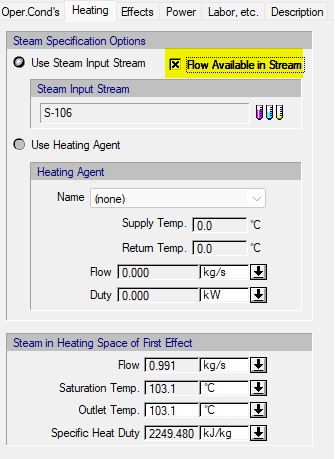
To accomplish this, each Multi-Effect Evaporation operation must be set to represent a single effect without vapor recompression, and it must be set to use a input stream instead of a heating agent in order to represent steam. If these requirements are met, the 'Flow Available in Stream' option will be available in the 'Heating' tab (see image below):
B02, SBN 1000: Multi-Effect Evaporation: Condensate Subcooling Is now Optional (Improvement)
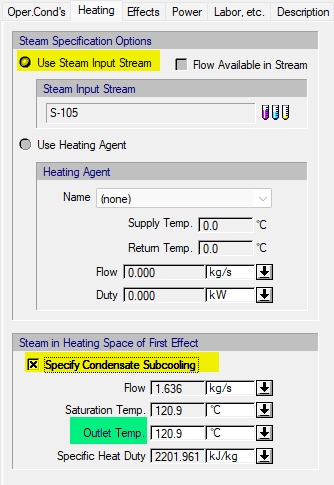
In previous versions of this model, when a steam input stream was specified in the “Heating” tab, the outlet temperature of the condensed steam had to be entered manually. As a result, users had to explicitly set either the saturation temperature or a subcooled temperature.
To avoid requiring input when the outlet temperature is equal to the saturation temperature, a new “Specify Condensate Subcooling” option has been introduced. When this option is selected, users can enter a subcooling temperature for condensate outlet (see image below).
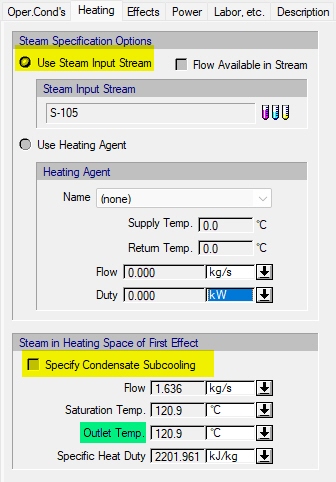
If the “Specify Condensate Subcooling” option is not selected, the outlet temperature of the condensate is automatically set equal to the saturation temperature, as shown in the image below
B02, SBN 1000: Freeze Drying Procedure now Supports a Few More Operations (Improvement)
This procedure now supports:
Gas Sweep, Pressurize, Evacuate, Vent.
B02, SBN 1000: Vent Condenser Heat Transfer Agent Is Now Checked for Feasibility (Improvement)
When checking on the presence of a condenser on the emissions line, SuperPro calculates the cooling load required to achieve the indicated temperature. A heat transfer agent is also selected and assumed to be carrying out the cooling task. Starting with this release if the target temperature of the condenser is not achievable by the selected agent a warning is issued.
B02, SBN 1000: ME-Evaporation: Condensate Pressure Is Now Set to the Inlet Pressure (Bug Fix)
Used to be ambient. Fixed.
B02, SBN 1000: Batch Distillation Calculations Fail when a Component in a VERY small amount is Present and Declared Volatile (Bug Fix)
When a component was present in the distillation pool at a very small amount, and that component was declared as volatile, the simulation code would fail to find an appropriate solution. This has now been corrected.
B02, SBN 1000: CIP, SIP, Hold, Generic Wash & Sampling Ops Could Have Turned on the Option to Deal with Emissions When Moved to New Procedure with More Streams (Bug Fix)
Switching the i/o configuration of a procedure sometimes allows for an operation that previously was not offering an interface for Vent/Emissions (because there weren't enough stream available) to start offering it. An example is a charge into a procedure hosted by a 1x1 GBX box that switches to a 1x2 GBX box. However, along with those operations, some other operations that are not capable of carrying out emissions calculations were also switched (e.g. CIP, SIP etc.) leading to a potential crash. This has now been fixed.
B02, SBN 1000: Sludge Wasting Stream Selection Issues in WM and PF Anaerobic Bio-Oxidation Ops (Bug Fix)
Fixed.
B02, SBN 1000: Identity tab Is Hidden for Equipment Contents (Bug Fix)
Application used to display the 'Identity' tab even for equipment contents. Of course this was incorrect and it has been fixed.
B02, SBN 1000: Electrode Consumable: Interface Dialog Glitch (Bug Fix)
After changing the electrode type option in the dialog of an electrode-type consumable from “Pair” to “Anode” or “Cathode”, the calculated purchase and disposable cost options were disabled incorrectly. This issue has now been fixed.
B02, SBN 1000: Gasification Heat Duty or Final Temperature Was Incorrectly Calculated (Bug Fix)
When the final temperature is set, the calculated heat duty is lower by a factor of 1,000 due to a conversion issue from kJ/kg of fuel to kW. Similarly, when the user sets the heat duty, the value is incorrectly converted from kW to kJ/kg, causing the final temperature calculation to fail or be incorrect.
B02, SBN 1000: Freeze Drying Sometimes Would Fail to Keep Mass Balance Correctly (Bug Fix)
In some rare cases, the freeze drying operation would fail to produce the evaporated water on the output stream resulting in mass balances not to close. This has now been fixed.
B02, SBN 1000: Regulation and Neutralization Operations Now Correctly Assign the Required Flow to their Adjustable Input Streams (Bug Fix)
In previous releases, when the adjustable stream associated with a neutralization operation (or a pH Regulation operation) was a direct input stream with specified composition but zero flow, the simulation engine failed to set the required flow on the stream. This has now been fixed.
B02, SBN 1000: ME Evaporation: Interface Would Freeze when Selecting a Heating Agent and then Selecting a Different Vapor Recompression Option (Bug Fix)
If a heating agent was selected in the “Heating” tab, and the user then switched to MVR or TVR in the “Oper. Cond’s” tab, revisiting the “Heating” tab would cause the program to crash. This issue has now been fixed.
B02, SBN 1000: Disk-Stack, Decanter and Bowl Centrifugation: Solvent Retention Calculation for Solids and Oil Removal Was Sometimes Incorrectly Calculated (Bug Fix)
The appropriate oil and/or solid particle input data for the selected centrifugation objective (solids removal, oil removal, or both) is now displayed in the “Oper. Cond’s” tab. This data is used to calculate the centrifuge’s sigma factor and is now shown regardless of whether sizing is based on the sigma factor or on throughput.
B02, SBN 1000: Input Stream Data Dialog: Mass Composition on Dry Basis Glitch (Bug Fix)
If the mass composition on dry basis column was displayed in the input stream data dialog, and the composition units changed from percent to ppm, ppb, or [0…1], the mass composition on dry basis was kept at percent units, but now it changes to the new units (as it should).
B02, SBN 1000: Crystallization Operations: Agent-in-Crystal Calculations Missed Correct Amount (Bug Fix)
The agent-in-crystal amount was not calculated correctly when the agent-to-crystal ratio was in mol Agent/mol crystal. This issue has now been fixed.
B02, SBN 1000: Batch Sheet Now Includes a Pure Component Table (Bug Fix)
After user recommendations, a new table has been added to the generated batch sheet. The table includes some basic properties for all components involved in the process.